
If you want to make money online from your website or blog, Google AdSense is one of the easiest, best and most trusted ways to get started.
But the reality is, many beginners apply too early without preparing their site properly, and that’s why they get rejected from AdSense again and again.

The good news is that AdSense approval is not complicated. You just need to focus on a few important things and make sure your website is actually ready.
In this guide, I’ll walk you through a simple and practical Google AdSense Approval checklist that you can follow step by step, even if you’re just starting out.
Google AdSense Approval Checklist (2026)
To get Google AdSense approval, ensure your site has at least 15–20 high-quality, original articles, essential pages, and a clean, user-friendly design.
And your website should be over 1 month old, a domain-specific email address, generate organic traffic, and strictly comply with Google Publisher Policies.
Let’s understand this in detail.
1. Focus on High-Quality Content
Before anything else, your content needs to be strong. This is the most important part of getting approval easily from Google AdSense.
Google wants to see that your website is useful and actually helps people, not just something created for ads or google search engine.
Try to publish at least 20-30 or more quality-content articles before applying, and make sure each post is detailed, simple & clear, and easy to understand.
A good range is around 1000 words or more per article, but what really matters is whether the content solves a real problem, so, write only the necessary words.
If your articles are too short or don’t offer much value, that can lead to rejection. In that case, it’s better to improve your existing content first.
This guide will help you fix that:
My personal advice is this – think about it this way: If a visitor lands on your page, will they feel satisfied after reading it? If YES, you are on the right track.
2. Make Sure Your Website Has Important Pages
A lot of beginners skip this step, but it’s actually very important. Your website should have some basic essential pages that show it’s a real and trustworthy platform.
These include:
- About Us
- Contact Us
- Privacy Policy
- Disclaimer
- Terms & Conditions
These pages don’t need to be complicated, but they should clearly explain who you are, what your site is about, and how users can reach you.
After creating the necessary pages, include them in your website’s footer, as shown in the screenshot below.
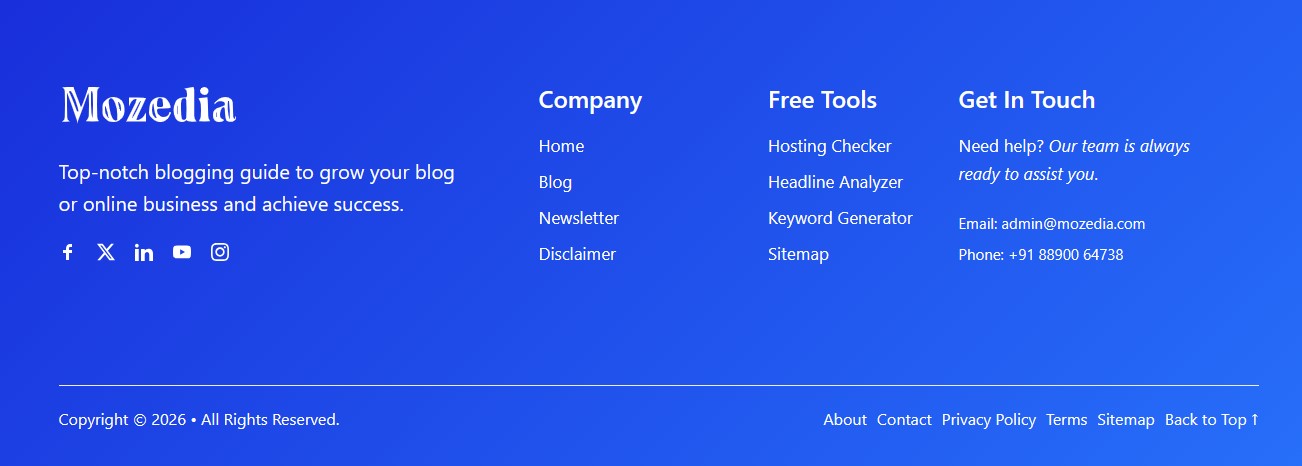
From Google’s perspective, these pages build trust. You can also add links to your social media profiles in the footer.
Without them, your website may look incomplete or unprofessional, which can hurt your chances of AdSense approval.
3. Keep Your Website Clean and Easy to Use
Your website design doesn’t need to be fancy, but it should be simple, clean and easy to navigate. Google often does not like overly designed sites either.
When someone visits your site, they should be able to find what they’re looking for without confusion. For this, you simply need to stick to a standard, lightweight design.
Make sure your site:
- Works well on mobile devices,
- Loads quickly,
- and has a simple menu structure.
Avoid adding too many popups, flashy elements, or anything that distracts from the content. A simple, professional layout always performs better than a complicated one.
Remember, your goal is to create a good experience for the user, not just impress with design.
4. Use a Proper Domain and Setup
Using a custom domain (like .com or .net) makes your site look more professional and trustworthy. Free subdomains can work, but they often reduce your chances of approval.
Also, make sure your website is fully set up and under your control.
You should be able to edit content, manage pages, and add code if needed. A half-finished or poorly configured site can easily get rejected.
While domain age is not a strict requirement, a site that has been active for a few weeks and regularly updated tends to perform better during review.
5. Some Traffic Helps, Even if It’s Small
There is no official traffic requirement for Google AdSense, but having some visitors on your website is always a good sign to get approval easily.
Even 10 to 50 daily users can show that your content is getting discovered and used. This article help you to indentify low traffic reasons.
This doesn’t mean you need to wait for huge traffic. Just focus on publishing useful content, and a bit of organic traffic will start coming naturally.
If your goal is to actually earn money from blogging in the long run, this guide can give you a clear direction: how to earn money from blogging.
6. Avoid Copyrighted Content Completely
One of the biggest reasons for rejection is using content that doesn’t belong to you. This includes copying text from other websites or using images without permission.
Always write your own content and use images that are either free to use or created by you. It might take a little more effort, but it keeps your site safe and builds long-term credibility.

Original content is not just important for AdSense but it also helps you grow your website in search engines like Google, Bing, and Yahoo.
7. Choose a Safe and Useful Niche
The topic of your website also matters. Some niches are more suitable for AdSense because they are informative and follow Google’s policies.
To find your favorite niche, read this guide:
Topics like blogging, SEO, digital marketing, make money online, education, and technology are generally safe and easier to get approved.
On the other hand, content related to piracy, adult material, or illegal activities can lead to instant rejection. Google don’t allow this type of content.
If you’re unsure whether AdSense is right for your site, you can read this: Is Google AdSense Still Worth It, this article give you clear message.
8. Keep Your Website Structure Simple
Your website should be organized in a way that makes sense. Visitors should be able to move between pages easily, and your categories should be clearly defined.
A simple menu, proper categories, and internal links between related articles can make a big difference. It helps users stay longer on your site and improves overall experience.
Good structure also makes your site look more complete and professional in Google’s eyes.
9. Check If Your Pages Are Indexed
Before applying for Google AdSense account, always make sure your website posts or pages are visible on Google search results.
You can do this by searching:
site:yourdomain.com
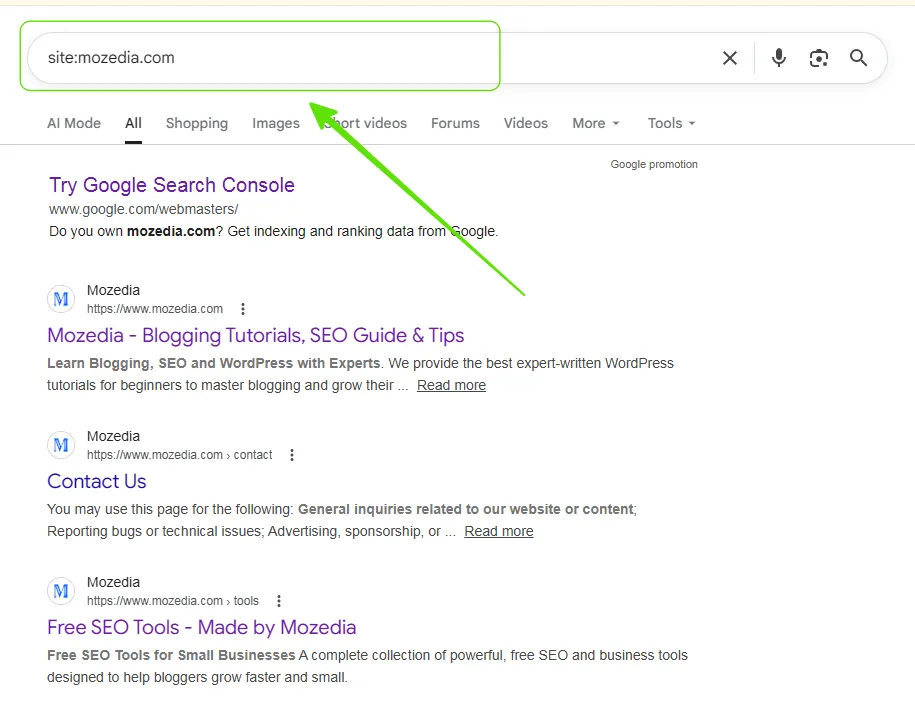
If your pages show up, that means they are indexed. If not, you should fix this first before applying, otherwise your chances of approval will be very low.
You can use the Google Search Console tool to determine which URLs on your website are indexed and which are not and why.
10. Apply the Right Way
Even if everything is ready, applying incorrectly can still lead to rejection. Take your time and make sure your site is complete before submitting your application.
If you want a clear step-by-step process, you can follow this guide:
Don’t rush this step. A careful application is always better than a quick one. Always think it through carefully before applying for AdSense approval.
Why AdSense Gets Rejected?
Most rejections happen for simple reasons like low-quality content, too few articles, incomplete websites, or poor navigation.
Sometimes even small issues can make your site look unprepared.
The key is to look at your website honestly and fix anything that feels incomplete or weak before applying again and again.
What to Do If You Get Rejected?
If your application gets rejected, don’t worry, it happens to many people. Instead of applying again immediately, take some time to improve your site.
Fix the issues, improve your content, and wait for about a week before reapplying.
This gives you a much better chance of getting approved the next time.
Final AdSense Checklist:
Before you submit your application, quickly go through this checklist:
- You have 20 or more high-quality articles
- All important pages are created
- Your site is mobile-friendly and fast
- All content must be original
- Your pages are indexed in Google
- Navigation is clear and simple
- There are no broken or empty pages
If everything looks good, you’re ready to apply.
Conclusion
Getting Google AdSense approval is not about tricks or shortcuts. It’s about building a website that actually helps people and looks complete.
Also read:
Take your time, focus on quality, and don’t rush the process. I’m sure, if you follow the above mentioned tips, you will definitely get Adsense approval.
Once your website is solid & strong, approval becomes much easier and more importantly, you’ll be set up for long-term earnings.
Thanks for reading, best of luck!





Leave A Comment