
Want to know how Mozedia site is built, which hosting we use, what WordPress theme powers our design, and which plugins and tools help us grow?
If yes, then you have come to the right place where you will get right information about all the tools, hosting, themes and plugins used on this website.
Actually, you’re not the only one who is curious to know this, many of our readers who love us and regularly read our content often ask us about this.
Many readers ask us:
- Which hosting is best for WordPress?
- Which theme are you using?
- Which SEO plugins do you recommend?
- What tools do you use for keyword research?
That’s why we created this detailed guide – the Mozedia Blueprint, where we share everything we use to build, manage, and grow our website.
How Mozedia is Built: Hosting, WordPress Theme, Plugins & SEO Tools We Use (2026)
In creating the Mozedia website, we did a lot of testing and used many themes, plugins and tools to find the best ones, and finally, the results are here.
This page gives you complete information about:
- Blogging Platform
- Hosting Setup
- WordPress Theme
- Essential Plugins
- SEO Tools and Services
If you’re planning to start a new blog, or want to explore more strategies from our blog section, this list will help you choose the right tools.
So let us now tell you everything in detail without any delay.
1. Blogging Platform
Mozedia runs on WordPress, we use the self-hosted WordPress blogging platform, the world’s largest blogging platform, to build this site.
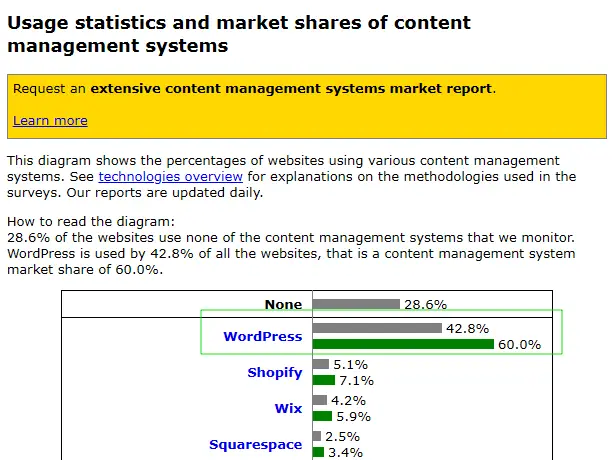
According to W3Techs, WordPress powers 42.8% of all websites on the Internet and has a market share of almost 60% in CMS (Content Management System).
Here, we want to make one thing clear…
We use WordPress.org instead of WordPress.com, if you’re confused about these two, then first know them well and understand the difference.
Because many people get confused, we have also shared a detailed guide on this, check out the difference Between WordPress.com vs WordPress.org.
Why We Chose WordPress.org?
WordPress is the most widely used blogging platform in the world. However, this is not the only reason, we have many other reasons, such as:
- Full control
- Complete customization
- Plugin freedom
- Better SEO flexibility
- No platform limitations
And most importantly, WordPress.org is a self-hosted platform, which means you can host it on any hosting server of your choice.
According to Mozedia, if you are serious about blogging or building a brand, self-hosted WordPress is always the best option.
2. Web Hosting
Web hosting is the foundation of any website. Without fast and reliable hosting, even the best content won’t perform well, which is why we need fast hosting.
Mozedia is currently hosted on AWS Cloud (Amazon Web Services) as it provides very fast hosting servers and we have an expert team for server setup.
However, before this we hosted our websites on DigitalOcean cloud infrastructure, which is an unmanaged (self-managed) hosting provider.
Why DigitalOcean?
- 99.99% uptime
- High performance servers
- Global data centers
- Affordable pricing
- Excellent scalability
However, DigitalOcean is technical and not beginner-friendly.
Unmanaged hosting is very difficult to setup. That’s why we recommend beginners to use its managed version Cloudways, which offers the same hosting servers.
If you don’t like it, don’t worry.
There are many other best hosting providers for WordPress, which not only we but WordPress itself officially recommends in its hosting page section.
Recommended Hosting for Beginners
If you’re new, we recommend:
For High-Traffic Websites:
- Kinsta
- Cloudways
Choosing the right hosting can directly impact:
- Page Speed
- SEO Ranking
- User Experience
- Revenue
If you need help choosing a hosting, check out our detailed guide:
Website Design (Theme)
Mozedia uses a custom-designed child theme with GeneratePress template, although we previously used the Genesis framework on all our websites.
However, since Genesis isn’t updated regularly, we’ve now moved on to the GeneratePress theme, which is a very lightweight theme for WordPress.
The GeneratePress theme is known for:
- Clean code
- SEO-friendly structure
- Lightweight performance
- Strong security
Best WordPress Themes We Recommend
If you’re looking for a fast-loading, lightweight, and professional WordPress theme that offers both premium and free versions, check out these:
- GeneratePress: Lightweight, ultra-fast and performance-focused
- Genesis Framework (by StudioPress): Secure, SEO-optimized and developer-friendly
- Astra Theme: Highly customizable, fast-loading and beginner-friendly
- OceanWP: Flexible, feature-rich and WooCommerce-ready
- Kadence Theme: Modern, lightweight and Gutenberg-optimized
- Elegant Themes (Divi): Powerful drag-and-drop builder with advanced flexibility
All of these thems are SEO optimized, mobile responsive, secure, fast loading and beginner-friendly, you don’t need any special skills to use them.
But always remember that:
Your theme directly affects Core Web Vitals and SEO performance, so choose wisely and use our wp theme detector tool to identify any WordPress site theme.
3. WordPress Plugins
Plugins enhance WordPress’ functionality. However, it’s always important to remember that too many plugins slow down your site, so we only use the most essential plugins.
Here are the plugins that currently power Mozedia:
1. Yoast SEO
Yoast SEO is our main on-page SEO plugin, helping with title tags, meta descriptions, XML sitemaps, and schema optimization.
It also provides content readability analysis and keyword optimization suggestions, helping us make our articles search engine-friendly.
2. Akismet
Akismet automatically filters comment spam. Spam comments on blogs harm both SEO and user experience, so Akismet provides an essential security layer.
3. Classic Editor
The Classic Editor plugin gives us the flexibility to switch between WordPress’s traditional editor and the Gutenberg block editor.
4. Cloudflare
Cloudflare provides CDN and DDoS protection. It improves website speed, global performance, and strengthens security.
5. Nginx Helper
Nginx Helper helps manage server-level caching. We’re using an Nginx server, so this plugin is useful for clearing the FastCGI cache and optimizing performance.
6. Redis Object Cache
We use object caching; Redis Object Cache is the perfect plugin for this. It caches database queries, significantly improving the loading speed of dynamic WordPress sites.
7. Contact Form (Custom)
We typically use a custom contact form for our personal websites. You can use Contact Form 7 for this; it’s an easy and reliable solution for beginners.
8. Table of Contents (Custom)
We use a custom table of contents for a better user experience in long articles. You can use a plugin like Table of Contents Plus or Easy Table of Contents to create a TOC.
9. Auto Optimize
Although we’re not currently using any performance optimization plugins on Mozedia site, as we’ve manually optimized it via theme code and from server side.
But we advice you that you can use plugins like Auto Optimize, WP Super Cache, or W3 Total Cache to minify CSS, JavaScript, and HTML.
10. Site Kit by Google
We’re not currently using any ad plugins on Mozedia, but if you prefer, we recommend using Google’s official plugin, Site Kit by Google.
It lets you monitor Google Analytics, Search Console, PageSpeed Insights, and AdSense data directly in the WordPress dashboard. This is very useful for performance tracking.
4. Tools & Services (for Growth)
A successful content website isn’t just about writing articles. Research, analytics, tracking, testing, and branding are all equally important.
At Mozeedia, we use professional SEO tools as well as our own tools to further strengthen the research and optimization process.
These are the main tools and services we use daily:
SEO & Keyword Research
While there are many tools for SEO and keyword research, Ahrefs is our primary SEO research tool.
If you need to find ranking opportunities in a niche, Ahrefs is a very powerful tool.
We use it for:
- Backlink analysis
- Competitor research
- Finding low-competition keywords
- Content gap analysis
- Technical SEO audits
In addition to Ahrefs, we use the Semrush tool for competitor keyword tracking and domain comparison.
This allows us to:
- Monitor keyword rankings
- Track SERP positions
- Analyze competitor traffic
- Identify technical SEO issues
In our case, Ahrefs and Semrush together create a complete SEO ecosystem. We have also compared SEO tools in detail, including Moz vs Ahrefs comparison.
Design & Media
Brand presentation is very important, as consistent design builds branding trust. We use Canva for design.
Canva is best for:
- Blog featured images
- Social media creatives
- Promotional banners
- Creating infographics
- Ebook and PDF covers
Email Marketing
Email lists are a long-term asset for any content website. Social media algorithms change, but email subscribers are your direct audience.
That’s why we consider email marketing a serious growth strategy and we primarily use Mailchimp & ConvertKit for email campaigns, newsletter broadcasting.
Through Mailchimp, we:
- Send regular email campaigns
- Set up automated welcome sequences
- Perform subscriber segmentation (based on interest, behavior, or niche)
- Track open rates, CTR, and engagement metrics
We also use ConvertKit for advanced automation and creator-focused features. ConvertKit is specifically designed for bloggers and content creators.
Our Own Tools That Help Us Grow
Not only third-party tools, at Mozedia we’ve also built some powerful SEO tools of our own that simplify the SEO and blogging process.
We use them all, and the good thing is that they’re also available for Mozedia readers to use, and you can use them for free.
For example, you can try these tools:
- Hosting Checker
- Redirect Checker
- WP Theme Detector
- Keyword Generator
- Headline Analyzer
- Business Name Generator
You can explore all our free tools on the Mozedia Tools page.
Why We Share this Blueprint?
Above all, transparency builds trust. We believe newcomers shouldn’t waste money on the wrong products, tools & services especially the Mozedia audience.
This blueprint shows you:
- What actually works
- What we personally use
- What we recommend for different stages
Our special and personal advice to Mozadia readers is:
You don’t need to use everything on this list to get started. Start simple and upgrade as you grow in future.
Final Words
Mozedia’s growth wasn’t just due to content publishing; it was made possible by the right tools, smart strategies, and constant optimization.
We’ve tested and selected every tool, whether it’s SEO research, email marketing, performance optimization, or branding.
Each service and software has a clear purpose:
- Improved rankings
- Faster website performance
- Stronger audience connections
- Sustainable long-term growth
If you’re just starting out blogging or looking to expand your existing website, remember the most expensive tool isn’t necessarily the best.
If you’re looking for professional help, you can hire our expert team. Check out our website services or get a free blog setup, this is a one-time offer.
The best tool is the one that aligns with your goals.
- Start simple
- Maintain consistency
- Analyze data
And gradually upgrade your systems in future. This is the main purpose of the Mozedia Blueprint to transparently share what really works.
We hope this guide helps you build a smart, fast, and profitable website, thanks!
Affiliate Disclosure: This post may contain affiliate links. If you make a purchase through these links, we may earn a commission at no extra cost to you.
