
Has your website been rejected by Google AdSense due to ‘low-value content,’ ‘thin content,’ or ‘insufficient content,’ and now you don’t know where to start to fix it?
You are not alone, many website owners work hard for hours, yet face frustrating rejections from AdSense due to “Thin Content” and they simply don’t know where to begin to fix it.

Many beginners think adding more articles is the only solution, but the real fix is improving content quality, structure, and user experience. Search engines today evaluate how helpful your content is, not just how many words it contains.
Thin content refers to pages that offer little or no real value to readers. Google’s algorithms are smarter than ever, and they can easily detect pages that are too short, lack originality, or simply exist to fill space.
When your site has too much of this kind of content, it can trigger a thin content penalty, damage your SEO rankings, and make you ineligible for monetization programs.
The good news? This is a fixable problem.
By focusing on creating 20–30 in-depth, original articles (1,000+ words each), improving your website structure, and following Google’s E-E-A-T guidelines, you can turn things around.
This guide walks you through exactly how to do that.
What Is Thin Content in SEO? (Definition + Examples)
In simple terms, thin content in SEO refers to web pages that provide very little value to users.
These are pages that are too short, too vague, or too similar to other content already available on the web.
The thin content definition in SEO can cover several types of pages:
- Pages with fewer than 300–400 words that don’t answer a question fully
- Auto-generated or scraped content copied from other sources
- Affiliate pages with little original writing just product links and descriptions
- Doorway pages created just to rank for keywords, not to help users
- Duplicate content appearing on multiple URLs
When it comes to SEO, thin content meaning goes beyond just word count.
A page can have 1,000 words and still be considered thin if it doesn’t provide unique insights, practical advice, or real value.
Google’s job is to serve the best answer to any search query and thin pages simply don’t make the cut.
Thin content in SEO refers to web pages that provide little or no useful information to users, often consisting of short, duplicate, or low-value content that fails to satisfy search intent.
For more read, Google spam policies.
Why Thin Content Hurts SEO Rankings (Google Thin Content Penalty Explained)
Google’s algorithm is designed to reward helpful, original, and well-structured content.
When your site is filled with low-quality or shallow pages, it sends a negative signal to search engines and your rankings suffer as a result.
Here’s how thin content SEO impact plays out in practice:
- Lower rankings: Google pushes thin pages down in search results because they don’t fully satisfy user intent.
- Reduced crawl budget: Googlebot may waste time crawling your low-quality pages instead of your best content.
- Higher bounce rates: Users land on your page, find nothing useful, and leave immediately, which further hurts rankings.
- Google thin content penalty: If Google detects a pattern of thin or duplicate content across your site, it may issue a manual or algorithmic penalty, causing significant traffic loss.
The impact of a thin content penalty can take months to recover from. That’s why it’s far better to prevent the problem upfront rather than fix it after the damage is done.
Ask yourself honestly: is thin content hurting my SEO?
If your pages are short, lack depth, or feel rushed, the answer is probably yes.
How to Identify Thin Content on Your Website?
Before you can fix the problem, you need to know where it exists. Auditing your site for thin content is an essential first step.
Here are some reliable thin content checker tools and methods you can use:
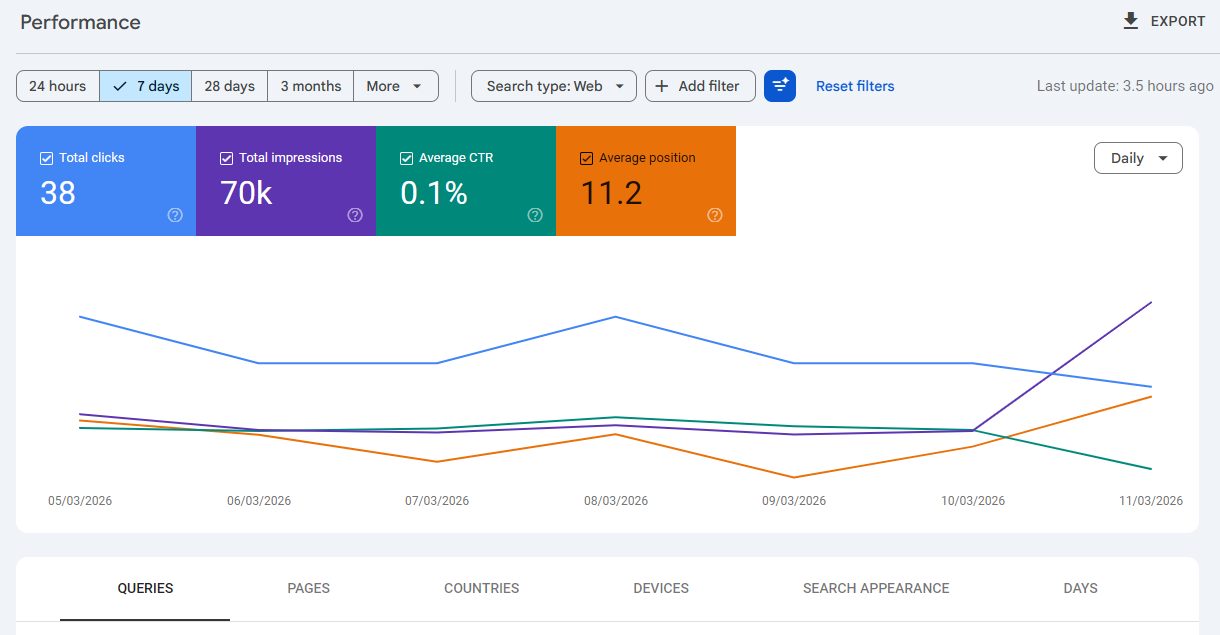
Check your Performance report for pages with zero or very few impressions and clicks. These are often your weakest pages.
2. Screaming Frog SEO Spider
Crawl your entire site and filter pages by word count. Any page under 300–400 words deserves a closer look.
3. SEMrush or Ahrefs
Use the site audit feature to flag thin or duplicate content pages automatically. You can also see this comparison of Moz vs Ahrefs.
4. Copyscape
Detect if your content has been duplicated elsewhere or if you’ve accidentally published content that resembles other sites.
Beyond tools, there are clear signs that show you how to identify thin content that needs expansion:
- Pages with only a short paragraph or two
- Category or tag archive pages with no original text
- Product pages with manufacturer descriptions and nothing else
- Blog posts that summarize a topic without going into detail
- Pages that were once relevant but are now outdated and no longer match user needs
Once you have your list, you can decide whether to improve, merge, or remove each page. Learning how to write engaging articles can also help improve thin pages.
Why Google AdSense Rejects Your Website for Low Value Content?
Getting rejected by Google AdSense is frustrating, especially when you’ve put real effort into your website. But understanding the reasons behind rejection is the first step toward fixing them.
Below is a real example of an AdSense policy violation message that many website owners receive when their site contains thin or low-value content.
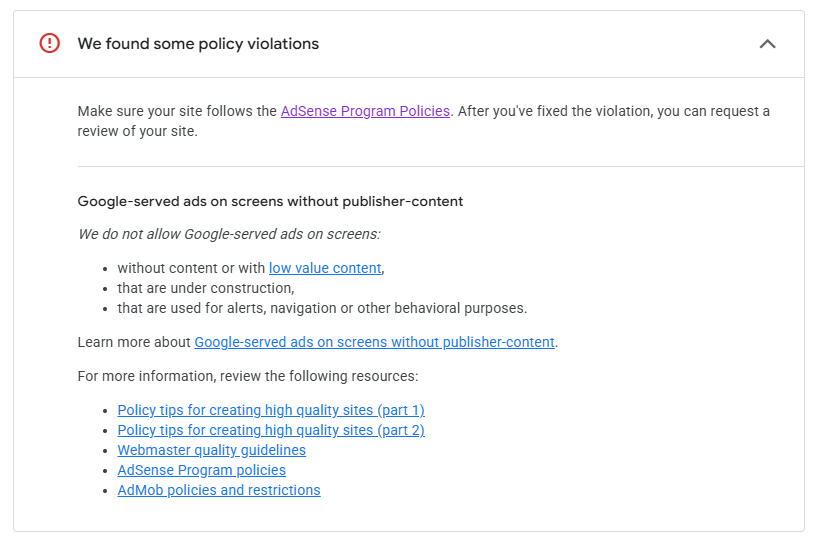
If you are planning to monetize your blog you can read this guide on how to apply for Google AdSense.
Here are some important reasons:
1. Low-Value or Thin Content
This is the most common reason for AdSense rejection. If your pages are too short, too vague, or simply don’t provide useful information, Google considers them low-value.
Google thin content standards have become stricter over the years, and reviewers look for pages that genuinely help users solve problems or answer questions.
2. Unoriginal Content
Copied, scraped, or poorly edited AI-generated content will get your application rejected instantly.
Even if you paraphrase another article without adding your own perspective, Google can detect the lack of originality.
Your content must bring something new to the table — a unique angle, real-world experience, or original research.
3. Missing Important Pages
Google requires that websites applying for AdSense have essential legal and informational pages in place. These include an About Us page, a Contact page, and a Privacy Policy.
Without these, your application is very likely to be rejected, regardless of content quality.
4. Poor Website Design or Under Construction
If your website has broken links, a confusing layout, unfinished pages, or an outdated design, it signals to Google that the site isn’t ready to display ads.
A clean, professional, and easy-to-navigate design is a basic requirement for AdSense approval.
5. Insufficient Content Quantity
Applying for AdSense with fewer than 15–20 solid articles is a mistake many beginners make. Google wants to see that your website is an established resource, not a brand-new site with only a handful of posts.
Aim for at least 20–30 high-quality articles before you apply.
10 Best Ways to Fix the Thin Content Issues in 2026
Now let’s get to the practical part. Here are ten proven strategies to fix your thin content problem and build a website that ranks well and gets approved for AdSense.
1. Increase Content Depth and Quality
The most straightforward fix is to make your articles longer and more comprehensive. Aim for at least 1,000–1,500 words per article, and go deeper into your topic than competing pages.
Thin Content vs High-Quality Content Example:

For example, instead of writing a 400-word post titled “What is SEO?“, turn it into a 1,500-word guide that explains SEO basics, types of SEO, tools, and real beginner steps.
When a reader finishes your article, they should feel like they actually learned something valuable not just skimmed a surface-level overview.
2. Focus on Original Content
Original content doesn’t just mean avoiding copy-paste. It means adding your own perspective, real-life examples, data you’ve gathered, or insights that aren’t available on other websites.
If you’re writing a review, share your actual experience. If you’re explaining a concept, use a metaphor or example that you came up with yourself.
Google rewards content that provides something new to the conversation not just a rehash of what’s already out there.
3. Add Real Value for Users
Before publishing any article, ask yourself: “Does this genuinely answer the question someone typed into Google?“
Your content should directly address real search queries and solve real problems.
Think about what a user needs to walk away satisfied. If someone searches for “how to fix slow website speed,” they want step-by-step instructions not a vague article telling them speed matters.
Real value means practical, actionable advice.
4. Improve Content Structure and Readability
Even great content can feel thin if it’s poorly formatted.
- Use clear H2 and H3 headings to organize your ideas.
- Break text into short 2–3 line paragraphs.
- Add bullet points to list key takeaways.
- Use bold text to highlight important information.
Good formatting does two things:
- It makes your content easier to read for users,
- and it helps Google understand what your page is about.
Both factors directly impact your SEO rankings.
5. Remove Low-Quality or Empty Pages
Not every page needs to be fixed, some are better off deleted.
Empty category pages, outdated tag archives, and placeholder pages with no real content should be removed or redirected to stronger pages.
Use a 301 redirect to send traffic from deleted pages to a relevant, high-quality page.
This consolidates your site’s authority and prevents Google from crawling dead-end pages.
6. Update or Expand Old Content
Don’t ignore your existing articles. If you have blog posts sitting at 300–500 words, revisit them and expand them with new information, updated statistics, and additional sections.
Updating old content is often faster than writing new articles, and it can produce quick SEO wins.
Google pays attention to when content was last updated. Fresh, expanded content tends to rank better than stale, unchanged pages.
7. Publish Enough High-Quality Articles
Quality is important, but quantity matters too, especially for AdSense account approval. Build your website to at least 20–30 well-written, in-depth articles before applying.
Make sure each post covers a unique topic and is at least 800–1,000 words. Think of your blog like a library. A library with 5 books doesn’t feel like a credible resource.
But a library with 30 well-organized, informative books signals authority and trustworthiness to both users and Google. If you are new, you can start by learning how to start a blog.
8. Create Essential Website Pages
Make sure your website has all the pages Google expects to see.
At a minimum, you need an About Us page (explaining who you are), a Contact page (so users and advertisers can reach you), and a privacy page (required for AdSense compliance).
These pages signal professionalism and transparency.
They also build trust with your visitors, which indirectly improves engagement metrics that Google tracks.
9. Improve Website Design and User Experience
A fast-loading, mobile-friendly website is no longer optional.
Google uses Core Web Vitals as a ranking factor, which measures page loading speed, interactivity, and visual stability. Use tools like Google PageSpeed Insights to identify and fix performance issues.
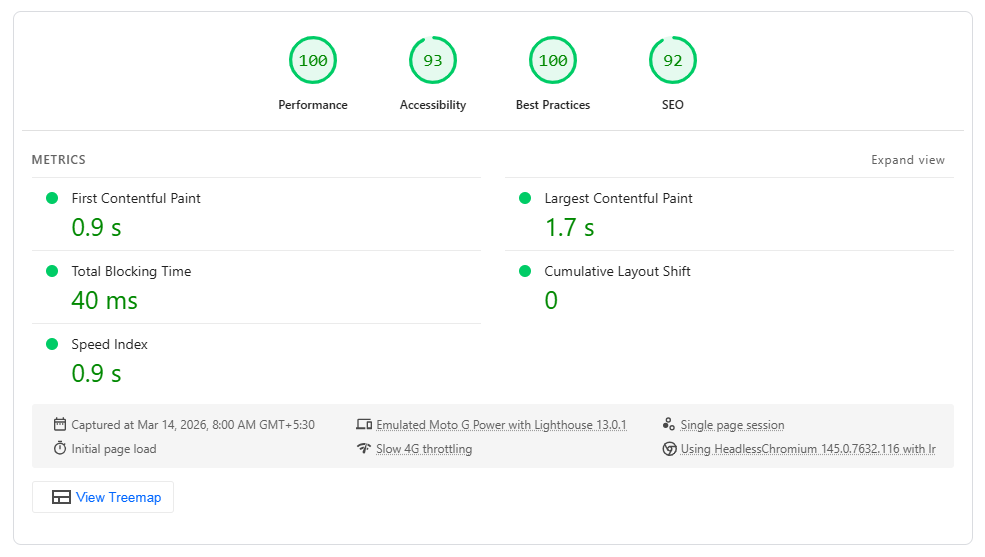
Also make sure your navigation is clear, your font is readable, and there are no broken links or error pages.
A positive user experience keeps visitors on your site longer, reduces bounce rate, and improves your chances of AdSense approval.
10. Follow Google E-E-A-T Principles
E-E-A-T stands for Experience, Expertise, Authoritativeness, and Trustworthiness. Google uses these signals to evaluate the quality and credibility of your content.
To improve your E-E-A-T score, add a detailed author bio to your articles, cite trustworthy sources, link to authoritative websites, and write from a place of genuine knowledge.
If you’re writing about health, finance, or legal topics, E-E-A-T is especially critical, Google holds these “Your Money or Your Life” (YMYL) topics to a very high standard.
FAQs About Thin Content and SEO
Before we wrap up, here are some common questions people often ask about thin content, SEO rankings, and Google AdSense approval.
These quick answers will help you better understand what thin content in SEO is, how it impacts SEO rankings, and how to fix it effectively.
1. What is thin content in SEO?
Thin content in SEO refers to web pages that provide little to no value for users.
This includes pages that are too short, duplicate, auto-generated, or simply don’t answer a user’s search query in a meaningful way.
Google identifies such content and may penalize or ignore these pages in search results.
2. How does thin content affect my website’s SEO rankings?
Thin content negatively affects SEO by lowering your page rankings, increasing bounce rates, and wasting your crawl budget.
In more serious cases, it can trigger a Google thin content penalty, either through algorithmic updates or manual action, which can cause significant drops in organic traffic.
3. How many articles do I need before applying for Google AdSense?
While Google doesn’t publish an official minimum, most SEO experts recommend having at least 20–30 high-quality, original articles before applying.
Each post should be at least 800–1,000 words and cover a unique, relevant topic within your niche.
4. What tools can I use as a thin content checker?
Some reliable tools to identify thin content include Google Search Console (for low-traffic pages), Screaming Frog SEO Spider (to filter pages by word count), SEMrush or Ahrefs (for content audits), and Copyscape (to detect duplicate content).
Using these tools together gives you the most accurate picture of your site’s content quality.
5. Can AI-written content be considered thin content?
Yes, poorly edited or generic AI-generated content can absolutely be flagged as thin content by Google.
AI tools can help you draft articles faster, but the content must be reviewed, personalized, and enriched with original insights before publishing.
Content that reads as generic, repetitive, or lacking real expertise will not meet Google’s quality standards, regardless of word count.
Quick Thin Content Checklist:
If you want to quickly check whether your content is strong enough for SEO and AdSense approval, use this simple checklist:
- Minimum 1000+ words per article
- Original insights, examples, or experience
- Clear headings and proper formatting
- Internal links to related articles
- Author bio to strengthen E-E-A-T signals
Conclusion
Fixing thin content is not a quick fix, it’s a commitment to building a website that genuinely helps people. But the rewards are well worth the effort.
When you replace shallow, low-value pages with in-depth, original, and well-structured content, your SEO rankings improve, your visitors stay longer, and your site becomes a real authority in your niche.
Also read:
More importantly, following these steps dramatically increases your chances of Google AdSense approval.
Google wants to show ads on websites that provide value and when your site does exactly that, the doors to monetization open up naturally.
Start by auditing your current content, identify the weakest pages, and work through the 10 tips in this guide one by one.
Whether you’re fixing google thin content issues or building your blog from scratch, consistency and quality are your two most powerful tools.
You can also explore different ways of making money blogging.




Leave A Comment