
You’re probably familiar with Google’s Top Stories feature. It is designed to highlight important and timely news stories, and everyone wants to rank in it.
Ranking in Google’s Top Stories section has traditionally been difficult, but now Google itself has made it much easier.
In this article, you’ll learn a practical approach that Google officially supports to get traffic from top stories in Google search.

If you are a blogger or a website owner, your main goal is to write quality content and deliver it to the right audience, and Google helps you with this.
What is Google Top Stories?
Google Top Stories is a feature that displays timely and relevant news articles, videos, and other news-related content at the top of Google search results.
It usually appears as a carousel displaying three or more stories from different publishers, giving users quick access to multiple perspectives on trending and breaking topics.
For example, search anything news-related in Google, you’ll see results like this.
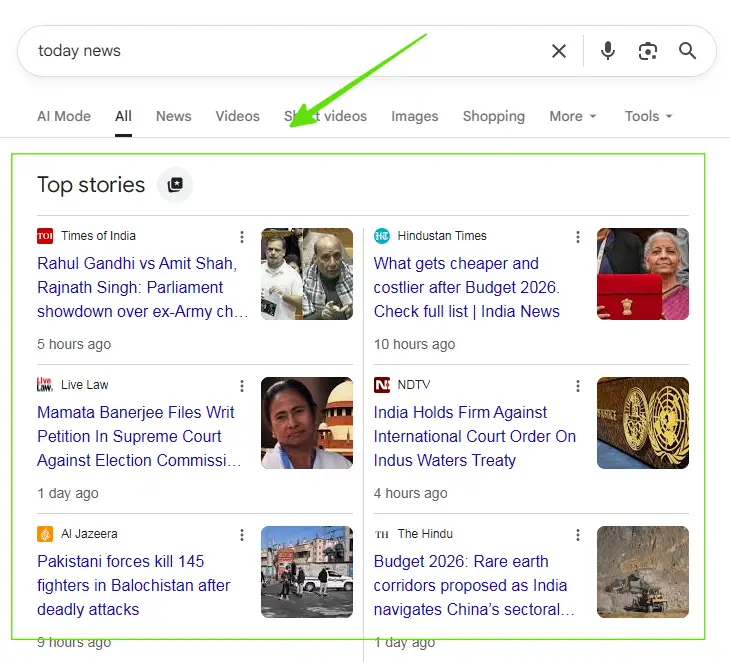
Now the question is: how can you get your website’s news articles featured in the Top Stories section?
Below is one practical method that can help publishers gain visibility through Top Stories.
Let’s get back to our main topic now.
Practical Ways to Drive Traffic from Google Top Stories in 2026
There are several ways to get your content featured in Google’s Top Stories and drive traffic to your website, such as creating high-quality, original, and timely content.
But I will tell you the easiest and best working way that will help every blogger, and website owner to get traffic from the Google Top Stories feature.
Source Preferences Tool
Google “Preferred Sources” tool is a search customization feature. This allows users to add their favorite websites as a source list.
The good news is that you can help your readers find your website through their preferred sources in Google Search and add it to their source list.
When users select your site as a preferred source, your content is more likely to be shown to them for relevant news searches, especially in the Top Stories section.
This increases your visibility among readers who are already interested in your content and helps build a more consistent and loyal audience.
How can You Help Your Readers Add Your Website as a Preferred Source?
If your site appears in the Source Preferences tool, you can encourage your website readers to select your site as a preferred source using the methods below.
Ways to guide readers to choose your site as a preferred source:
1. Share a Direct Link in Social Posts
Add a deeplink to your social posts or profile that takes users directly to your website within the source preferences tool; then they simply need to save the settings.
Use the following URL format:
https://google.com/preferences/source?q=Your_Website_URL
For example:
Our website url is https://mozedia.com, so we use this:
https://google.com/preferences/source?q=mozedia.com
2. Add a Call-to-Action Button on Your Website
You can include a button on your site alongside other social CTAs. You can use the official button assets provided by Google or design your own custom button.
For example, we use this:
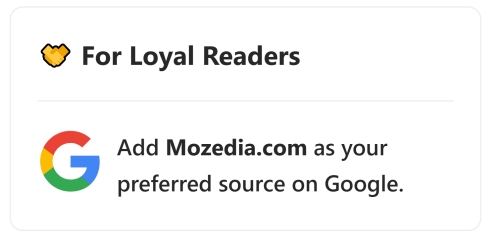
These methods are optional and serve as examples of how you can grow your audience and help readers find your site as a preferred source.
Using them is not required for your site to appear as a preferred source in Google Search.
Feature Availability
The Preferred Sources feature is available worldwide for English-language searches that trigger the Top Stories section in Google Search.
Currently, only domain-level and subdomain-level websites are eligible to appear in the Source Preferences tool, until we write this article.
For example:
- Domain:
example.comorwww.example.com - Sub domain:
news.example.com,blog.example.com
These URLs are eligible as preferred sources, while sub directories like example.com/blog/ and example.com/news/ are not eligible.
How to Add a Website to the Google Preferred Sources List
There are, it’s also important to explain how you can add your favorite websites to the Google Preferred Sources list, and it’s very easy.
There are two ways to do this.
1. From Top Stories Feature
You need to search for any news-related term or recent important event on Google Search, like I searched for “dog news” and this is the result I got here.
- If the Top Stories feature is visible, click the star icon on the right side of the Top Stories header.
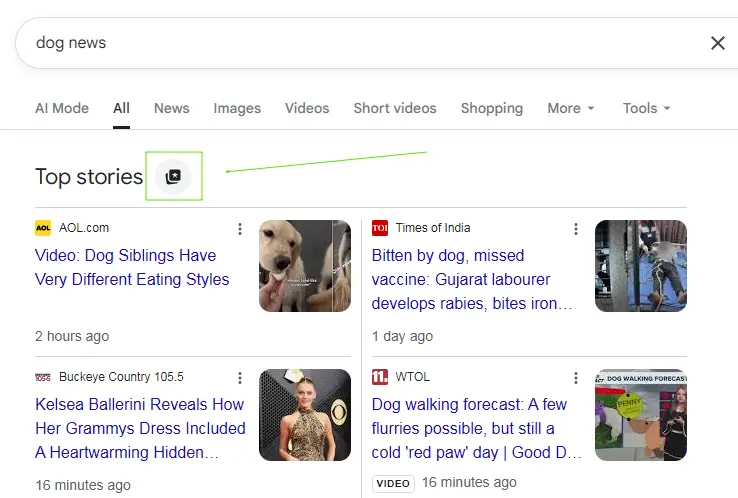
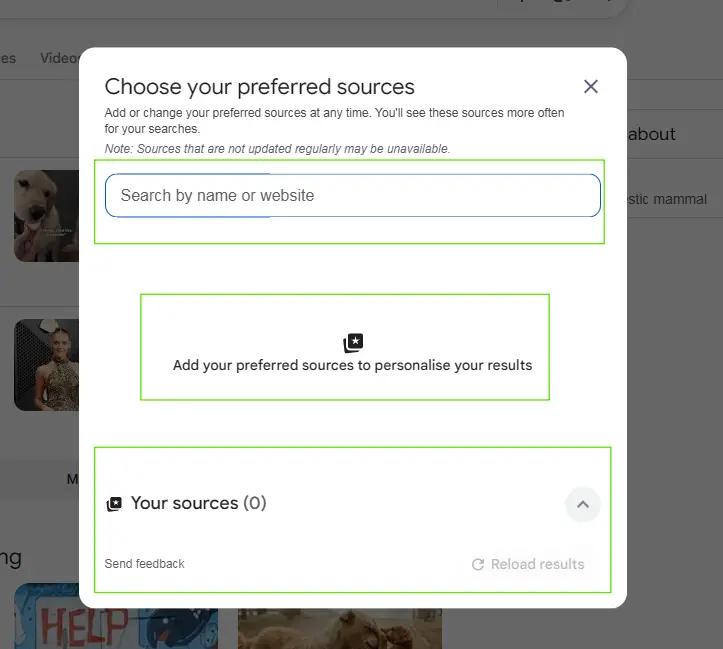
Now, a pop-up window titled “Choose Your Preferred Sources” will open, where you will have to manually search for your favorite sites.
- Search for your favorite website by name or URL, select it, and save the settings.
2. Direct Link (from Websites)
If you find its widget on a website, click on it, or open our source Preferences tool link, or copy the link above and open it in your internet browser.
Now a page like this will open, which will already have a link to your favorite site added. You just need to select it in the checkbox.
- Select the website and save the settings by clicking the “Google Search in Tech” button.
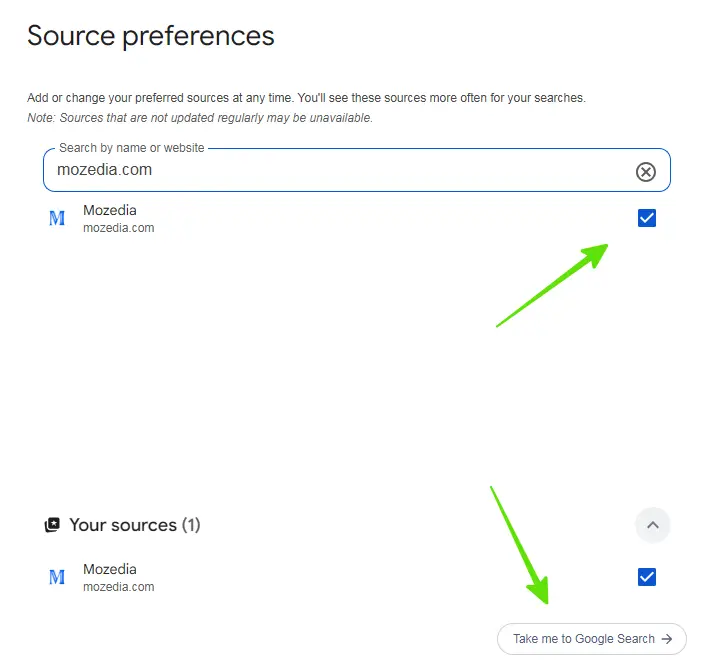
It’s very easy, isn’t it? This way you can add your website to the preferred source list or add your favorite website, enjoy!
However, preferred Source does not guarantee ranking in Top Stories, but it increases visibility for users who have chosen your site.
This explanation is based on Google’s official documentation and current behavior of the feature, see Google’s official top stories in search page.
Conclusion
In 2026, Google Top Stories is no longer limited to only large news publishers. However, content quality, freshness, and reliability remain the most important factors.
But Google’s Preferred Sources feature offers a new way to improve visibility among loyal readers, which is helpful for every blogger and webmaster.
- How to Rank In People Also Ask Boxes (Proven Tips 2026)
- How to Rank Content Without Backlinks (10 Proven Ways)
It’s important to understand that Preferred Sources doesn’t guarantee a ranking in the Top Stories section. Instead, it functions as a personalization feature.
It helps your content appear more frequently for users who have selected your website as a trusted source. You can help them to adding this tool.




Leave A Comment