
Free Hosting Checker – Check WhoIs Hosting Any Website?
To find out which web hosting company is hosting a website, simply enter a domain name or URL and find out who is hosting any website in just a second!
Our free hosting checker tool provides you with information such as the hosting provider’s name, IP address, whois information, and server location details completely free of charge.

What is this Mozedia Hosting Checker Tool?
This is a fast and easy web hosting checker tool to easily find information about the web hosting infrastructure of any website or blog.
When you enter a website URL into this hosting checker tool, This tool not only tells you about the website’s hosting,
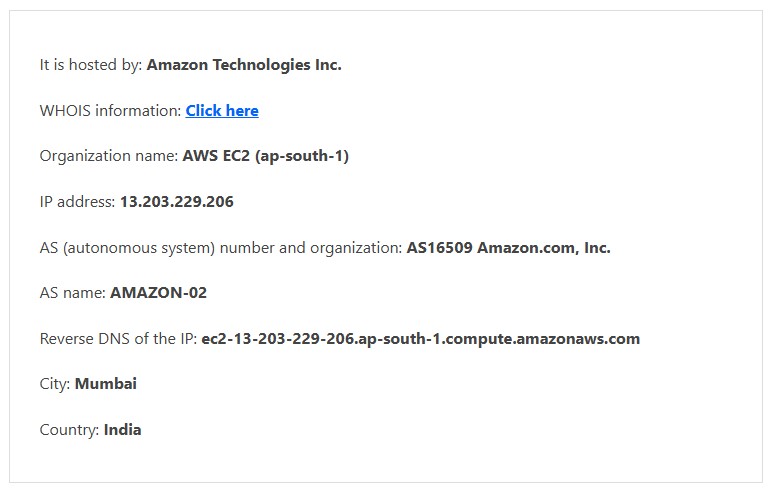
It also displays several useful technical details about the website, such as the website IP address, WHOIS info, name servers, reverse DNS, and city and country location.
What Can This Hosting Checker Tool Find?
This hosting checker tool not only tells you where a website is hosted, but it also provides a basic health report for the website, for example:
- Hosting provider name
- Website IP address
- Nameservers
- Reverse DNS
- Server city & country
- WHOIS & domain age
This information is useful for both website owners and SEO professionals.
Here is a screenshot showing the detailed results of our hosting checker tool.
How can I find out where a website is hosted?
Often, we need to find out which hosting company a website is using.
There can be several reasons for this, such as:
- You might want to use the same hosting provider,
- You might need to perform a technical analysis of a website,
- or you might need information related to SEO and performance.
The Mozedia Hosting Checker Tool is designed for this purpose.

You simply enter the website’s domain or full URL, and in just a few seconds, the tool tells you which hosting company’s server the website is hosted on.
Is Mozedia Hosting Checker Tool Free?
Yes, this Mozedia Hosting Checker Tool is completely free.
You can find out which hosting company a website is hosted on without any charge. This tool is easy to use and you can use it as many times as you want, without any limitations.
How does the Mozedia Hosting Checker Tool work?
When you enter a websitedomain or URL into this tool, our hosting checker tool first extracts the technical information associated with that domain.
Then, it analyzes the website’s IP address, server, and DNS data. It determines which hosting provider the website is hosted on and where the server is located.
What does the Website Hosting Search Tool do?
This tool tells you, in simple and clear terms, which web hosting company a website is using.
Mozedia’s database contains information on thousands of hosting companies, resulting in more accurate results.
This tool is especially useful for those who:
- Want to find out a website’s hosting provider
- Want to choose the right hosting for their own website
- Want to study their competitors’ technology
How to find a website’s real location?
Sometimes, a website’s address shows one location, but its server is actually located in a different country but our hosting checker tool help you to find it’s real location.
Mozedia’s Website Location Tool shows you the website’s true server location.
This information is very useful when:
- The website is slow
- The target audience is in a specific country
- There are GDPR or data location-related reasons

Why is Web Hosting IP Address Lookup necessary?
Every website is associated with an IP address.
An IP lookup tool allows you to find out which IP address the website’s server is running on and whether that IP address is on any blacklists.
If an IP address is blacklisted, it can affect SEO, email deliverability, and the website’s credibility.
Therefore, this tool is very helpful for checking the health of a website.
Why are Domain WHOIS and Domain Age important?
Domain age is considered a sign of trustworthiness by search engines. Older domains are generally trusted more quickly by search engines, provided they haven’t been used for spam.
- With the WHOIS tool, you can find out:
- When the domain was registered
- How old the domain is
- Basic registration information associated with the domain
Why is Mozedia’s report different?
The unique feature of the Mozedia Hosting Checker Tool is that it displays all the necessary information in one place.
You don’t need to visit different websites to check the information.
The report includes:
- Hosting and server information
- IP blacklist status
- Domain age and WHOIS data
- Basic SEO and performance indicators
You can also download the complete report as a PDF file.
What does Server Check mean?
Server Check means checking whether a website’s server is functioning correctly. If the server is frequently down, it directly impacts the website’s traffic and revenue.
Therefore, knowing the server’s status is very important.
How to Evaluate a Hosting?
When choosing web hosting, it’s not wise to make a decision based solely on offers or low prices. Good hosting keeps your website fast, secure, and always online.
When evaluating hosting, pay attention to these factors:
Uptime
Good hosting is one that keeps your website online for the maximum amount of time.
A 99.9% or better uptime guarantee shows that the hosting company is serious about its service and makes every effort to prevent website downtime.
Speed
Website speed is crucial. A fast website means a better user experience, more traffic, higher conversions, and increased business revenue.
Therefore, the hosting server should be fast and reliable.
Support
Hosting support is one of the most important factors.
It’s essential to check how quickly the support team responds and whether there are technical experts (such as system administrators) available or if it’s just outsourced support.
Price
Many hosting companies show very low prices for 3-year plans, but when you look at the 1-year plan, the price is significantly higher.
Therefore, always consider the actual plan price, renewal charges, and long-term costs before making a decision.
How to Choose the Right Web Hosting?
When choosing a hosting for your website, simply looking for the cheapest price isn’t the right approach. The wrong hosting can negatively impact your website’s speed, SEO, and user experience.
- You should pay special attention to these factors when choosing hosting:
- The hosting should have good uptime so that the website doesn’t go down frequently.
- The server speed should be fast so that the website loads quickly.
- The support team should be technically strong so that you can get immediate help when needed.
- The hosting plan should be cost-effective and scalable in the long run.
If you are specifically looking for the right hosting for a WordPress website, then you should definitely check out our guide:
👉 Top 10 Best WordPress Hosting Providers 2026
In this article, we have explained the best hosting options for WordPress, comparing their speed, features, and pricing in simple terms.
