
SEO automation is a revolutionary change in 2026. If you’re still doing SEO the same way as in 2020-22, believe me, your blogging career is over or about to end.
Because this is the age of AI, SEO is no longer just about keywords, backlinks, and meta tags, which used to be very time-consuming. Now it’s all about systems, data, and automation.
This is why top-ranking blogs (authority sites like Backlinko) with millions of traffic treat SEO as a process, not a task, and a large part of that process is automated.
In this article, I will explain SEO automation to you not on a surface level, but in the same depth as a professional blogger creates his internal SOPs.
This guide shows exactly how modern bloggers and authority sites automate SEO in 2026 to save time, scale traffic, and stay ahead of AI-driven competition.

Many people now question whether blogging is still worth it, because the competition is very high and bloggers or content writers are now using AI (Artificial intelligence) in blogging.
And honestly, there are a lot of repetitive tasks in SEO (search engine optimization) that you can automate, which we’ll cover in this niche article.
In this detailed guide, we will understand everything from the very basic level to advanced automation, that too in simple language.
- What Is SEO Automation?
- Why Is SEO Automation Important In 2026?
- 10 Most Important Areas and Best SEO Automation Platform & Tools for 2026
- 1. Keyword Research & Tracking
- 2. Technical SEO Monitoring
- 3. Content Optimization Automation
- 4. On-Page SEO Automation
- 5. Internal Linking Automation
- 6. Meta Tags & SERP Preview Automation
- 7. Backlink Monitoring & Automation
- 8. Reporting & Analytics Automation
- 9. Social Media & Content Distribution
- 10. Local SEO Automation (If applicable)
- How to Start SEO Automation – Beginner’s Guide for 2026
- Advanced SEO Automation Strategies (For Scaling Faster)
- Common SEO Automation Mistakes (and How to Avoid Them)
- How do I Know If the Automation Is Working?
- The Future of SEO Automation In 2026
- SEO Automation Related Questions & Answers (FAQs)
- What Is SEO Automation?
- Which is the best SEO automation platform?
- What are automated SEO reports?
- Can SEO be fully automated?
- How is SEO a part of marketing automation?
- How does marketing automation impact SEO?
- How does marketing automation impact SEO performance?
- How to choose an automated SEO reporting tool?
- How to create and automate white-label SEO reports?
- How long does it take to learn SEO automation?
- Which SEO tasks are best for automation?
- Which AI tools are best for SEO automation?
- What are the best tools for SEO automation?
- SEO Automation Related Questions & Answers (FAQs)
- Conclusion
What Is SEO Automation?
SEO automation means automatically performing repetitive and time-consuming SEO tasks using software and AI tools to save time, reduce errors, maintain consistency, and accelerate growth.
What tasks does automation help with?
- Keyword research
- On-page SEO checks
- Technical SEO audits
- Rank tracking
- Backlink monitoring
- Content optimization
- Reporting & alerts
For example:
A blogger used to manually check the rankings for each keyword. It took him 3-4 hours every week. When he automated SEMrush, the same task was done in 10 minutes.
This means less effort and more output. That’s the true power of SEO automation.
Automation increases efficiency, keeps data consistent, and allows marketers to focus on SEO terminology and concepts rather than tedious manual work.
Why Is SEO Automation Important In 2026?
I meet a lot of beginner bloggers who think SEO automation is only for big brands or companies. This is completely wrong. In fact, beginners benefit more from it.
Automating SEO saves them time, and you don’t need to spend many hours manually collecting data, so you can focus only on quality content creation.
It provides consistency and automated systems never forget, or there’s a very low chance of error. Your site’s health will be monitored weekly, even when you’re busy.
And best of all, costly mistakes are avoided. Automated alerts let you know immediately when there’s a broken link or your site is down.
Now you understand what SEO automation is and why it’s important, before moving on to the best SEO automation platforms, tools, and software for 2026.
Now it’s time to understand about SEO automation tools & software, and where SEO automation truly delivers the most value.
Important Note:
This guide is written by humans and based on real-world SEO automation workflows, tested on multiple blogs and large websites, combining extensive research with practical experience.
10 Most Important Areas and Best SEO Automation Platform & Tools for 2026
Automating the right tasks like keyword research, site audits, optimization, and performance tracking can save hours of manual work and improve overall SEO.
In this section, you’ll learn about the key pillars of SEO automation so you can confidently choose the right tools and build a scalable SEO strategy.
Let’s look at the core areas you should automate:
1. Keyword Research & Tracking
Keywords are the foundation of your website SEO strategy. But manually researching hundreds of keywords is a very difficult and time-consuming task.
What to automate:
- Generating keyword ideas
- Tracking competitor keywords
- Monitoring ranking positions
- Identifying search volume changes
Keyword auto-research isn’t just about keyword lists. Automation scans thousands of keywords, identifies search intent and People Also Ask data, and detects trends.
It reveals low-competition gaps. Manual research might look at 20 keywords, while automation might signal 20,000 keywords.
Best Tools for Keyword Research Automation:
- SEMrush Position Tracking automatically tracks your rankings.
- Ahrefs Rank Tracker offers similar features with historical data.
- Google Search Console works best for real-world performance data.
My advice is to closely track only the top 10-20 important keywords at first. Tracking too many keywords will overwhelm you.
2. Technical SEO Monitoring
Technical SEO errors can seriously hurt your rankings, as Google looks at technical issues first, content second, and manually checking every page is almost impossible.
If you notice a sudden drop in rankings right now, you can use some tools to auto-detect technical SEO issues.
What you can automate:
- Site audit & crawling
- Page speed monitoring
- Mobile-friendliness checks
- XML sitemap updates
Best tools for technical SEO monitoring:
- Google Search Console automatically detects technical issues and sends email alerts.
- Automate GTmetrix and Google PageSpeed Insights for regular page speed checks.
- Screaming Frog SEO Spider for identifing broken links, 404 pages, and redirect chains.
Real Case Study:
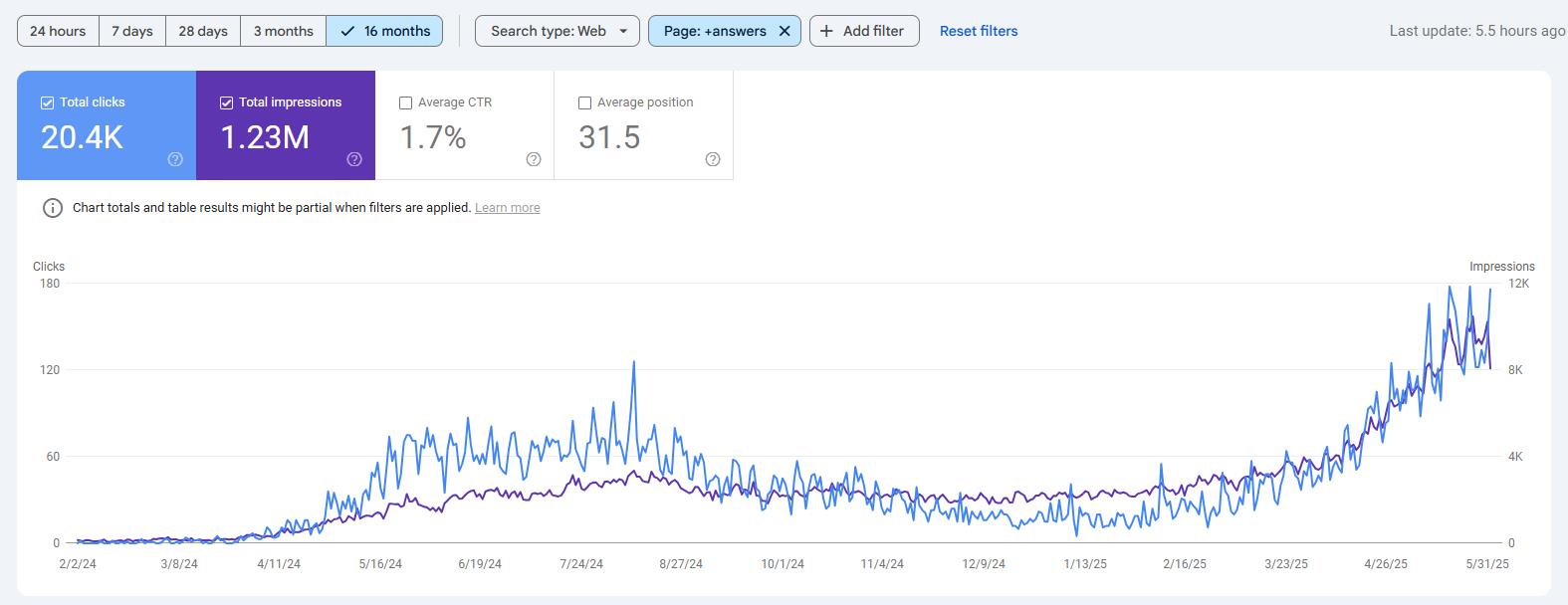
An e-commerce site set up automated crawling to identify technical SEO issues. Within a week, they discovered that over 200 product pages had broken images.
After fixing these issues, organic traffic increased by 23%, a result consistent with insights shared in a documented ecommerce SEO case study.
3. Content Optimization Automation
Here, automation doesn’t write content, it judges it. Writing content is a creative process, but SEO optimization… that can be automated.
What to automate:
- On-page SEO suggestions
- Content gap analysis
- Internal linking suggestions
- Readability scores
Best tools for content optimization automation:
- Surfer SEO provides real-time suggestions while you’re writing content.
- Clearscope automatically analyzes content and suggests missing keywords.
- Yoast SEO (WordPress plugin) displays a live SEO score while writing.
If you want a complete guide on setting up a post, read these articles:
Important note:
Automation tools provide suggestions, but you’re the one who makes the final content decisions. Quality should not be compromised.
4. On-Page SEO Automation
Optimizing On-page SEO of a page manually is easy, but when your site grows to hundreds of pages, maintaining the same on-page SEO standards becomes difficult.
On-page SEO automation helps ensure that every page follows proper SEO structure, best practices, and optimization rules without missing critical elements.
What to automate in on-page SEO:
- Heading structure checks (H1, H2, H3 hierarchy)
- Image alt text suggestions and missing alt detection
- Schema markup generation and validation
- Canonical tag and noindex issues detection
Automation tools scan your pages, identify missing or incorrect on-page elements, and alert you before these issues start affecting your rankings.
Important highlight:
Image SEO automation has become a major traffic source in 2026. Auto optimized image alt text, and compression can drive significant traffic from Google Image search.
If your website pages contain a lot of images, don’t just rely on the browser’s native lazy load, you should manually implement lazy load so that the images are loaded when needed.
Best tools for on-page SEO automation:
- SEO plugins for live on-page SEO checks in WordPress
- Schema Pro for automated schema markup
Remember, automation highlights issues and suggestions, but final optimization decisions should always be reviewed manually to maintain content quality and user experience.
5. Internal Linking Automation
Internal linking is a part of SEO that most bloggers take lightly, but for Google, it’s a core signal of crawlability, indexing, and authority distribution.
Manually adding internal links to 2–3 pages is easy, but once your website reaches 100+ pages, internal linking becomes messy and inconsistent without automation.
The main goal of internal linking automation is to ensure that:
- No important pages remain isolated (orphaned)
- Link equity flows to the correct pages
- Google has a clear understanding of the site structure
What to automate in internal linking:
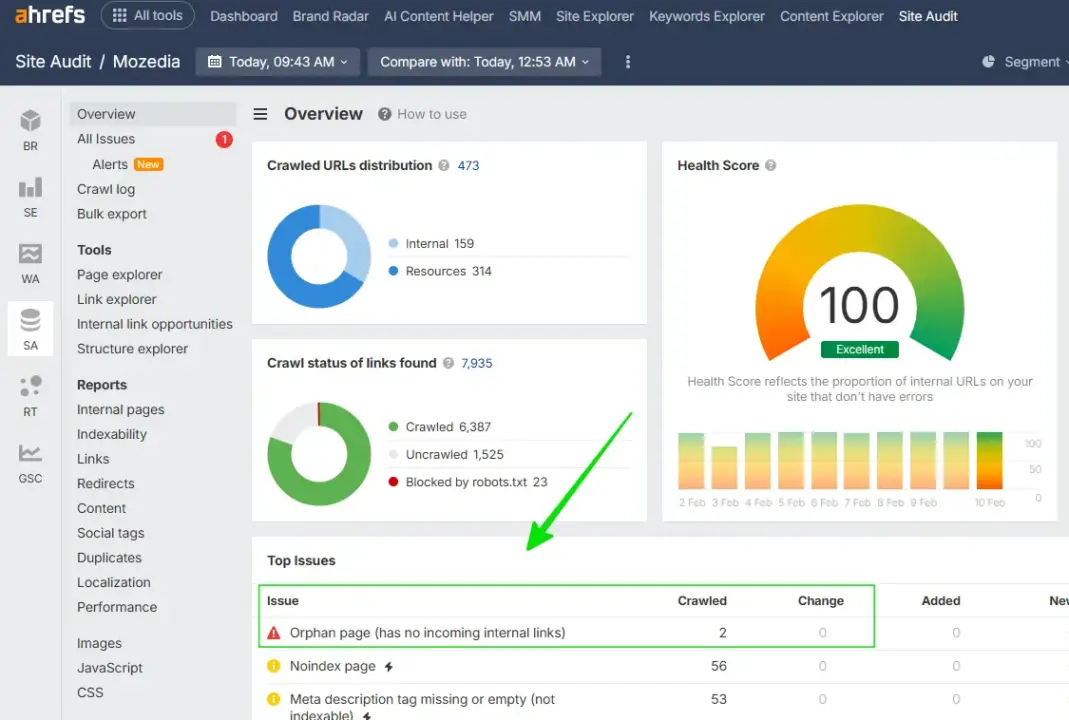
- Orphan page detection (pages with no internal links)
- Broken internal links identification
- Crawl depth analysis (how many clicks away important pages are)
- Over-optimized or duplicate anchor text detection
Automation tools crawl your entire site to show where the internal linking structure is weak and where improvements are needed, without having to manually open every page.
Best tools for internal linking automation:
Screaming Frog and Xenu are lightweight and beginner-friendly tools that help identify internal broken links and orphan URLs.
You can also monitor internal and external links using Ahrefs and Semrush.
For example:
- You can see this report from Ahrefs, which clearly shows pages with no internal links.
6. Meta Tags & SERP Preview Automation
Meta tags are the first impression between Google and users. If the meta title and description are weak, your CTR can remain low even if your rankings remain stable.
Writing meta tags for each page manually is possible, but as the site scales, problems arise, such as duplicate titles, missing descriptions, over-length metas, and SERP truncation.
This is where meta tag automation delivers real value. The goal of meta tags and SERP preview automation is to:
- The search intent of each page should be clear
- Titles and descriptions should display properly in the SERP
- Click-through rates should be maximized
What to automate in meta tags and SERP optimization:
- Checking the length of meta titles and meta descriptions
- Detecting duplicate or missing meta tags
- SERP preview optimization (desktop and mobile)
- Keyword placement and intent mismatch alerts
Automation tools automatically scan your pages and flag meta tag issues before they impact visibility or click performance.
Best tools for meta tag automation:
- SEO plugins that provide live meta checks and SERP previews in WordPress
- Screaming Frog: For detecting duplicate and missing meta tags on large sites
- ChatGPT: For generating intent-based meta title and description drafts
Automation tools detect issues, but AI tools like ChatGPT, Google Gemini and Deepseek can be very helpful in writing high-quality meta copy.
With AI, you can generate meta titles based on search intent and turn boring descriptions into compelling, click-worthy copy.
7. Backlink Monitoring & Automation
Although a lot has changed in SEO in 2026 and Google’s algorithm has become more complex, one thing is still clear: backlinks remain the backbone of SEO.
Although backlinks are not necessary for search ranking, by adopting the right strategy, you can get your site’s content to rank at the top in Google even without backlinks.
But manually tracking backlinks and outreach is time-intensive, so you can use tools like Ahrefs backlink audit and Semrush backlink audit.
What to automate in backlink monitoring:
- Get automatic notifications whenever someone links to your site, and learn immediately if an important backlink is removed.
- And if spammy websites are trying to spam your website by directing bad links to it, help identify and remove them.
- In addition to your own website backlink audit, also perform competitor backlink monitoring and see where your competitors are getting links from.
Best tools for backlink monitoring:
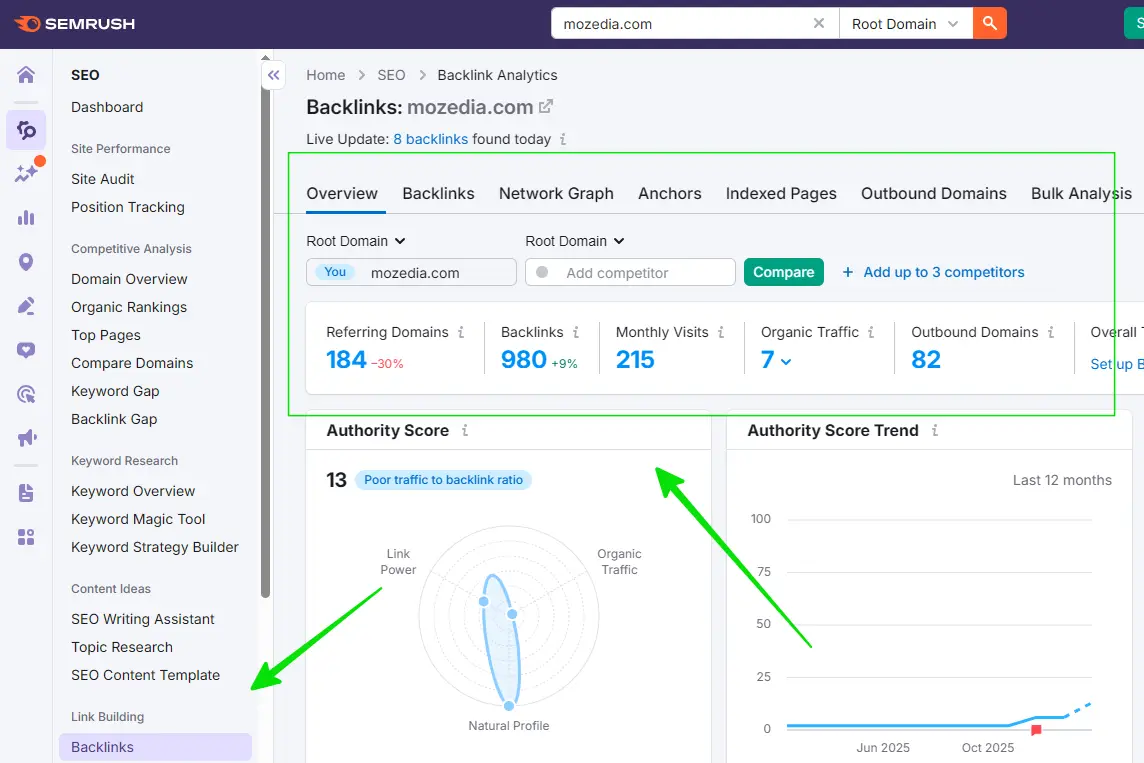
I mostly use Semrush and Ahrefs for backlink monitoring. Both of these help me automatically track new and lost backlinks.
8. Reporting & Analytics Automation
Regular reporting is essential for making data-driven decisions. But manually creating reports is time-consuming, and understanding Google Analytics 4 isn’t everyone’s cup of tea.
What to automate in reporting:
- Traffic reports
- Conversion tracking
- Custom dashboards
Best tools for reporting and analysis:
- Google Data Studio (Looker Studio) is free and creates powerful automated reports
- SEMrush and Ahrefs offer built-in reporting features
- AgencyAnalytics creates white-label reports specifically for agencies and bloggers
- Site Kit by Google to track analytics, AdSense RPM, CPC and GSC data
Include dashboard essentials in your reports to track organic traffic, top performing pages, keyword rankings, backlink growth, technical errors, and more.
9. Social Media & Content Distribution
Simply publishing content on your website isn’t the battle. The real battle is promoting your content in the right ways and on the right places (like social media platforms).
What to automate:
- Automatically share a new blog post on social media when it’s published.
- Automatically re-share evergreen content at different times.
- Automatically distribute your content across different platforms.
Best tools for social media automation:
- Buffer and Hootsuite automate social media posting
- IFTTT (If This Then That) connects different platforms for automated workflows
- Zapier creates advanced automation workflows
Avoid over-automation on social media. Some manual, genuine engagement is also necessary, so manually optimize and post well to engage more people.
10. Local SEO Automation (If applicable)
If your online business targets a specific country, city, local area, or service location, local SEO automation is not optional, but critical for you.
The biggest challenge in local SEO is consistency and real-time monitoring, as Google constantly updates local results based on reviews, proximity, and trust signals.
What to automate:
- Google Business Profile monitoring
- Citation management
- Review response templates
- Local ranking tracking
Best tools for local SEO automation:
- BrightLocal is specifically for local SEO automation.
- Moz handles local citation management.
- Grade.us for review monitoring and management.
Tracking all these signals manually is not only difficult, but practically impossible that’s where Local SEO automation comes in.
The goal of Local SEO automation is to ensure your business appears accurate, active, and trustworthy on every platform, without the need for daily manual intervention.
By now, you understand what SEO automation is and the areas in which it provides the most value. Enough theory, let’s move on to practical implementation.
How to Start SEO Automation – Beginner’s Guide for 2026
The biggest question for a beginner is how to automate SEO? Where to start? So let me show you a beginner-friendly method.
Trying to automate everything at once is the wrong approach, as doing so can lead to confusion and mistakes, and you won’t get anything right.
So, my advice is to always start SEO automation as a step-by-step system; this is the easiest and right way to start SEO automation.
1. First of All Clear the Goal
First, decide what you want to achieve. Determine your priorities, such as:
- Increase organic traffic by 50% in the next 6 months
- Rank in the top 10 for 5 important keywords
- Reduce technical errors to zero
- Gain 10 quality backlinks monthly
Without clear goals, your SEO automation will be directionless. So, the best approach is to choose a method first and solve one problem at a time.
2. Choose Essential Tools
Another automation method is to choose essential tools, which I recommend for beginners. You can start with some free tools, such as:
- GSC (must-have)
- Google Analytics 4
- Google Data Studio
- Ubersuggest (limited free version)
If your budget allows, you can try these as well. Free trial plans are also available, but the limits are very tight.
- SEMrush or Ahrefs (pick one)
- Screaming Frog (paid version)
- Buffer (basic plan)
My advice is not to use too many tools at once. Master 2-3 core tools first, and then try the rest if needed.
3. Start with Keyword & Tracking Automation
The entry point to SEO automation should always be keyword research and tracking. Without the right keywords, driving traffic to your site is nearly impossible.
To begin with:
- Select 10–20 important keywords
- Don’t track unnecessary keywords
- Observe weekly ranking movements
This will help you understand:
- Which content is working
- And where improvements are needed
For this, I recommend Ahrefs and Semrush. For the rest of the Google suggestion-based keyword research, you can also use our free keyword generator tool.
4. Automate Your Rank Tracking
You have set your goal, set up the free tool, and targeted keywords. Now the fourth task is to track the ranking of your blog posts and keywords.
Select your most important 10-20 keywords.
Position Tracking In SEMrush:
- Create a Position Tracking project
- Add keywords (you want to track)
- Set the location (whatever your target area is)
- Choose the tracking frequency (daily or weekly)
- Schedule email reports (weekly digest is best)
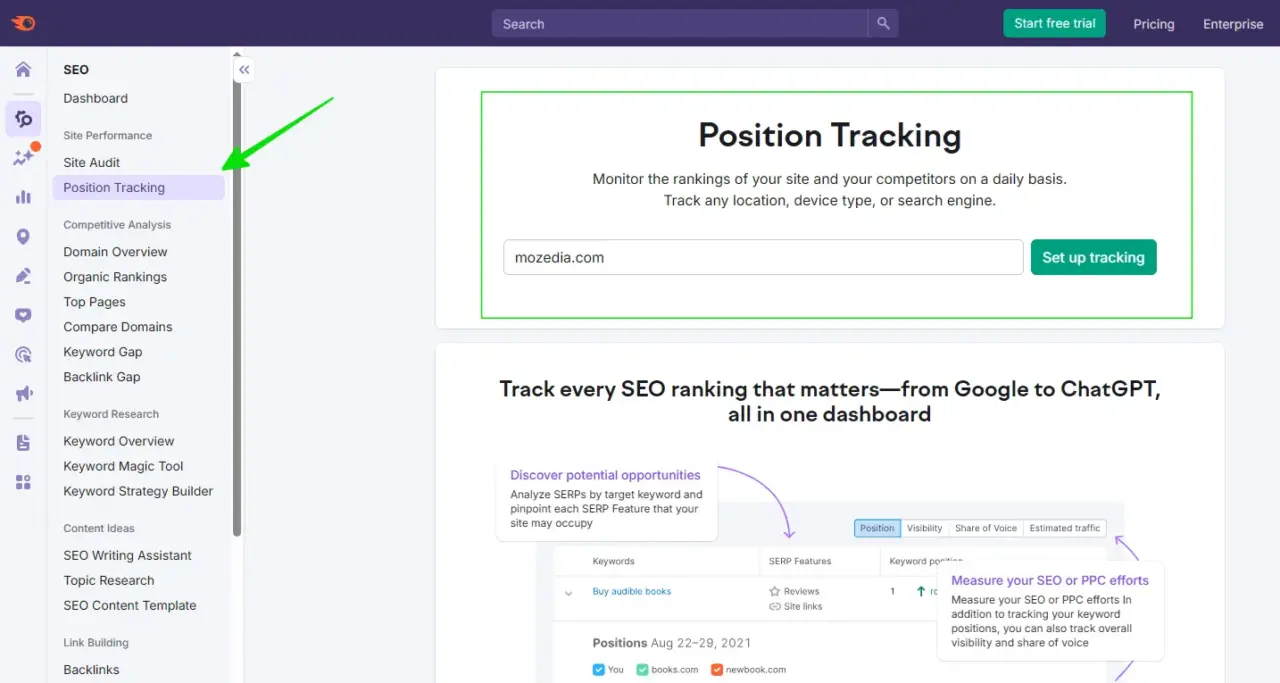
You can do the same work with Ahrefs also, in both these tools you can set daily or weekly schedule, you will get daily, weekly, monthly reports automatically through email.
5. Setup Technical SEO Monitoring
After this, set up technical SEO automation, because technical issues impact before the content, errors are caught early and you get an alert before the ranking drops.
I currently use Xenu tool to detect normal internal and external broken links, 404 pages and outdated links, because I find it very easy and lightweight and it is also free.
Here you can see the Xenu dashboard screenshot:
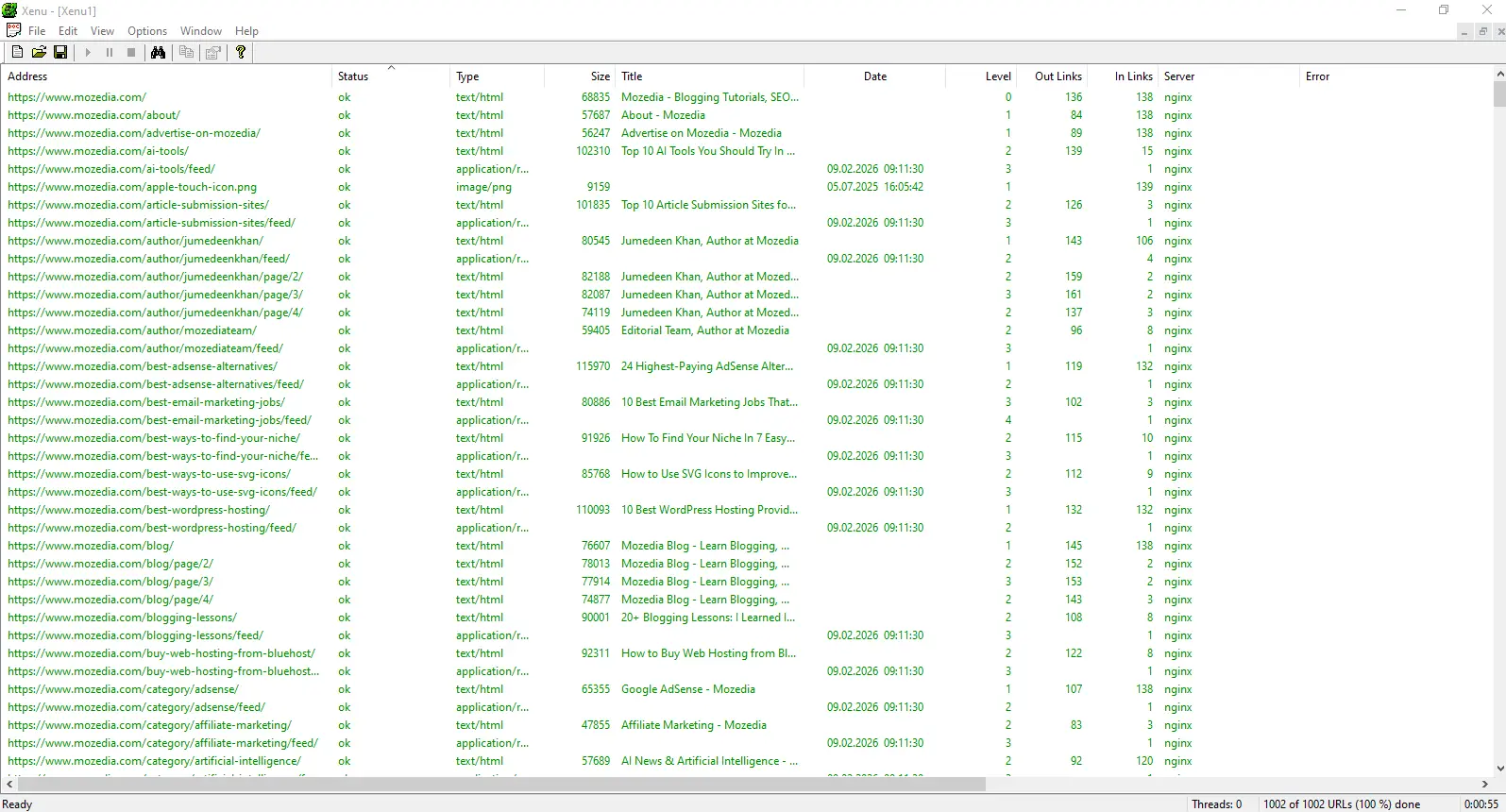
Run a full site crawl using Screaming Frog, Xenu, or a similar tool for a baseline. Identify common issues, such as broken links, missing meta descriptions, and duplicate content.
- Schedule weekly crawls.
- Set alerts for critical issues.
Minimum setup for a beginner:
- GSC alerts ON
- Weekly site crawl
- Monthly page speed check
According to Zippy, Google has over 400 billion pages in its index, meaning it has no shortage of content, and there are countless sites providing quality content.
Therefore, Google has to filter them based on many other factors apart from content quality, which also includes technical issues, Google does not like such sites.
For more information, check out Google official Search documentation.
6. Use Content Optimization Automation
Now that your data and technical base are strong, focus on content optimization automation, on-page SEO checks, and internal linking automation.
This phase makes your site scale-ready. But always remember that content automation doesn’t write content; it helps improve it.
You can use AI tools like ChatGPT and Claude for content writing assistance; I have explained about it in detail in the Top AI Tools in 2026 article.
Always remember to use AI only for content writing help; do not copy and paste AI written content.
If you use WordPress, install Yoast SEO or Rank Math, optimize the settings according to your target keywords, and create content templates for consistent optimization.
If you do not use WordPress, try Surfer SEO or Clearscope. Create a content optimization checklist and follow it before publishing every new post.
7. Set up Automated Reporting
The real benefit of SEO automation comes when you take action by deep-diving into the daily report, weekly overview and monthly performance reports.
This helps you avoid data overload and make informed decisions. Create a free account with Google Data Studio and choose a template (SEO reporting templates are available).
You can connect Google Search Console to Analytics and add custom metrics based on your goals. You can schedule weekly or monthly email reports.
Similarly, you can enable all the remaining SEO automation features one by one and take your blogging career to new heights.
Advanced SEO Automation Strategies (For Scaling Faster)
Beginners can explore these advanced SEO automation strategies after mastering the fundamentals. These techniques are designed to help you scale faster, and gain a competitive edge.
However, they require a solid understanding of core SEO concepts, proper monitoring, and careful implementation, as incorrect setup can negatively impact performance.
1. AI-Powered Content Briefs
Tools like Frase and MarketMuse use AI to generate comprehensive content briefs. It analyzes top-ranking pages and suggests the exact topics, subtopics, and keywords that should be covered.
2. Automated Schema Markup
Schema markup generates rich snippets in search results. Tools like Schema Pro (WordPress) automatically add appropriate schema for different content types.
3. Programmatic SEO
Generating pages at a large scale using templates and databases. A real estate site can automatically create city-wise and locality-wise landing pages.
This is an advanced strategy, and incorrect implementation can lead to thin content issues.
4. Predictive Analytics
Tools like BrightEdge and seoClarity use machine learning to predict, which keywords will be valuable in the future and content gaps that competitors are exploiting.
5. API Integrations
Connecting different tools for custom workflows. When a traffic spike is detected in Google Analytics, automatically send a notification to Slack.
Common SEO Automation Mistakes (and How to Avoid Them)
The biggest mistake I see is that many new bloggers don’t understand search automation and instead of doing it the right way, they do it the wrong way.
1. Trying to Automate Everything
Human judgment is essential in SEO. Fully automated strategies fail. Follow the 80/20 rule. Automate repetitive tasks, make strategic decisions manually.
2. Blindly Relying on Tools
Tools don’t understand context. What’s best practice for one site may not be for another, so use tools as advisors.
3. Setting Up Automation and Forgetting It
Algorithms change frequently, and competitors evolve. Therefore, your old automation may become outdated.
Review your automation workflows monthly. Keep making updates and improvements.
4. Tracking Too Many Metrics.
This can cause important insights to get lost in the noise. Focus on 5-7 core KPIs that are directly connected to business goals.
5. Quality Sacrifice
Compromising content quality in pursuit of speed is a mistake. Your poor-quality content will never rank, no matter how optimized it is.
That’s why I recommend that you make automation an efficiency tool, not a replacement for quality work.
How do I Know If the Automation Is Working?
To understand whether automation is working properly, you need clear metrics and regular reviews.
First, consider how much time is being saved per week. If automation saves 10–15 hours per week, this is a realistic and healthy signal.
Next, compare organic traffic growth month-over-month; with consistent efforts, 10–20% monthly growth is considered achievable.
Also, monitor keyword ranking improvements: how many keywords appear on the first page and how much the top-3 positions increase.
On the technical side, compare error reduction with baseline; the goal should be to gradually reduce critical errors to zero.
Similarly, look at the backlink growth rate to see how many quality backlinks are being added each month.
Finally, the most important is the ROI calculation. Comparing the cost of the tools, the time saved by automation, and the revenue generated can clearly determine whether automation is truly profitable.
The Future of SEO Automation In 2026
After 2026, SEO automation will become faster and smarter, with manual work decreasing and AI-driven systems taking over.
Already, AI is playing a major role in content creation, research, and optimization, improving both speed and consistency.
Voice search and video SEO automation will also become more important in the future, with tools understanding natural language and automatically optimizing content and video elements.
In addition, automated E-E-A-T signals and hyper-personalization will become major trends, meaning tools will help demonstrate your credibility and customize content based on user intent.
The lesson for you is to adopt new tools quickly, keep your SEO basics strong, and focus on continuous learning. While automation will change, SEO fundamentals will always be relevant.
SEO Automation Related Questions & Answers (FAQs)
If you’re confused about how automation works, what tasks can be automated, or which tools to use, the answers below will help you quickly understand the practical aspects of automated SEO.
These frequently asked questions address the most common doubts beginners and marketers have about SEO automation.
What Is SEO Automation?
SEO automation is the use of tools and AI to automatically handle repetitive SEO tasks like keyword tracking, auditing, reporting, and monitoring, saving time and reducing errors.
Which is the best SEO automation platform?
There’s no single best platform for everyone.
The best SEO automation platform depends on your goals, site size, and budget. Some tools focus on auditing, others on tracking or reporting.
What are automated SEO reports?
Automated SEO reports are scheduled reports that automatically pull data from Analytics, Search Console, and SEO tools to show traffic, rankings, backlinks, and performance trends.
Can SEO be fully automated?
No. SEO cannot be fully automated. Tools can automate data collection and monitoring, but human judgment is still required for strategy, content quality, and decision-making.
How is SEO a part of marketing automation?
SEO fits into marketing automation by consistently driving organic traffic, feeding data into the funnel, and supporting automated content distribution and lead generation systems.
How does marketing automation impact SEO?
Marketing automation improves SEO by increasing content consistency, faster publishing, better user engagement tracking, and stronger data-driven optimization decisions.
How does marketing automation impact SEO performance?
It positively impacts SEO by aligning content, analytics, and user behavior data, helping improve rankings, engagement metrics, and conversion optimization.
How to choose an automated SEO reporting tool?
Choose a tool based on data accuracy, integrations, customization options, scheduling features, and whether it supports dashboards or white-label reporting.
How to create and automate white-label SEO reports?
Use reporting tools that allow branding customization, connect analytics and SEO data sources, create reusable report templates, and schedule automatic delivery.
How long does it take to learn SEO automation?
Basic SEO automation can be learned in 2–4 weeks. Advanced automation workflows usually take 2–3 months with regular practice.
Which SEO tasks are best for automation?
Keyword tracking, site audits, backlink monitoring, technical error alerts, reporting, and performance monitoring are best suited for automation.
Which AI tools are best for SEO automation?
AI tools that assist with content optimization, keyword intent analysis, meta generation, and automated reporting are best for SEO automation tasks.
What are the best tools for SEO automation?
The best tools typically combine keyword tracking, technical SEO auditing, content optimization, backlink monitoring, and an automated reporting platform.
Conclusion
So my dear friends, thank you so much for reading this far. Now you know what SEO automation is and how to implement it for your website.
Let’s quickly recap:
SEO automation saves you time, brings consistency, and helps you scale. And most importantly, it’s as valuable for beginners as it is for experts.
Focus on these 10 main areas and try them all step-by-step: keyword tracking, technical monitoring, content optimization, and backlink management.
Start with free tools, then scale gradually.
Avoid common mistakes like over-automation and blind trust, and never compromise on quality.
At last, Most Importantly:
Automation is a tool, not a replacement. It makes your work easier, but it can’t replace strategy, creativity, and the human touch.
Now’s the time to take action. Setup Google Search Console today if you haven’t already, and identify your top 10 keywords this week.
Have a basic automation workflow ready by next month. Remember – every expert was once a beginner. The only difference is that they started early.
My golden tips for your SEO success:
- Start today, don’t wait for the perfect setup.
- Start with the basics and keep improving.
- Check your results every month.
- Continue what’s working, tweak what’s not.
- Learn continuously, SEO and automation both evolve.
- Stay updated, try new tools, and engage with the community.
If you have any questions about SEO automation, please ask in the comments. I’ll try to answer each one.
And if you found this guide helpful, you can help someone else by sharing it with your fellow bloggers and SEO enthusiasts.
If you want more automation tutorials, bookmark this page and check Mozedia regularly.
Now go out and automate your SEO game! 🚀