
Today we’ll learn how to reduce spam score of website? If your website spam score has increased, there’s no need to panic. You can reduce it using the right strategies.
In this detailed guide, we’ll cover everything from the basics of spam score to practical ways to reduce them. Let’s learn What is Spam Score and How to Reduce it in 2026.

Many bloggers abandon their websites when the spam score rises and start a new site, which is a big mistake. You should never do this.
First you need to know what is spam score, who decides it, does a high spam score lower the site rank, and then reduce spam score by making necessary changes.
So let us first know that:
- What Is Spam Score? (Definition)
- What is Moz Spam Score?
- How to Check Website Spam Score (Step-by-Step Guide)
- 20 Best & Proven Ways to Reduce Spam Score of the Website in 2026
- How Long Does It Take to Reduce Spam Score?
- Final Conclusion
What Is Spam Score? (Definition)
Spam Score, primarily created by Moz, is an SEO metric (from 0-100%) that measures how spammy a website is based on low quality content and spammy features.
This isn’t a score directly assigned by Google, but rather an indicator created by SEO tools to help understand a website’s risk level.
It identifies risk based on various factors, such as low link diversity or thin content, to help identify harmful backlinks, meaning it’s there to help you.
This score is primarily based on:
- Backlink quality
- Website credibility
- Content quality
- Site structure and trust signals
Many people interpret this as a Google penalty, but a high spam score doesn’t mean your site has been penalized; it’s simply a warning of improvements.
Why Spam Score Important for SEO?
I already mentioned above that Spam Score isn’t directly a factor in Google rankings, but they do indicate a website’s credibility and risk level.
If your site has low-quality links, duplicate content, or suspicious signals, Google’s trust can decrease, and you could even receive penalties.
This often leads to ranking drops, which you can understand better in our guide on why new blog rankings drop suddenly and how to fix it.
Potential disadvantages of a high Spam Score:
- Decreased rankings
- Indexing problems
- Decreased trust in Google
- Decreased organic traffic
Furthermore, a high spam score negatively impacts your domain authority. A high spam score often reflects underlying trust issues that can affect rankings and user confidence.
Many SEO tools and website analysts have found that websites with high spam scores experience a decrease in organic traffic over time.
Therefore, it is not a good idea to ignore the spam score, my advice is that if the spam score of your site has increased then you should try to reduce it ASAP.
What is Moz Spam Score?
Moz was the first to consider the spam score in 2015, which is why it’s considered an SEO metric by Moz, meaning:
Moz Spam Score estimates the likelihood that a website may appear spammy based on patterns commonly found in penalized or low-quality sites.
It serves as a risk indicator for potential penalties, from 0% to 100% (prev. 0-17 scale), based on 27 specific spam flags that help identify low quality, and spammy backlinks.
Important Note: Moz Spam Score is not a direct Google ranking factor, but it helps identify risk patterns that may affect search trust.
If you want a deeper comparison of SEO tools, see our comparison of Moz vs Ahrefs:
How the Moz Spam Score Works?
Moz uses machine learning and a large set of training data, including known penalized and banned domains, to analyze approximately 27 spam score Signals.
Moz evaluates several spam signals, including:
- Suspicious backlinks
- Links from low-quality sites
- Too many outbound links
- Low trust signals
- Thin or duplicate content
The more spam signals your website has, the higher the spam score.
Where to Find the Moz Spam Score?
You can check your spam score by entering a website URL into the Moz Link Explorer. It also shows you the domain’s quality, backlinks, and risk indicators.
What should your maximum Moz spam score be?
Generally safe ranges:
- A score of 1%-30% is considered a low spam score.
- A score of 31%-60% is considered a medium spam score.
- A score of 61%-100% is considered a high spam score.
Moz Spam Score Risk Levels:
Understand the risk level of Moz Spam Score with an infographic (designed by Mozedia) that shows safe, warning, and high-risk zones.
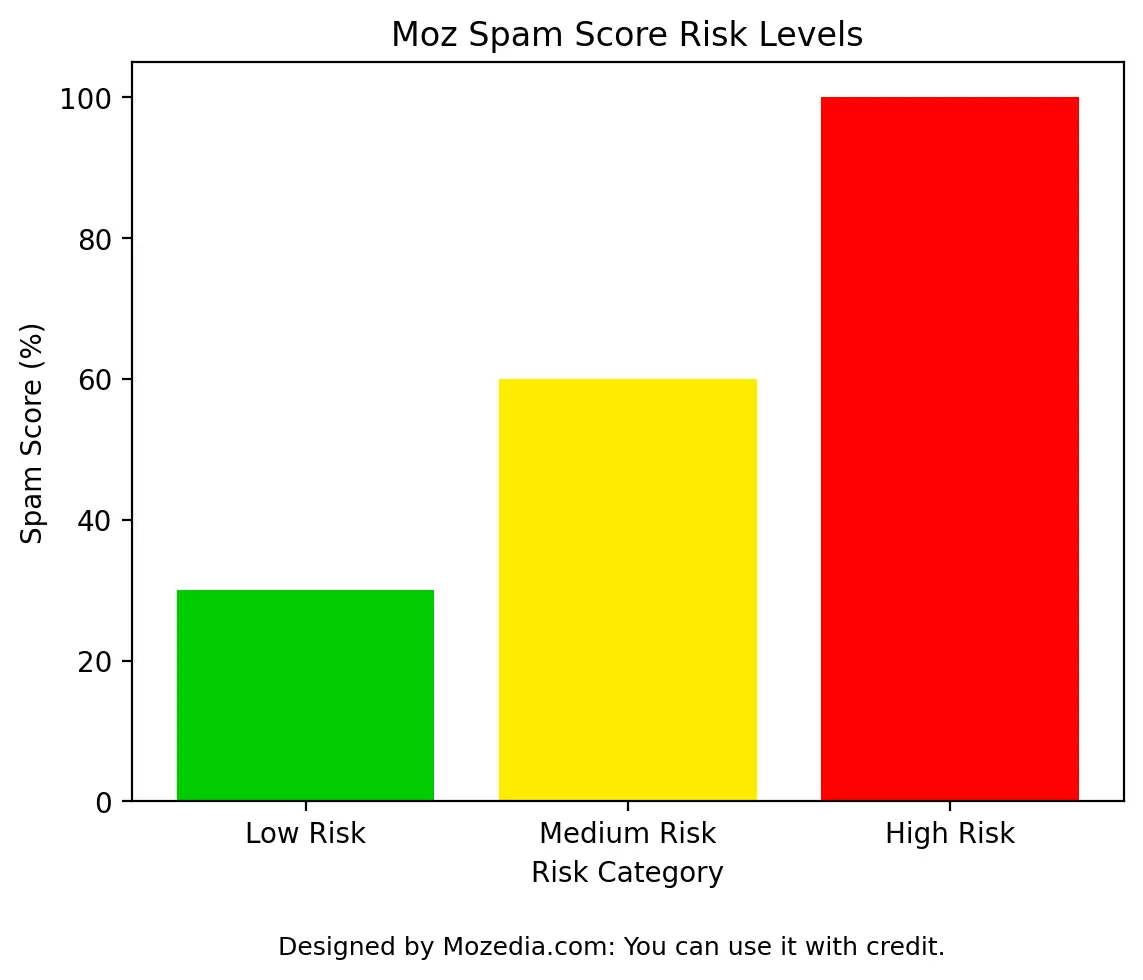
This means that a score below 30% is considered normal, and a score above 60% is considered dangerous. That’s clear.
How to See Reason for Moz Spam Score?
To find out Moz spam score reasons you have to use the Moz Link Explorer, but for this you have to create a free account, through which you can do 10 SEO queries for free.
- Select spam score section and enter your domain URL.
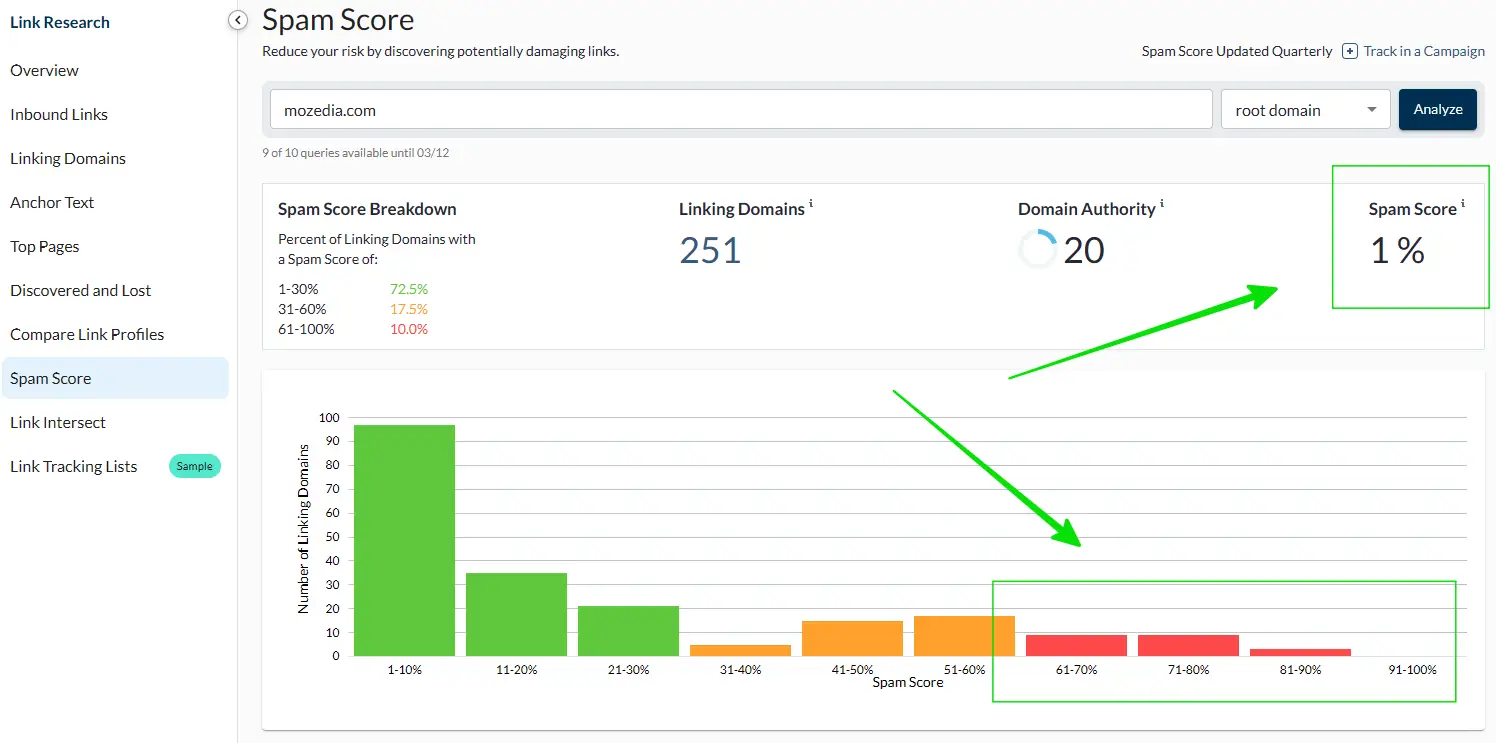
Now here you will find some bad backlinks with red flags due to which the spam score of your domain has increased, you can reduce spam score by removing them.
How to Check Website Spam Score (Step-by-Step Guide)
It’s important to check your spam score regularly so you can identify red flags early. You can check your spam score using several tools.
Different tools analyze from different perspectives, so it’s best to use more than one.
1. How to Test Spam Score in Moz?
The most reliable way to find out the spam score is Moz. You can view the spam score, domain authority, and link quality by entering the URL into Moz Link Explorer.
The Moz tool shows you a link profile and risk indicators. A high spam score is often due to:
- Low-quality backlinks
- Links from questionable websites
- Low-trust pages
- Excessively keyword-rich anchor text
You can check your website’s spam score with Moz’s own domain authority checker tool, this method is free and does not require signup.
- Simply, go to Moz domain authority checker tool
- Enter your domain and and hit the Check DA button
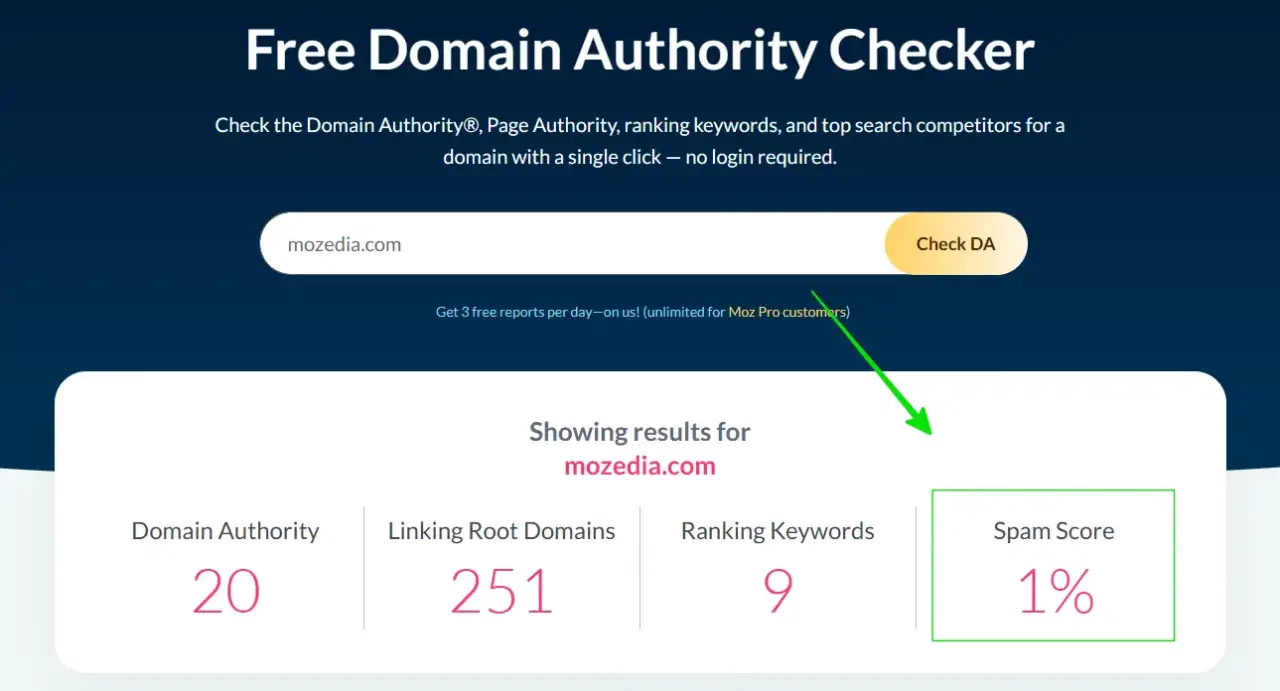
Here you can see your site’s domain authority, linking root domains, keyword ranking and spam score, I have highlighted the spam score.
2. How to Analyze Spam Risk on Ahrefs
Ahrefs is another powerful SEO tool that provides detailed information about backlinks and domains, but it doesn’t provide a specific spam score metric like Moz.
However, Ahrefs offers a toxic backlinks report that are just as useful. Enter your domain into Ahrefs’ site explorer and go to the Backlink Profile section.
Here you’ll find a list of unhealthy or suspicious backlinks.
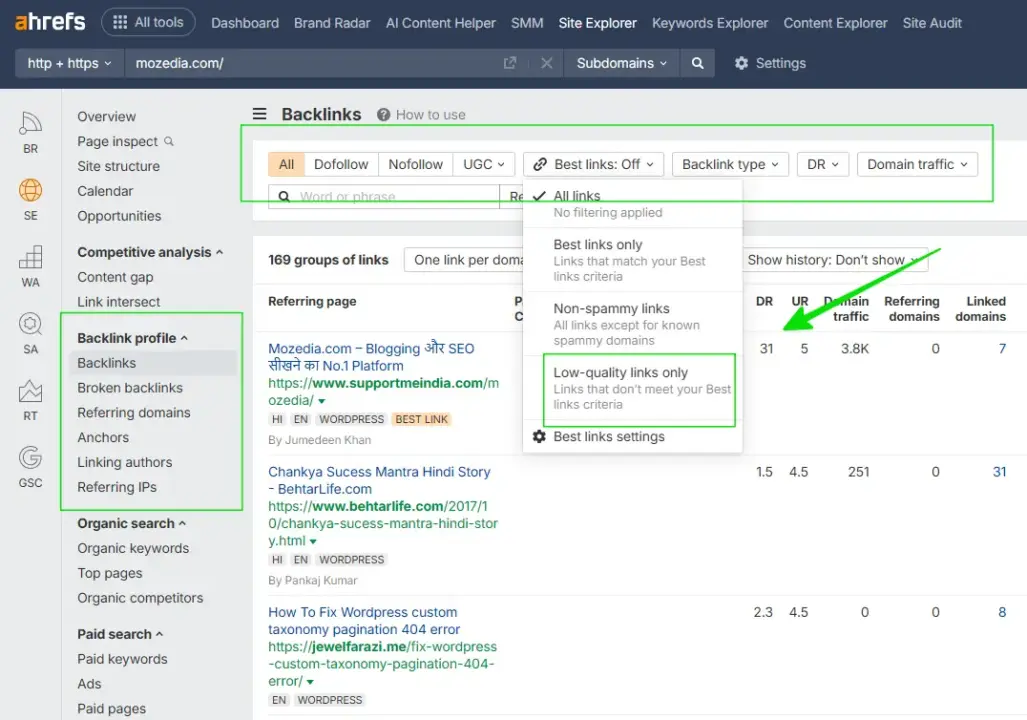
This includes analyzing the backlinks report and identifying potential spam scores by focusing on low domain ratings (DR), poor anchor text, and excessive, low-quality referring domains.
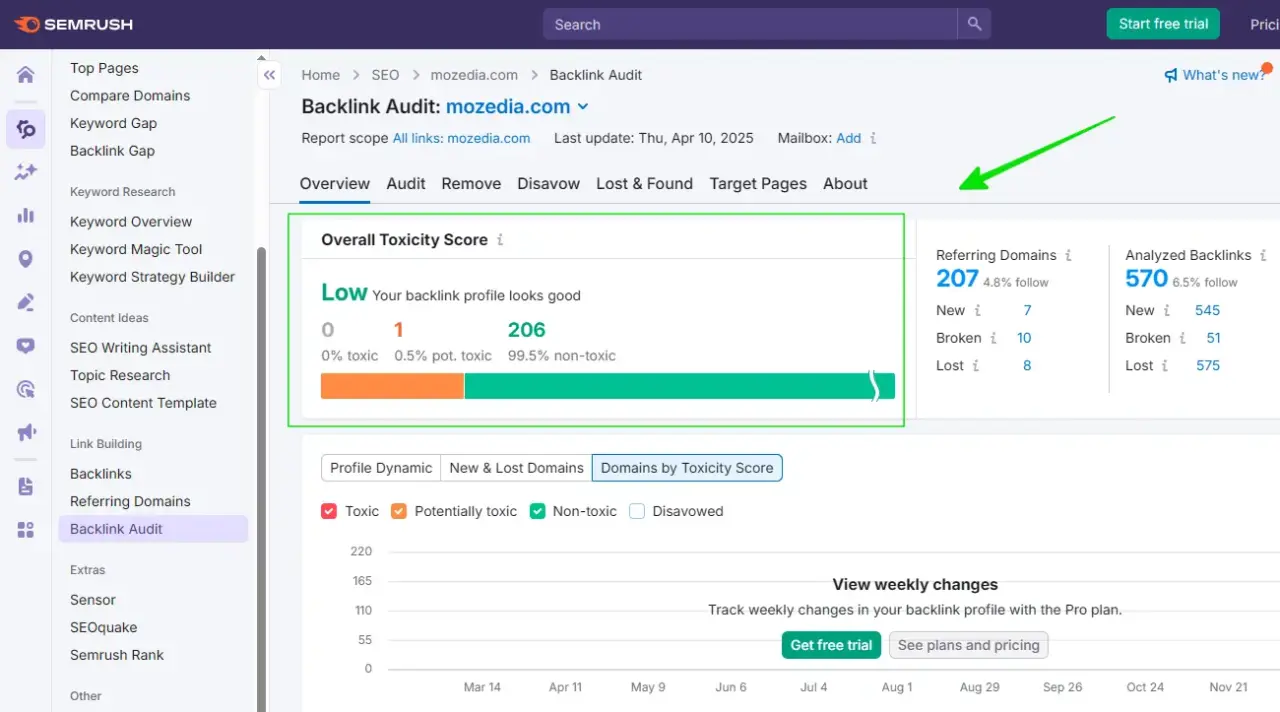
3. How to See Toxic Links In Semrush
In Semrush, you can use the backlink audit tool to analyze toxic backlinks, or evaluate any domain spam score factors using the Authority Score metric.
The overall toxicity score in a backlink audit identifies harmful links, while the authority score considers unnatural link profiles such as spam signals.
Natural backlinks grow gradually over time, not overnight. Here is the steps to check the Spam Score/Toxicity in Semrush:
- Go to the Semrush dashboard and enter your domain
- Select the Backlink Audit menu in the left sidebar
- Now, view and analyze backlinks (low, medium, and high)
4. Using GSC (Export Links)
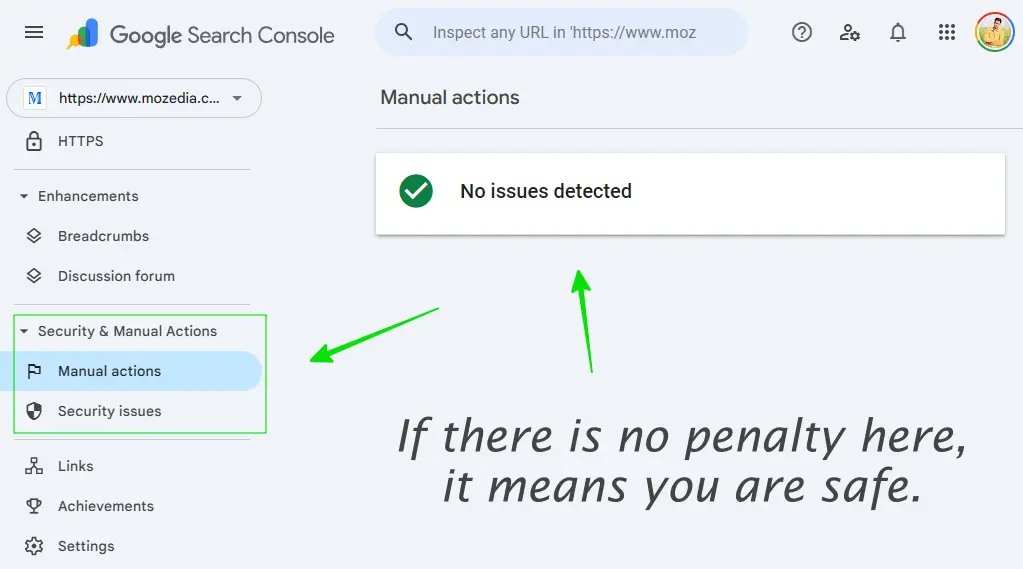
Google Search Console is a valuable and authoritative tool. You can check the Manual Actions section to see if Google has taken any action against your website.
If you don’t receive any penalties here, your website is safe. However, if you see any manual actions here, it could be a serious matter.
5. Using Other ThirdParty Tools
There are also some third-party tools that provide spam scores, such as SmallSEOTools, Ubersuggest, and some other SEO tools that also provide spam metrics.
Although less reliable, these tools provide a free, simple analysis of your domain’s backlink profile, indicators like domain authority, and potential spam signals.
In our opinion, always remember, a spam score doesn’t mean your site is definitely spammy, and the best way is to use multiple tools to get the right report.
20 Best & Proven Ways to Reduce Spam Score of the Website in 2026
Reducing a website’s spam score is a gradual process, it isn’t a one-day task. It requires cleaning up toxic backlinks, improving content quality, and fixing technical SEO issues.
The methods below are practical and have long-lasting effects. Read each method carefully and implement them one by one on your website.
Be patient and use the right approach. If you adopt the right strategy, you may start seeing improvements within a few weeks.
Key Strategies to Lower Spam Score:
1) Clean Up Backlinks
The first and best way to reduce your spam score is to clean up your website’s backlinks, just like you would clean up trash from your room or house.
1. Audit Backlinks
A backlink audit means thoroughly examining all the links coming to your website. Analyze your entire link profile and identify suspicious, useless, and low-quality links.
Open your website’s backlink profile in a tool like Ahrefs, Semrush, or Moz. Pull out a list of all referring domains and see which ones are providing links.
In many cases, a sudden spike in backlinks within a short period is a clear signal of unnatural link building and should be reviewed carefully.
- Check the domain rating, spam score, and trust flow to identify bad domains.
- Links from domains that are actually spammy
- or contain inappropriate content are detrimental to you.
Create a spreadsheet where you can note down all your backlinks to make them easier to follow, as we’re going to remove or disavow them.
You can also learn how to increase domain authority naturally while cleaning backlinks.
2. Remove Toxic & Spam Backlinks
Once you’ve identified spammy links, contact the website’s webmaster and request that they remove your link from their website.
Whenever possible, contact the website owner to have the harmful link removed. Visit their contact page and send a clear message. Include your URL, the link’s URL, and the reason for removing the link.
This method often works, especially if your website is active. It’s time consuming, but it’s the first and most effective step.
3. Disavow Harmful Backlinks
When link removal requests don’t work or the website itself is inactive, use the Google Disavow Tool; this is the best method in this case.
- First, go to Search Console tool
- Select your website you want to analyze
- Then click on the Links in left sidebar
- Now, download external links via top right
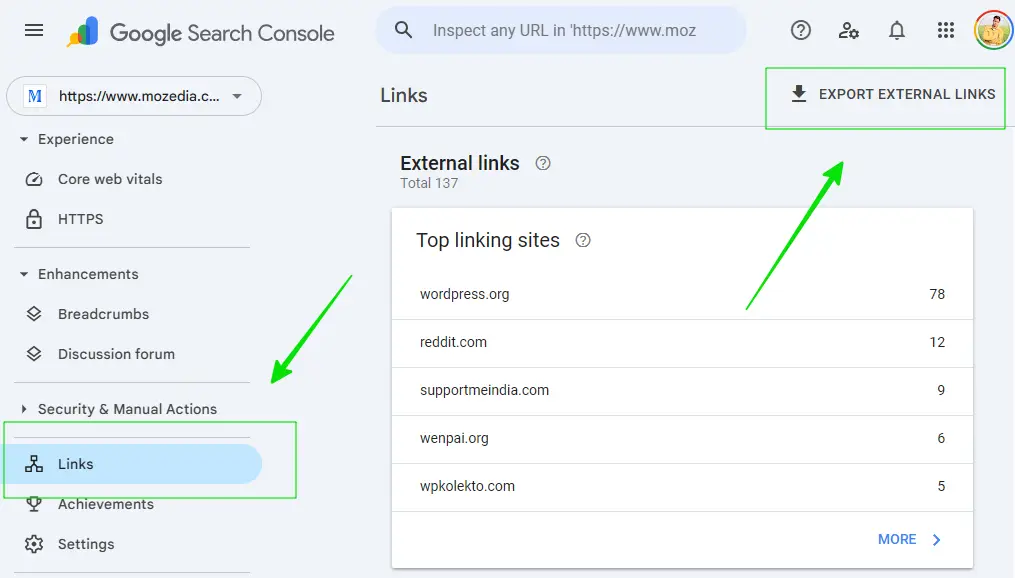
After downloading your website’s links, identify bad backlinks manually and create a simple text file containing the domains or URLs you want to disavow.
If there are too many links, it will be difficult to review them manually, for this you can use backlink audit tools like Moz, Semrush and Ahrefs etc.
You need to write something like this for one domain on a single line: domain:example.com. and repeat this for all domains.
Your format should look something like this:
# Pages to disavow
http://example.com/sample-page/
http://example.com/blog/sample-page/

# Domains to disavow
domain:example.com
domain:example2.com

# Sub domain to disavow
blog.example.com
Then upload this file to the Google Disavow Tool. Remember that it may take a few weeks for Google to process this information, so you’ll need to wait 1-2 weeks.
Note: Use the Disavow Tool only if you are absolutely sure that the link is harmful because disavowing a wrong link can also harm your website.
Google recommends using the disavow tool cautiously in its official documentation. For more info, read Google’s official guidelines on Disavow links.
4. Avoid Link Schemes
Avoid cheap backlink packages, PBN networks, and paid link schemes. Some people resort to link schemes like link farms, PBNs, link exchange programs, or buying paid links to get backlinks quickly.
All of these are against Google’s policies. If Google discovers you’re using these methods, they may penalize your website and increase your spam score.
Some sites try shortcuts, but as explained in rank without backlinks, long-term SEO success comes from trust and quality of content.
Therefore, always try to get links through natural, organic means and only from websites that match the quality of your website’s content.
2) Improve Content Quality
Now the second most important thing to reduce spam score is to improve the content quality, this includes avoiding keyword stuffing and updating old content.
Let us understand everything a little better:
5. Quality Content
High-quality content is content that provides genuine answers to readers’ questions. Review any articles or pages on your website and consider whether they provide genuine value to readers.
Content should be complete, free of unnecessary information, and the language should be simple and clear. Using real-life examples, summaries, illustrations, and videos can make content more relevant.
Search engines like Google always prefer websites that people spend a lot of time on and visit frequently, so always write for your readers.
This approach aligns with modern SEO practices explained in our guide on how SEO automation works, read this full article here.
6. Fix Thin & Duplicate Content
Thin content is content that contains very little information, such as short pages of a few lines, or pages that are created by stuffing keywords with no real value.
Duplicate content occurs when the same thing is repeated on different pages or the text is slightly changed.
Here is the examples:
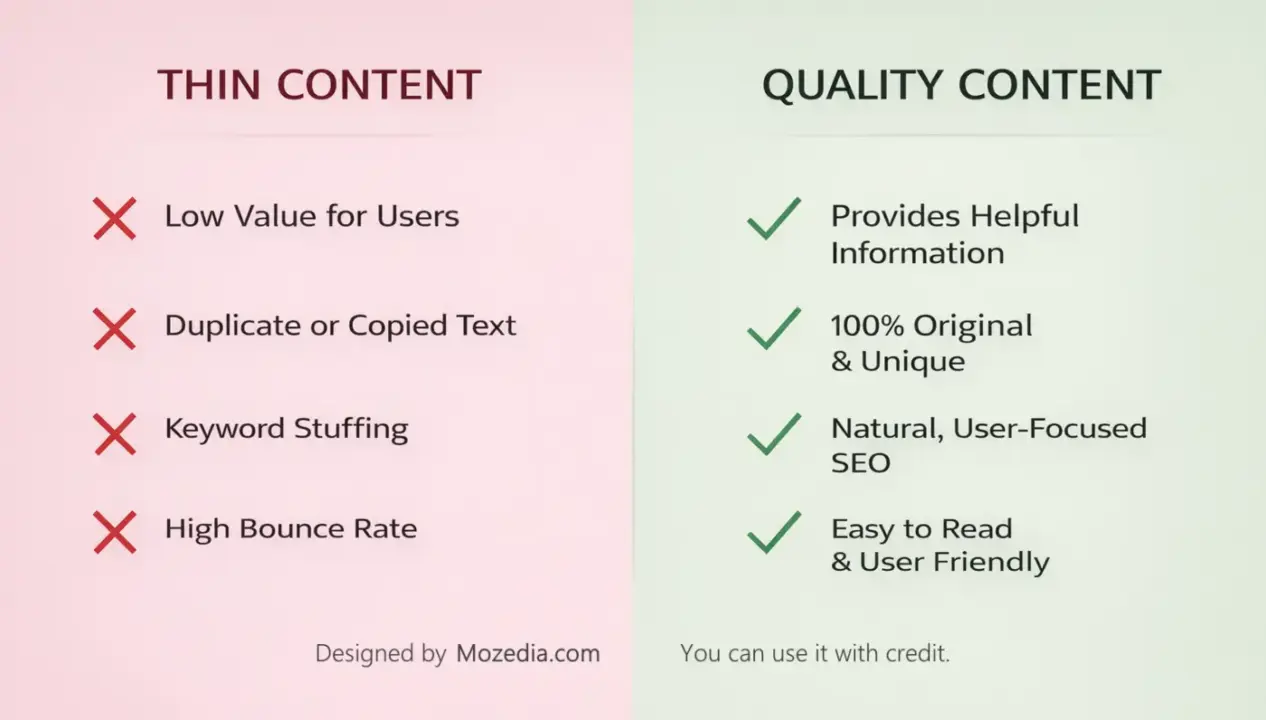
Both types of content harm your search engine ranking. Either deepen all thin content or remove it and merge it with a better page.
Use canonical tags for duplicate content or merge them. In our opinion, it’s better to delete pages or posts that don’t have any value.
7. Avoid Keyword Stuffing
Keyword stuffing is an old and harmful practice where people think that typing a word repeatedly will boost their search results for that keyword.
But forcing keywords into your article creates spam signals, and Google has become smart enough to easily detect this, thanks to the age of AI.
When you pointlessly type a keyword repeatedly, the content becomes unreadable and search engines consider it spam. Therefore, avoid targeting useless keywords.
Adopt a simple and meaningful writing style where keywords appear naturally and contain only essential content. Write content for humans, not for search engines.
8. Update Old Content
Sometimes people create their website and write content, but then never update it. It’s 2026 now, but you’ll still find content from previous years on many websites.
Articles with outdated information are not only useless to readers but also lose their ranking in search engines. No one wants to read 10+ year old content.
Make a list of all the main articles on your website and ensure they contain new and fresh content. For example, improve your 2025 content to reflect 2026.
Add new statistics, new examples, new links, and expand articles if necessary. Frequently refreshing your content helps your website maintain a high ranking in search results.
3) Build Trust (with E-E-A-T)
Google is now giving more value to the websites of big brands that have deep understanding on a topic, now without user trust your site can be considered useless.
9. Create Necessary Pages
A trustworthy website should have some clarity, create an about us page and provide complete info about yourself, and a contact page to include your contact details.
Also create a privacy policy page where you explain how you use visitor data. Some websites also require Terms and Conditions and disclaimer pages.
Having these necessary pages tells Google and others search engines that your website is associated with a genuine and responsible organization.
10. Improve Experience, Expertise, Auth, and Trust
You’ve probably heard of Google E-E-A-T. It stands for Experience, Expertise, Authenticity, and Trustworthiness. It’s a good way to reduce spam score.
Google prioritizes websites that share real experiences, have in-depth subject knowledge, have established authority in the industry, and provide trustworthy information.
Following E-E-A-T principles on your website not only improves Google rankings but also helps reduce spam score of your website.
You can do this by:
- Adding author details to your articles
- Citing authentic sources when writing content
- Writing content based on real experiences
- Maintaining site security and transparency
This is a big topic to explain briefly, you can check out Google’s Creating helpful, reliable, people-first content page for more detailed information.
11. Improve Internal Links
Internal links are those that connect one page on your website to another. As you can see in this article, I’ve included several internal links on this page.
Good internal links are a sign of a healthy website. When you reference another article in one article, you should link to it. This makes it easier for users to navigate to the corresponding page.
And good internal linking helps readers spend more time on a website and also helps search engines understand the website’s structure.
We recommend that you ensure the link is to a page that actually relates to the topic. Incorrect or forced links can be a sign of spam.
12. Secure Your Website with HTTPS
According to Data Reportal portal, over 95% of web traffic on the Internet uses Hypertext Transfer Protocol Secure, means 95% of websites are now secured with HTTPS.
This means that HTTPS is now crucial for security and data privacy. It makes websites more secure and displays with a padlock icon in the browser.
Google has made HTTPS a ranking signal. So, if your website is still running on HTTP, migrate it to HTTPS immediately.
Websites running on HTTP are now considered less trustworthy, and SSL certificates are now very cheap or even free, such as those from Let’s Encrypt.
We recommend that you immediately contact your hosting provider and have an SSL certificate installed on your website.
4) Make Technical Improvements
Website technical issues are functional, structural, or performance-related problems with a website’s backend code, server, or configuration that prevent it from functioning properly.
This often results in slow loading times, broken features, or security vulnerabilities, which can increase the likelihood of a website being considered spammy.
13. Fix Technical Issues
Technical issues include broken links, 404 error messages, excessive redirect chains, incorrect sitemap entries, incorrect robots.txt settings, and incorrect schema markup.
And search engines and users only prefer websites with better technical infrastructure. This can cause a website to appear low quality or untrustworthy.
Go to the coverage section in GSC to see what issues exist and carefully fix each review one by one. This will definitely help reduce spam score.
14. Improve Page Speed
A slow website can signal poor quality and negatively affect user experience and trust, as high-quality websites pay close attention to their hosting and technical infrastructure.
There are some important steps to improve page speed, such as:
- Compress large images
- Enable browser caching
- Minify JavaScript and CSS files
- Use a content delivery network
- Switch to a better hosting provider.
Page speed is especially important on mobile. Google’s PageSpeed Insights tool checks your website speed for free and suggests improvements.
If you use WordPress, read our article on how to speed up WordPress site. In this we have explained the complete process of improving site speed.
15. Mobile Friendly Design
Nowadays, most internet users are mobile, and Google has implemented mobile-first indexing, which means it sees the mobile version of your website first.
A fast and responsive website also depends on good hosting, which we discussed in Best WordPress Hosting article, check it out to choose the fastest hosting server.
If your website doesn’t load properly on smartphone screen, buttons are small, text is hard to read, or pages don’t load smoothly, these could all be signs of spam.
Choose a responsive design that automatically adjusts to the screen. You can use the following tools to test mobile-friendly test:
- Google Search Console: Go to Experience → Mobile Usability
- Google chrome DevTools: Right click → Inspect and Toggle device toolbar
- Google PageSpeed Insights: Complete performance report
- Lighthouse: Inspect → Lighthouse tab Mobile select Generate report
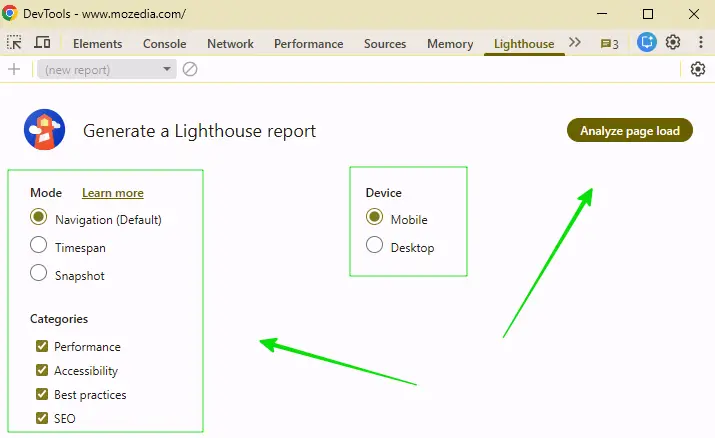
We recommend that you make sure that your site loads properly on all devices, not just mobile devices or internet browsers, such as desktop, laptop, etc.
16. Control Outbound Links
Outbound links are those that lead from your website to other websites, that is, links to websites that you link to in the content of your site.
Linking to spammy or low-quality websites reduces your website’s trustworthiness. Therefore, avoid linking to suspicious or disreputable websites.
Regularly review all external links and unlink links that have been removed or from websites that have become spammy, or replace them with new, better links.
Always add the nofollow attribute to links you don’t fully trust, such as affiliate links, sponsored links, low quality or user-generated links.
5. Site Management
Regular maintenance and monitoring are crucial to keeping your website safe from spam. A one-time fix isn’t enough; you must maintain your site periodically.
Here are the detailed steps to maintain your site properly:
17. Build High Quality Backlinks
A surefire way to reduce spam score of a website or blog is to remove bad links and also get good backlinks from reputable websites.
When you have a lot of links from trusted sources, the impact of a few bad links is diminished, so you need to focus on building quality backlinks.
To generate good backlinks, rely on guest posting, helpful content, original research, infographics, expert interviews, and creating helpful free tools.
You know that publishing helpful content also helps you get more traffic from Google Top Stories. If you have a news site then you must try this.
Always remember that one good link from a website with high domain authority is more valuable than thousands of links from low-quality websites.
18. Remove Spam Comments
If your website has a blog or commenting feature, spam comments are common. These comments often contain inappropriate links and harm both the look and status of your website.
To combat this, install an anti-spam plugin like Akismet and Forget Spam Comment. Disable automatic submission of new comments and implement moderation.
Or, use CAPTCHA or honeypot fields in comment form and delete old spam comments (those made solely to get a backlink to your site) altogether.
If the comment section is not useful to you, we recommend disabling it altogether. This will eliminate the hassle of spam comments.
19. Remove Hidden Text/Links
Hidden links and text violate Google guidelines and can be a major cause of a high spam score. In fact, these are the hallmarks of spammy sites.
Some older websites have the problem of hiding text or links from the viewer, such as white text on a white background, or links with zero font size.
This is one of the most common spam techniques and can result in a direct penalty for Google. Carefully review your website’s source code.
Remove any such text or links immediately. If a website designer has done this without your knowledge, let them know and have it fixed.
20. Monitor Backlinks
You should keep checking your backlink profile and cleaning up spam activity, this will maintain your website’s credibility and prevent spam score from increasing.
The backlink profile changes over time, and sometimes spam or suspicious websites link to your site without permission, which can automatically increase your spam risk.
Therefore, it’s very important to regularly check your backlink profile. Periodically check backlinks with tools like Moz, Ahrefs, or Semrush.
Identify new and harmful links and remove or disavow them if necessary. This practice helps maintain your website’s credibility and keep your spam score under control.
Bonus Tip: Avoid Low-Quality AI-Generated Content
A new challenge has emerged in 2026. People are rapidly receiving thousands of articles written by AI and then posting them on websites without checking them.
AI-generated content that is simply stuffed with keywords is neither accurate nor useful to users and search engines, and is considered a new form of spam.
Google increasingly prioritizes helpful, people-first content and may devalue low-quality, mass-produced AI content in future.
That’s why, we always recommend using AI as a supporting tool to help you write your quotes. You shouldn’t rely on it entirely.
Publish each article only after it has been proofread and corrected by an expert. Your content should reflect your experience, accurate examples, and genuine information.
How Long Does It Take to Reduce Spam Score?
This is one of the most frequently asked questions. The simple answer is that reducing your spam score is a gradual process, and its timing depends on many factors.
Generally, if you take the right action, improvements can be seen within 3 to 5 months, but in some cases, it can take 3 to 6 months.
For example, if the problems on your website are minor and there are only a few bad backlinks, some improvements can be seen in just 1 month.
The time also depends on the number of improvements you make and how many harmful links you remove, as it takes time for Google to reprocess those links.
The Moz spam score can take 4 to 8 weeks to update because Moz updates its database regularly. The same applies to the rest of the spam score metrics.
Most importantly, a one-time improvement isn’t enough. Our Mozedia experts recommend monitoring your website regularly.
What Spam Score is Safe for SEO?
Generally, a spam score below 30% is considered safe. Improvements should be initiated if the score is above 30, and immediate action is necessary if it exceeds 60%.
Regarding the Moz spam score, a score between 0 and 30 is considered safe. If your score is between 1 and 17, you’re in good shape.
Important note:
Keep in mind that Moz spam score alone isn’t the complete picture. Google doesn’t have its own publicly displayed number.
So, consider Semrush’s Toxicity Score, Ahrefs’ Backlink Health, and Google Search Console’s Manual Actions to get a complete assessment of your website’s health.
We recommend not relying on just one tool.
Final Conclusion
If you regularly clean your link profile, publish quality content, strengthen trust signals, and maintain technical health, your site remains secure and reliable.
However, I reiterate that a spam score only indicates a website’s credibility. It’s not a punishment or penalty, but an opportunity to improve your site.
And our advice is to avoid shortcuts and adopt natural SEO strategies for long-term success. This approach will ensure stable rankings and a trustworthy reputation for your website.
If you are new to blogging, start with our complete guide on how to start a blog.
- How to Start a Blog in 10 Easy Steps (Beginner Guide 2026)
- How I Made $10,000 with Blogging Despite AI (Real Study + Tips)
If your website’s spam score has increased, don’t panic. First, thoroughly check your backlinks and carefully implement the 20 methods in this article one by one.
Remove or disavow bad links, improve content quality, fix technical issues, and regularly monitor your website.
If you implement these methods correctly, not only will your spam score decrease, but your website’s search engine position, visitor trust, and organic traffic will also improve.
Creating a secure, reliable, and functional website is the true purpose of SEO, and we wish you the best in the future, continued the success.