
If you truly want to increase your website AdSense income, then increasing traffic isn’t enough. You need to increase Google AdSense RPM in 2026.
It’s very important, because the competition is very high, ad inventory has become smarter, and Google prioritizes user experience more than ever.
If your AdSense page RPM is low, having more traffic won’t help. Now you will only earn good money from AdSense if your RPM (Revenue Per Mille) is better.
In this guide, you will learn how to increase your Google AdSense RPM and earn more money from AdSense by using proven strategies that work even with low traffic.
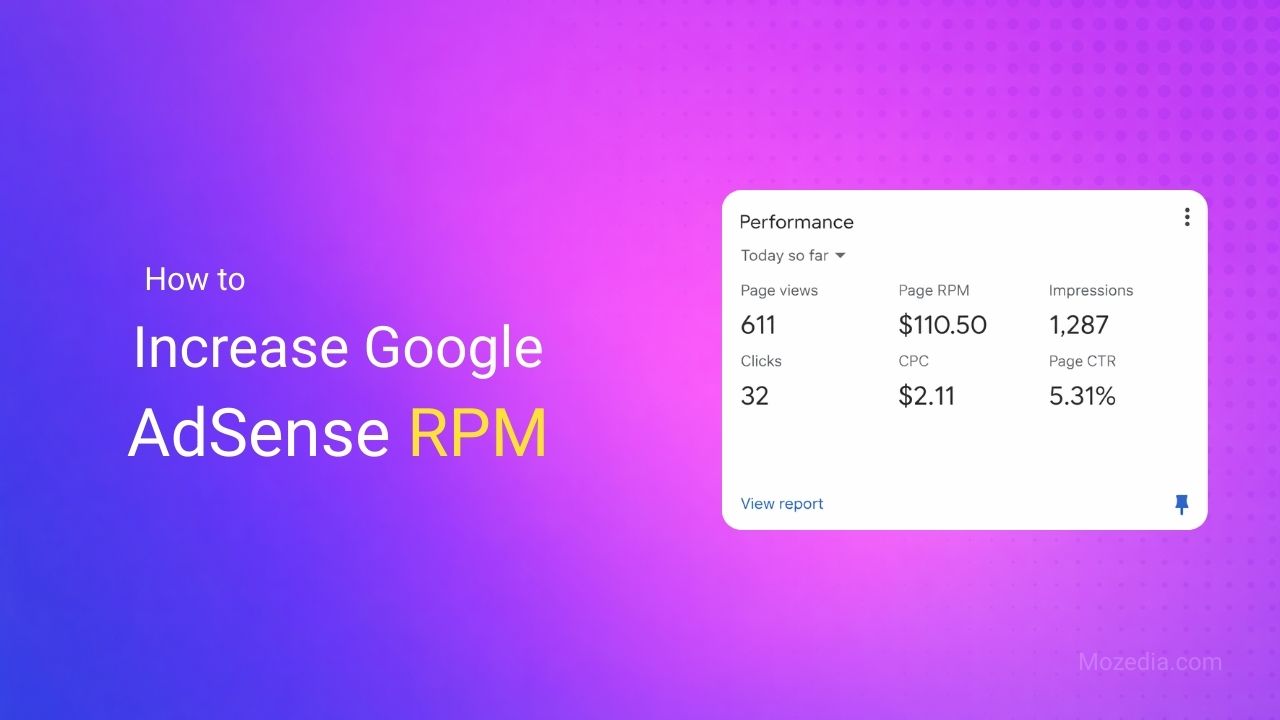
In my 10+ years of blogging career, I have seen many bloggers who only focus on website traffic and AdSense CPC, and completely ignore AdSense RPM.
They think that more pageviews will automatically lead to higher earnings, but that’s not true. The real key to your AdSense earnings is determined by AdSense RPM.
That’s why I’m writing this article, in which you will learn the following things:
- What Is AdSense RPM
- Google AdSense RPM Definition
- Why RPM Matters
- How Is Adsense RPM Calculated?
- Why Is My AdSense RPM Getting Low
- What Is Average AdSense RPM
- How to Increase AdSense RPM
- Proven Ways to Increase AdSense RPM
Although I have already written a post on increasing AdSense earnings, this article is specifically about increasing AdSense RPM.
If you’re still unsure whether AdSense is the right monetization model for you, this guide on whether Google AdSense is worth it will give you clarity.
- What Is Google AdSense RPM?
- Why AdSense RPM Important?
- 24 Proven Ways to Increase Google AdSense RPM in 2026
- 1. Choose a High RPM Niche
- 2. Target High CPC Keywords
- 3. Target High-Paying Regions
- 4. Improve Content Quality
- 5. Strengthen Your SEO
- 6. Increase Targeted Traffic
- 7. Avoid Low-Quality Traffic
- 8. Improve Website Speed
- 9. Improve User Experience
- 10. Improve Internal Linking
- 11. Use Responsive Ad Units
- 12. Optimize Ad Placement
- 13. Limit the Number of Ads
- 14. Use Auto Ads Wisely
- 15. Use Manual Ads Strategically
- 16. A/B Test Your Ad Settings
- 17. Use AdSense Experiments
- 18. Block Low-Paying Categories
- 19. Track RPM by Page
- 20. Analyze Advertiser Competition
- 21. Monitor Seasonal Trends
- 22. Follow AdSense Policies
- 23. Use Alternative Monetization Methods
- 24. Regularly Update Your Content
- What are the Main Factors that Affect AdSense RPM?
- How Much Google Adsense RPM is Considered Good?
- Why does Page RPM change?
- Frequently Asked Questions (FAQs)
- Conclusion
What Is Google AdSense RPM?
In AdSense, RPM stands for Revenue Per Mille/Thousand, which is your estimated earnings for every 1,000 impressions (ad views or page views).
It shows how much you’ll earn for every thousand times your ads are viewed, helping you compare performance across different channels.
How Is Adsense RPM Calculated?
AdSense Page RPM is calculated by dividing your estimated earnings by the number of page views received, and then multiplying by 1000.
AdSense RPM Formula:
- Page RPM = (Estimated earnings / Number of page views) * 1000
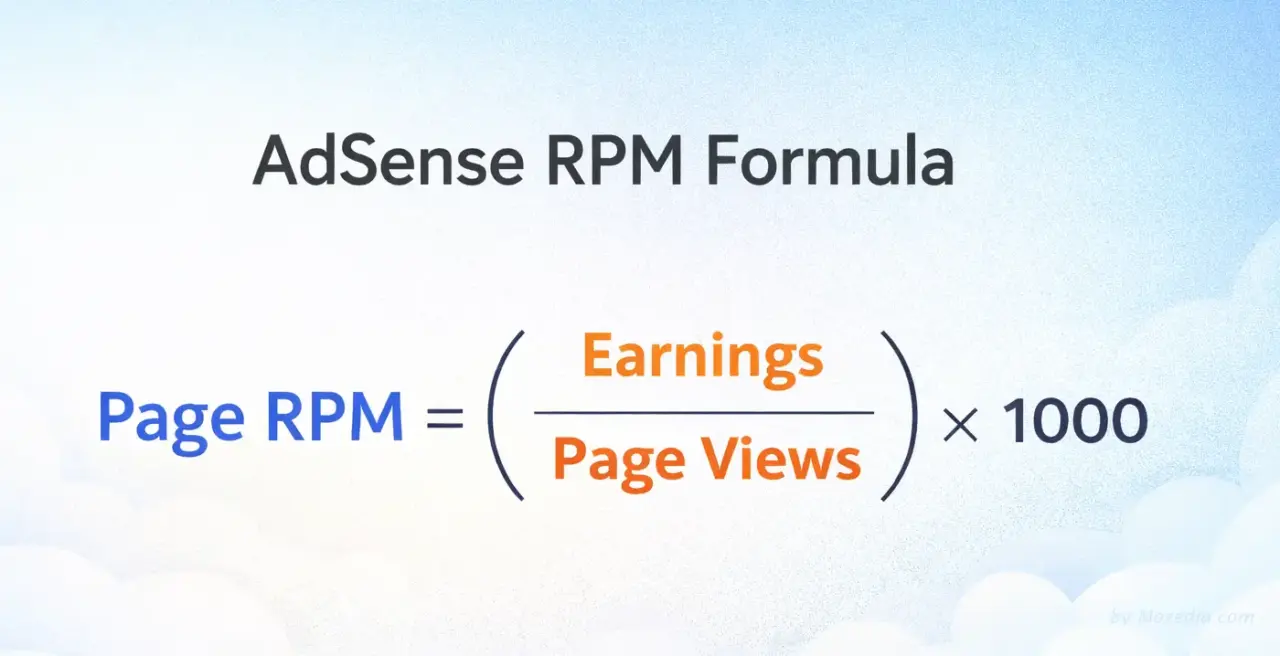
This means that if you earned an estimated $0.25 from 50 page views, your Page RPM would be ($0.25 / 50) * 1000, or $5.00.
This is an important metric for understanding your site’s monetization effectiveness, although it is an estimate and not your actual payout.
Why AdSense RPM Important?
AdSense RPM is important because it allows for higher earnings even with low traffic, you can improve ad placement, and advertisers value your site more.
This provides publishers with the necessary data to improve their monetization strategy, identify the types of content that attract targeted traffic and high-paying advertisers.
A professional blogger’s goal is always to increase AdSense RPM, not just traffic. If you also want to earn more money from AdSense, you should do the same.
Why Is My AdSense RPM Getting Low?
There are several reasons for low AdSense RPM, including low-paying ads, advertiser demand, low-quality content or low-value traffic, and poor ad placement.
Low-paying niche content, below-the-fold ads, a low click-through rate (CTR), or a high volume of traffic from developing countries can also lower your RPM.
If ads are not clearly visible to users (below the fold) on your website, earnings will remain low even with a high number of impressions.
Furthermore, if the CTR is low (users aren’t clicking on the ads), or if the site is generally displaying low-value ads, the overall AdSense RPM will naturally be lower.
24 Proven Ways to Increase Google AdSense RPM in 2026
There are several ways to increase Google AdSense RPM, such as focusing on attracting high-CPC, organic traffic from top-tier countries (US, UK, Canada), and optimizing ad placement.
Improving session duration by increasing content depth and implementing auto ads, using responsive units, and blocking low-paying ad categories also increases RPM.
Here are some strategies I’ve tried to increase my AdSense RPM:
1. Choose a High RPM Niche
Niches like Finance, Insurance, Real Estate, and Technology have very high CPC and RPM because advertisers earn millions from a single customer in these niches.
Niche selection has the biggest impact on your AdSense RPM, so avoid low-CPC niches like entertainment, gossip, recipes, and gaming where the RPM is very low.
If you are already in an existing niche, identify the high-paying topics within that niche and create more content on those topics.
If you’re confused about niche selection, this guide on how to find a profitable blogging niche will help you avoid low-RPM topics.
2. Target High CPC Keywords
Keywords with commercial intent automatically attract high-CPC ads. Target keywords with modifiers like top, best, review, comparison, buy, and sell.
Check CPC data using Google Keyword Planner and create detailed content around profitable keywords, as long-tail keywords that indicate buying intent are the most profitable.
Prioritize transactional and commercial keywords over informational keywords. You can use our keyword generator tool to find high-CPC and commercial-intent keywords.
3. Target High-Paying Regions
Not all countries’ traffic is of equal value. Traffic from the US, UK, Canada, Australia, and Western European countries generates the highest RPM.
If you are writing in English, focus on topics that attract the NRI (Non-Resident Indian) audience, such as immigration, foreign education, international jobs, and overseas investments.
Use geographic targeting in your SEO strategy to ensure your content ranks in these countries.
4. Improve Content Quality
High-quality, well-researched content not only ranks better in Google search, but also attracts premium advertisers.
Therefore, conduct research, analyze case studies, expert opinions, and detailed guides and create original content, also avoid grammar and spelling mistakes.
Add visual elements such as images, videos, infographics, and charts, because quality content means content that genuinely solves the user’s problem.
5. Strengthen Your SEO
Strong SEO increases organic traffic, which is more valuable than paid traffic. Optimize your on-page SEO – use a proper heading structure, meta descriptions, and alt tags.
Focus on technical SEO – submit your sitemap and optimize your robots.txt file. Build quality backlinks.
Make your site responsive for mobile-first indexing and optimize your theme structure for SEO. Also, implement schema markup.
Proper on-page SEO is essential. If you’re using WordPress, follow this step-by-step guide on setting up the Yoast SEO plugin.
6. Increase Targeted Traffic
Instead of random traffic, focus on targeted traffic that is relevant to your niche. Drive quality traffic through social media marketing, email marketing, and content marketing.
Understand search intent and create content accordingly.
Identify referral traffic sources that generate high revenue per thousand impressions (RPM) and try to attract more traffic from those sources.
7. Avoid Low-Quality Traffic
Avoid bot traffic, spam referrals, and incentivized clicks, as these drastically reduce your AdSense RPM, leading to a significant drop in AdSense income.
Regularly monitor traffic sources in Google Analytics and immediately block any suspicious traffic sources.
Stay away from click farms and traffic exchange programs. Do not click on your own ads and focus only on organic and genuine traffic.
8. Improve Website Speed
Faster loading websites are given preference in Google Ad Exchange. Pages that load quickly display ads faster and receive more clicks.
- Compress images, use the WebP format.
- Use high-quality, fast hosting.
- Minimize CSS/JavaScript files.
- Enable browser caching.
- Use a CDN (Content Delivery Network).
- Optimize Core Web Vitals, focusing on LCP, FID, and CLS.
If your website loads slowly, your RPM will suffer.
Follow this complete guide on website speed optimization. You should also implement lazy loading in WordPress to reduce page load time.
9. Improve User Experience
A better user experience increases session duration and reduces the bounce rate, so use a clean and professional design.
Keep your website’s navigation simple and avoid or minimize the use of numerous pop-ups and intrusive elements.
Use readable fonts and proper spacing in your site design. Prioritize the mobile experience and create fast-loading and clutter-free pages.
10. Improve Internal Linking
A strong internal linking strategy encourages users to visit more pages, which leads to more ad impressions.
Therefore, keep the related posts section prominent. Add contextual links within the content so that users can easily navigate from one page to another.
Create pillar pages and topic clusters on your website. Always use breadcrumbs and include relevant links in the footer and sidebar.
11. Use Responsive Ad Units
Responsive ads on your website automatically adjust to the device and screen size and perform better than fixed-size advertisements.
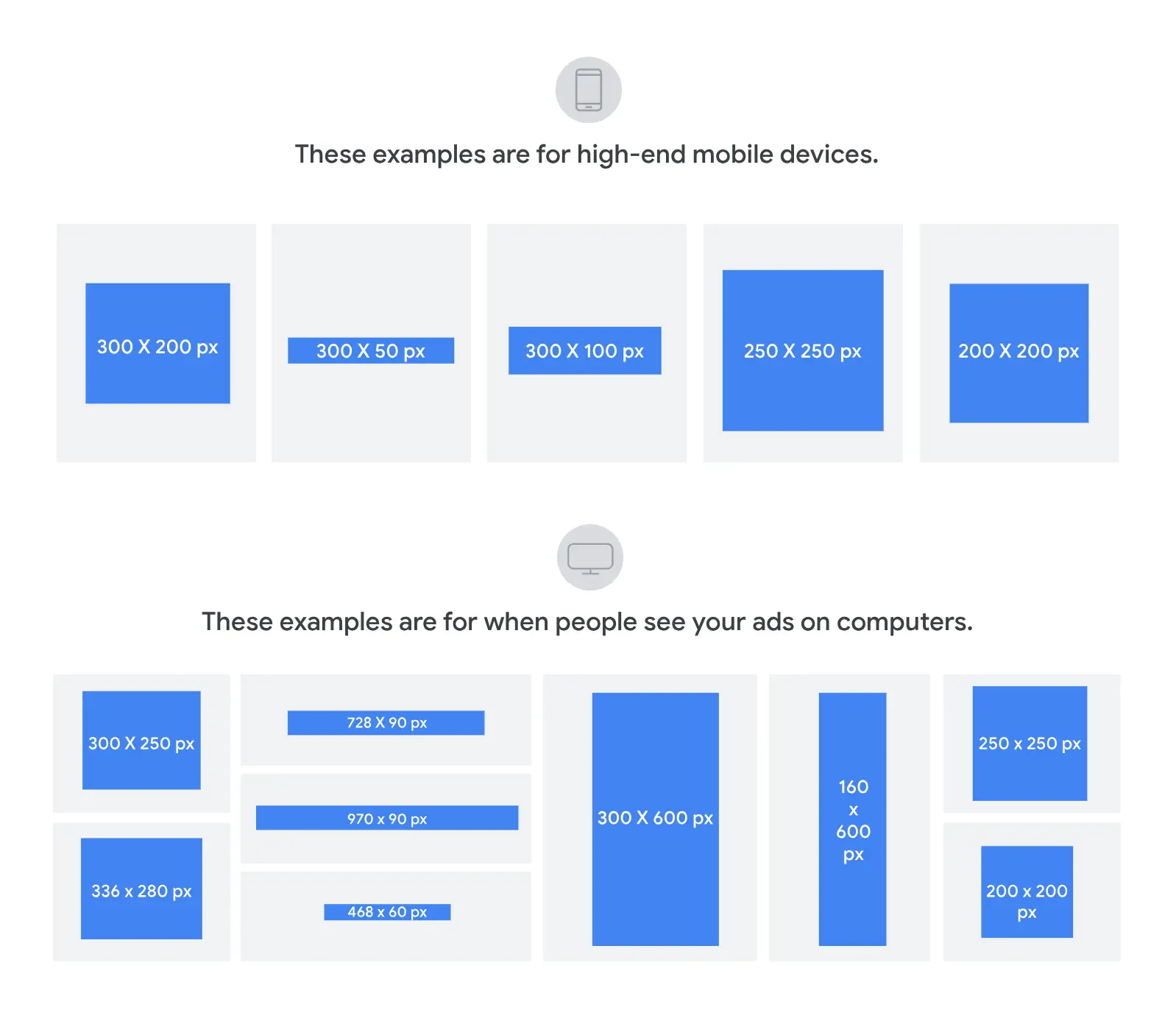
My personal advice is that if you are new and don’t have much knowledge of AdSense, use responsive units instead of fixed-size ads.
Because Google automatically chooses the best-performing size, you don’t need to do anything manually. This is an ideal solution for both mobile and desktop devices.
12. Optimize Ad Placement
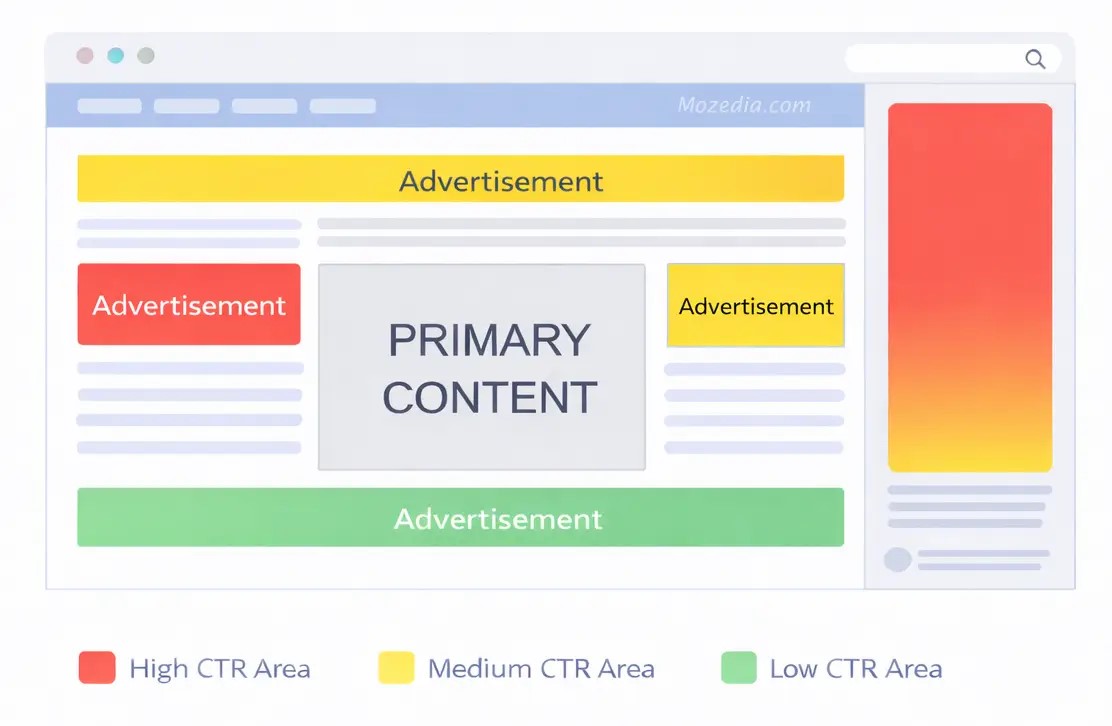
To improve AdSense RPM, proper ad placement is crucial, as strategic ad placement significantly improves AdSense page RPM (Revenue Per Mille).
Place one ad after the first paragraph, insert in-content ads after every 3-4 paragraphs, and place an ad at the end of the article.
At least one ad should be visible above the fold. 300×600 or 160×600 vertical ads in the sidebar are effective for desktop.
You can also use the AdSense heatmap to find out where users are spending the most time on your page and optimize your ad placements accordingly.
Before changing ad placement, estimate potential earnings using our AdSense revenue calculator.
13. Limit the Number of Ads
Having too many ads on your website pages can ruin the user experience and may even violate Google publisher policies.
I recommend maintaining a healthy content-to-ad ratio and placing only 3-5 ads per page, which is ideal depending on the content length.
Remember, excessive ad density decreases CTR and negatively impacts RPM, so prioritize quality over quantity.
14. Use Auto Ads Wisely
Google Auto Ads uses machine learning to identify the best positions, but you don’t need to use all of its formats right away.
Use Auto Ads, but don’t enable everything at once. Instead, enable features gradually, such as anchor ads first, then in-article ads.
Also, monitor performance regularly and adjust settings based on the results. Manual control might be better for some pages.
15. Use Manual Ads Strategically
Identify high-performing positions and place ads manually there. This is a method I’ve tried myself, and it can double your AdSense earnings.
My advice to you is to strategically place manual ads on important pages and high-traffic pages where you want complete control.
With manual ads, you can control the exact placement, size, and type of ads. You can achieve the best results by combining manual ads with auto ads.
16. A/B Test Your Ad Settings
Test different ad placements, sizes, and colors. Change only one variable at a time and collect data for at least 2-3 weeks.
After this 2-3 week period, carefully analyze the results statistically and implement the best-performing configuration.
Continue testing regularly, as user behavior and market conditions are constantly changing.
17. Use AdSense Experiments
Google AdSense’s built-in experiments feature allows you to conduct scientific tests, which you can find in the optimization section.
In this feature, the control group and variant group are automatically divided, and statistically significant results are provided.
With AdSense’s official Experiments, risk-free testing is possible. Test different ad densities, placements, and formats.
18. Block Low-Paying Categories
You can also increase your AdSense RPM by blocking categories like dating, get-rich-quick schemes, and low-quality apps in AdSense.
Regularly check the “Allow & block ads” section to see which advertisers are paying less, and block those with very low CPC (cost per click).
However, don’t block too many categories, as excessive blocking can reduce your fill rate. Maintain a balanced approach and review your settings on a monthly basis.
19. Track RPM by Page
Track the RPM of individual pages on your website or blog and identify which posts and pages are performing best.
Replicate the strategy of these high-performing pages (those with high RPM) on other low-performing pages.
Improve low-performing pages or change their ad settings, and identify patterns from page-level data.
20. Analyze Advertiser Competition
Regularly monitor advertiser competition in your niche and identify niches, topics, and keywords with high competition.
Track advertiser activity during seasonal changes throughout the year and gain market insights from Google Trends and industry reports.
Create more content on topics with high competition, but also make sure to choose keywords that don’t already have a large amount of existing content.
21. Monitor Seasonal Trends
CPC and RPM naturally increase during certain months of the year. For example, advertisers bid aggressively during the holiday shopping season in November-December.
Similarly, finance content performs better during tax season, and education content performs better during the back-to-school season.
Identify these trends and plan relevant content in advance. Focus on content with high-CPC keywords during periods when AdSense pays more.
22. Follow AdSense Policies
Based on my personal experience, I advise you to always strictly follow Google’s policies, otherwise your account may be suspended.
Do not click on your own ads and avoid invalid clicks. Follow the content guidelines and do not post adult, violent, or hateful content.
Also, avoid copyright infringement. Check for regular policy updates, as policy violations not only put your account at risk but also lower your RPM.
If you’re new to AdSense or worried about policy violations, read this complete guide on how to apply for Google AdSense correctly.
23. Use Alternative Monetization Methods
If your AdSense RPM is consistently low, you should consider AdSense alternatives for better monetization. You can try affiliate marketing, sponsored posts, and sell digital products.
Create multiple income streams for your website. However, be careful that too many monetization methods don’t negatively impact the user experience.
Also, choose monetization methods that are compatible with AdSense; otherwise, your AdSense account could be suspended.
You can also explore other income streams explained in our guide on how to make money blogging.
24. Regularly Update Your Content
Neither visitors nor advertisers like old content, because users leave the page as soon as they see such content, meaning no ad clicks and wasted impressions.
Always update your old content regularly, replace outdated information, add new sections, and fix broken links.
Fresh content signals to Google that your site is active. Updated content ranks better and attracts premium advertisers.
Therefore, conduct a content audit on a quarterly basis.
What are the Main Factors that Affect AdSense RPM?
AdSense RPM is not a fixed or constant metric. It constantly changes depending on the time, traffic, and quality of the website.
Sometimes the traffic remains the same, but the RPM fluctuates – this is due to the factors mentioned below.
Main factors affecting AdSense RPM:
1. CPC (Cost Per Click)
CPC refers to the price paid per click. If advertisers in your niche are willing to pay more, the value of each click increases. The higher the CPC, the better the RPM.
2. CTR (Click-Through Rate)
CTR indicates the percentage of visitors who click on your ads. If a higher percentage of 100 visitors click on the ad, your total earnings increase, which directly impacts the RPM.
3. Traffic Quality
Not all traffic is created equal. Traffic from search engines is usually more targeted, so its RPM is higher compared to social media or referral traffic.
4. User Location (Audience Country)
The country from which visitors are coming plays a significant role in RPM. Advertisers in countries like the USA, UK, Canada, and Australia spend larger budgets, so the RPM in these countries is many times higher than in countries like India.
5. Website Niche
Niches like Finance, Insurance, and Hosting have higher advertiser competition, so their RPM is significantly higher than niches with Entertainment, Shayari, or General content.
How Much Google Adsense RPM is Considered Good?
Google AdSense RPM is not a fixed number. It depends on your website niche, traffic source, geographic location, and content quality.
However, if we look at a general benchmark, it will be easy to understand whether your AdSense RPM is good or not.
1. Average RPM by Niche
Every niche has its own RPM range, which depends on the demand and competition among advertisers in that niche.
Understanding the average RPM for your niche is crucial so you can set realistic expectations and accurately measure your performance.
A) High-Paying Niches
In Finance, Insurance, Legal, and Real Estate niches, an RPM of $15 to $50 is considered very good.
In some premium niches, it can even go up to $100. For Indian traffic, an RPM of Rs. 500 to Rs. 2000 in these niches is excellent.
B) Medium-Paying Niches
In Technology, Business, Digital Marketing, and Education niches, an RPM of $5 to $15 is considered decent. For Indian traffic, an RPM of Rs. 200 to Rs. 500 is good.
C) Low-Paying Niches
In Entertainment, Gaming, Recipes, and General News niches, an RPM of $1 to $5 is normal. For Indian traffic, an RPM of Rs. 50 to Rs. 200 is average.
2. Average RPM by Geo Location
Geographic location has the biggest impact on your AdSense RPM because the buying power of advertisers and the level of competition vary greatly in different countries.
A) Tier 1 Countries (US, UK, Canada, Australia)
For traffic from these countries, an RPM of $10 to $30 is considered good. In premium niches, it can go up to $50+.
B) Tier 2 Countries (Western Europe, Singapore, UAE)
For these countries, an RPM of $5 to $15 is decent.
C) Tier 3 Countries (India, Pakistan, Bangladesh, Philippines)
For Indian traffic, an RPM of Rs. 100 to Rs. 300 (approximately $1.2 to $3.5) is considered good. If your RPM is Rs. 500+, it is excellent.
3. Average RPM by Website Type
Niche authority sites that focus on a specific topic generate better RPMs than general blogs because their targeted audience attracts premium advertisers.
The type of your website and your content strategy also significantly affect your RPM.
A) Niche Authority Sites
If your site is focused on a specific niche and provides quality content, you should aim for an RPM of $8 to $25.
B) General Blogs
For multi-topic blogs, an RPM of $3 to $10 is realistic. News Websites:
For news sites, an RPM of $2 to $8 is the normal range because while they receive a lot of traffic, engagement is lower.
C) Tutorial/How-To Sites
Users are more engaged on these sites, so an RPM of $5 to $20 is considered good.
4. Benchmark Your AdSense RPM?
You shouldn’t just compare your RPM to others. Instead, compare it to your data from previous months. If your RPM is increasing gradually each month, you’re on the right track.
1. Realistic Expectations
New bloggers get a lower RPM initially, which is very normal. An RPM of $1 to $3 in the first 6 months is acceptable.
As your site’s authority grows, content improves, and SEO strengthens, your RPM will automatically increase.
2. Month-over-Month Growth
Target a 5-10% growth in your RPM every month. This is sustainable and achievable. Your RPM won’t double overnight, but consistent improvements will show a significant difference in 6-12 months.
5. When Is Your RPM Too Low?
If your RPM is consistently below $0.50, it’s serious. This means either your niche is very low-paying, or the traffic quality is poor, or ad placement is not optimized, or there are policy violations.
If your RPM suddenly drops by 50% or more, investigate immediately. This could be a sign of invalid traffic, a policy violation, or a technical issue.
Industry Average AdSense RPM
The average RPM for professional bloggers and publishers globally is between $5 and $15. If you’re in this range, you’re at the industry average. An RPM of $20+ falls into the elite category.
Remember that RPM is just one metric. Your total earnings matter. Sometimes, having more traffic with a lower RPM can be better than less traffic with a higher RPM.
Ideally, you should optimize both.
Why does Page RPM change?
Many bloggers get frustrated when their AdSense RPM fluctuates daily or monthly. It’s important to understand that RPM is an estimated metric, and its fluctuations are completely normal.
Daily changes in RPM are natural because it depends on multiple factors such as advertiser demand, seasonal trends, traffic source, geographic location, and content type.
RPM typically peaks during the holiday season in November-December and is lower in January-February. Similarly, RPM is usually higher on weekdays and drops on weekends.
As a publisher, you should focus on monthly and quarterly trends rather than daily metrics. Any changes you implement take at least 2-4 weeks to show an effect, so be patient.
Also, don’t rely solely on RPM; analyze it in conjunction with other metrics like CTR, CPC, page views, session duration, and total earnings.
Continuously experiment and make data-driven decisions to achieve sustainable RPM growth in the long term.
Frequently Asked Questions (FAQs)
Beginner bloggers who use AdSense on their websites often have many questions about Google AdSense RPM, which can leave them confused.
Below, I’ve answered some of the most common questions that will help you better understand and optimize your AdSense RPM.
What does Page RPM mean?
AdSense page RPM means Revenue Per Mille, which is your estimated earnings per thousand page views or impressions on your website.
What is the average RPM?
The average RPM is between $3 and $10. In Tier 1 countries like the US and UK, an RPM of $10 to $30 is normal, and in high-paying niches, it can go up to $50 or even higher!
What is a good AdSense RPM?
This depends on your niche and traffic source. In high-paying niches like Finance and Insurance, an RPM of $15 to $50 is considered good, while in the Entertainment niche, $1 to $5 is normal.
What causes low RPM?
The main reasons for low RPM are – a low-paying niche, more traffic from developing countries, poor ad placement, low-quality content, or a bad user experience.
Does adding more ads increase RPM?
No, adding too many ads degrades the user experience and reduces CTR, which negatively impacts the overall RPM.
How long does it take to increase AdSense RPM?
RPM improvement is a gradual process. After implementing any changes, it takes 2-4 weeks for the results to show.
Why is RPM lower on mobile?
Mobile screens are smaller, which reduces ad visibility and CTR. However, proper mobile optimization, responsive ads, and anchor ads can improve mobile RPM.
What is the difference between AdSense RPM and CPC?
AdSense CPC (Cost Per Click) is the amount an advertiser pays for one click. While RPM shows your overall earnings per thousand page views.
Does Auto Ads increase RPM?
Yes, Auto Ads can improve RPM because Google’s machine learning identifies optimal positions. However, it doesn’t give the same results for every website.
Conclusion
Increasing your Google AdSense RPM is a continuous and strategic process. By implementing these 24 proven strategies, you can significantly improve your RPM.
Remember that you won’t see results overnight. Be patient and consistently work on these strategies. Never compromise on user experience, as long-term success depends on it.
First, select high-CPC niches and keywords. Then, optimize ad placement and user experience. Publish quality content consistently and follow SEO best practices.
Monitor and test regularly. Make data-driven decisions. Double down on the strategies that are working for you and adjust those that aren’t.
I believe that by following these proven tips, you can generate 2-3 times more AdSense revenue with the same amount of traffic.
Also read:
- How I Made $10,000 with Blogging Despite AI (Real Study+Tips)
- 20+ Blogging Lessons: I Learned In 10+ Years (Proven in 2026)
So, in conclusion, I would say focus on RPM, not just traffic, and you will see a huge difference in your AdSense earnings.