
Google AdSense remains one of the most reliable ways to monetize a website or blog. You can earn money easily by displaying ads within your content.
If you want to apply for an AdSense account in 2026, this guide will help you through the step-by-step process with screenshots to ensure that your application gets approved.
So be assured, and follow the steps we’ve provided below correctly, and your site will definitely get approved by the Google AdSense team.

You can use the most reliable Google AdSense advertising program to monetize your websites, blogs, or even your YouTube channels.
However, with the evolving algorithms, policies, and increasing competition, it is not easy to get AdSense approval easily in 2026 but our guide will make it easier.
I’ve earned thousands of dollars myself through Google AdSense, that’s why, I’m sharing my experience and explaining the correct way to apply for AdSense.
If you follow the steps I’ve outlined, you can easily get your site approved and start making money online from your website as quickly as possible.
If you don’t have a website or blog, first create your own website, then continue reading this aritcle and apply for AdSense monetization program.
Before applying for AdSense, you need to know 4 important things:
- What is AdSense
- How Does AdSense Work
- Why choose Google AdSense
- When you Apply for AdSense
Let’s us explain it in detail:
What is Google AdSense?
Google AdSense is a advertising program that allows website owners and content creators to earn money by displaying advertisements on their website content or YouTube videos.
How does AdSense Work?
Google AdSense works on a pay-per-click (PPC) and pay-per-impression (CPM) model, publishers earn revenue when visitors click on ads.
Google AdSense offers display, text, and video ads, customizable to the site. Earnings depend on traffic, niche, and ad quality.
Why choose Google AdSense?
There are many good reasons to choose Google AdSense is one of the best choices for monetizing your website, such as:
- Google AdSense is the top choice for publishers worldwide.
- It offers an easy and automated way to earn money by displaying ads.
- You get direct access to Google’s vast advertising network.
- You can control and customize ad placements to your liking.
- And most importantly, it’s a trusted and secure platform from Google.
When you Apply for AdSense?
To participate in the AdSense program, you must meet the AdSense eligibility requirements. You should check these requirements before signing up for an AdSense account.
You should only apply for AdSense if your website or YouTube channel meets certain requirements, such as these general Google AdSense requirements:
1. Content Quality
Your website should have original and useful content. Copied or low-quality writing directly impacts AdSense approval, so publish valuable articles regularly.
2. Website Design
The site should be clean, organized, and easy to navigate. Menus should be clear, fonts readable, and users should have no trouble finding information.
3. Policy Compliance
AdSense policies must be strictly followed. Avoid prohibited topics and ensure your content is safe, family-friendly, and advertiser-friendly.
Please take five minutes break and read thsis first, AdSense program policies.
4. Website Activity
Your site should have been active for some time. Brand new websites typically take longer to get approved, so be patient initially.
5. Website Traffic
There’s no fixed traffic requirement, but good traffic demonstrates the quality of your website and increases the chances of approval.
Now you understand the basic Google AdSense requirements.
Let’s learn how to apply for AdSense correctly.
How to Apply for an AdSense Account in 2026?
To apply for AdSense, simply go to the official AdSense website, sign in with your Google account, and submit your application with the correct website URL and basic details.
Next, verify your account by adding the code provided by AdSense to your website so that Google can review your site.
Here is the complete process explained step-by-step with screenshots:
1. Sign Up for an AdSense Account
First, you need to go to the official AdSense website and click on the Sign Up button.
- Go to AdSense official website.
- Click on the Sign Up button.
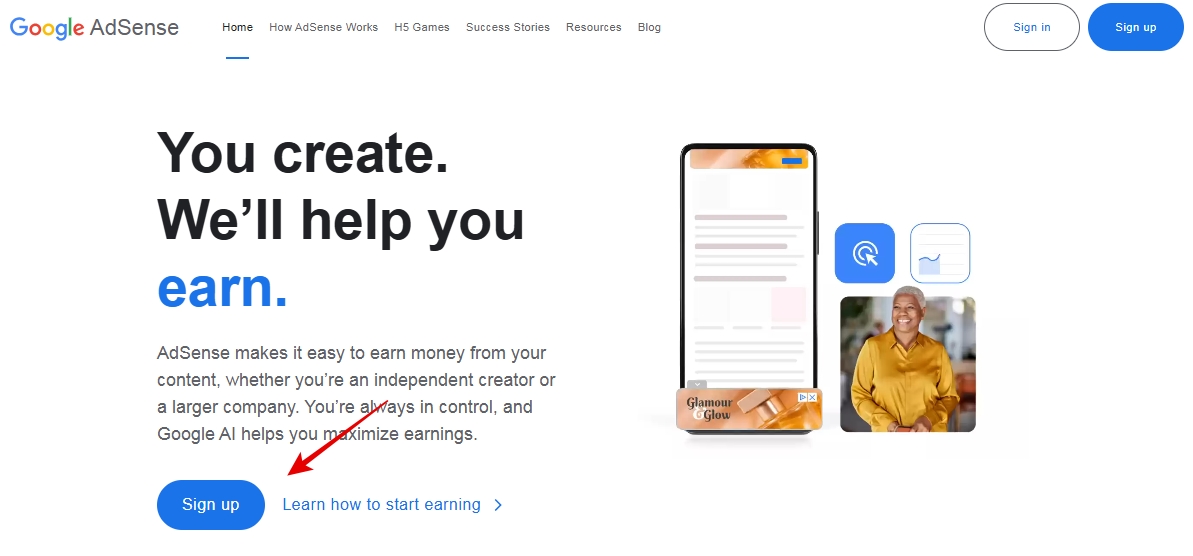
After clicking Sign Up, you will be asked to log in with your Google account. You can choose to use your existing Google account or create a new one.
2. Fill Out the Application Form
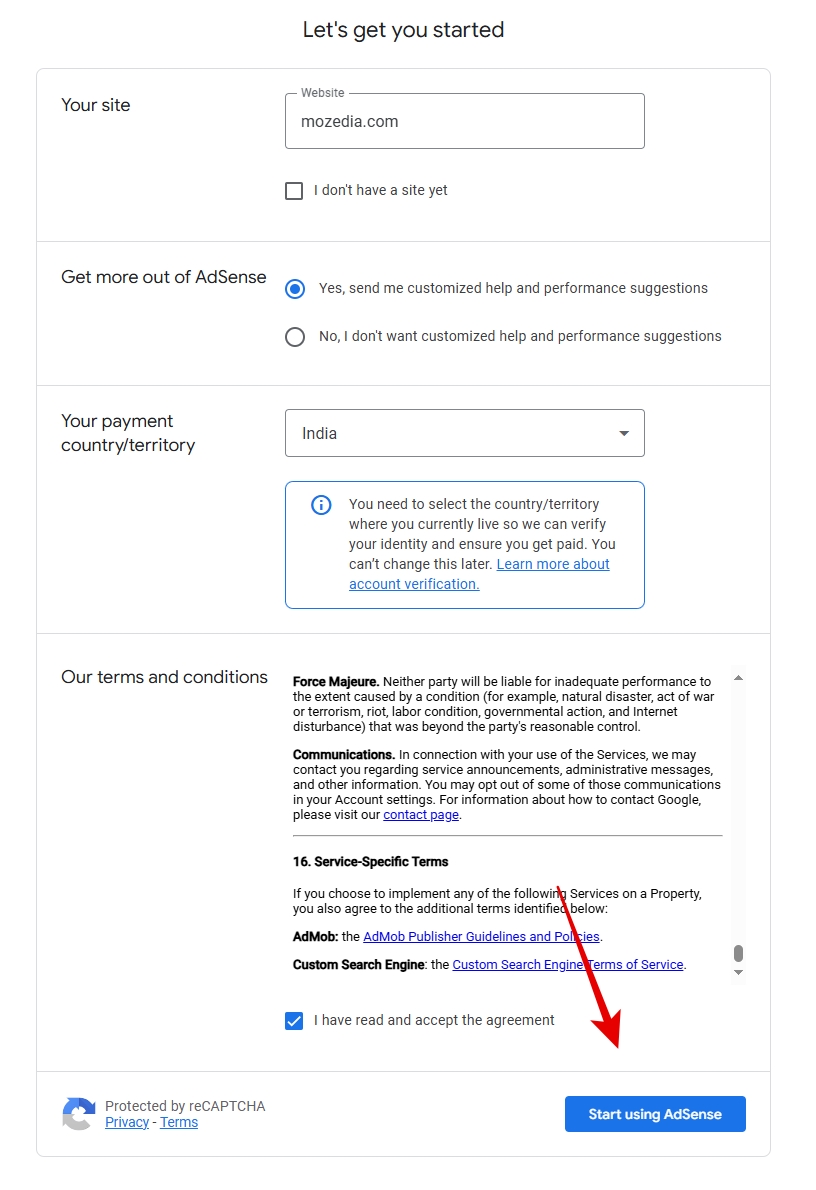
After logging in with your Google account, you will need to fill in information related to your website.
Carefully follow the steps below:
- Enter the correct URL of your website.
- Select your payment country or region.
- Read and accept the AdSense Terms and Conditions.
- Finally, click on “Start using AdSense“.
3. Settings Up AdSense Account
Once your AdSense account is created, the next step is to set it up correctly.
Google will only submit your site for review after these basic steps are completed. Therefore, please carefully complete all three points below:
- Add your personal and bank details to receive payments.
- Review the settings for how and where ads will appear on your website.
- Connect your website to AdSense to verify your account.
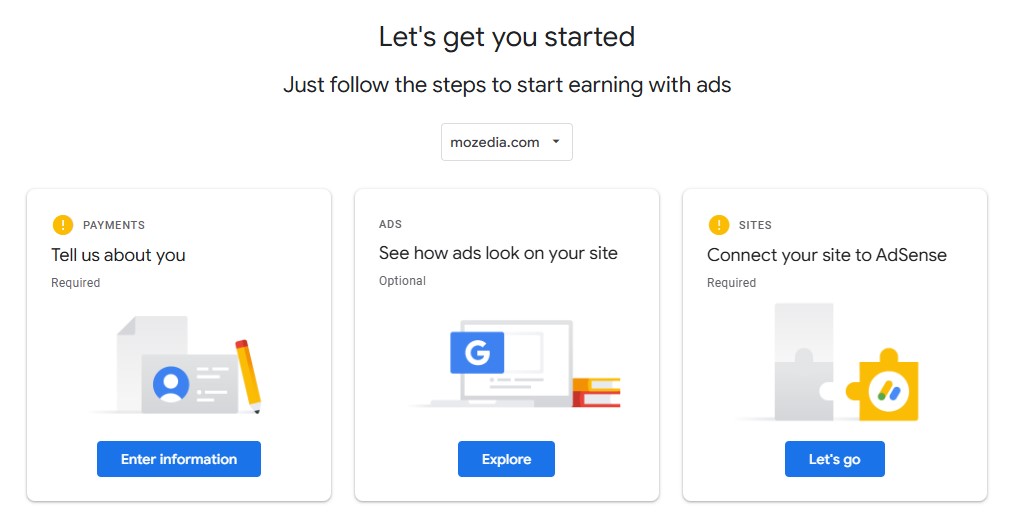
These steps can be completed later, but it’s recommended to complete them immediately.
This will expedite your application and significantly reduce the chances of rejection.
4. Get Ad Code from AdSense
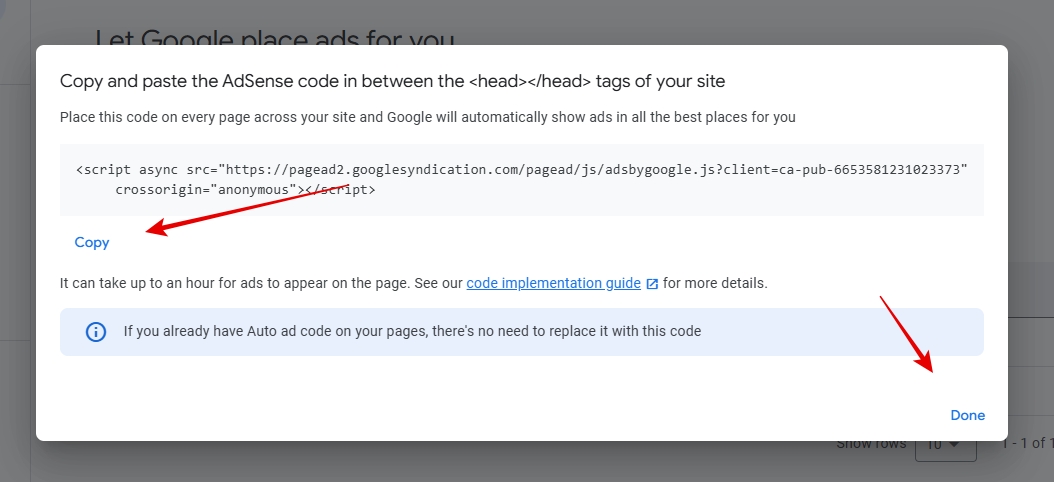
After completing all the AdSense account settings, the next step is to add the AdSense code to your website. This code is how Google identifies and reviews your site.
Here’s how:
- Go to the Ads section in the left sidebar.
- Click on Get Code.
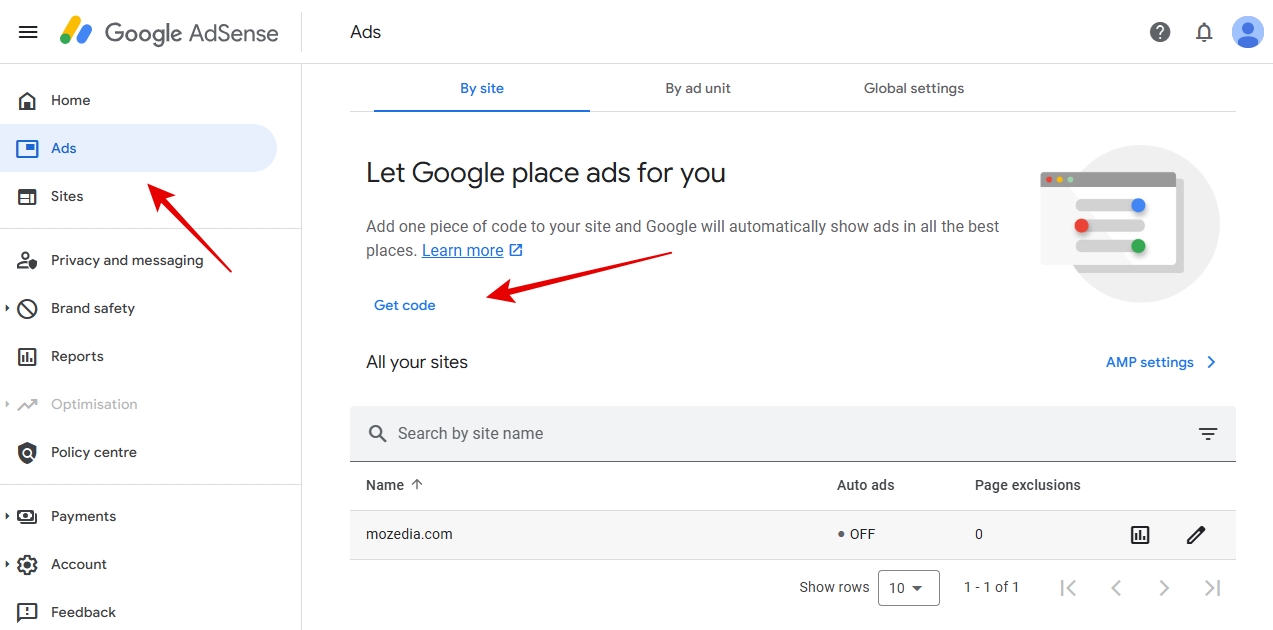
A pop-up window will then appear displaying the AdSense code.
This is your Auto Ads code.
You don’t need to place it in multiple locations on your site, adding it once is sufficient.
4.1: Copy the AdSense code
- Copy the code displayed in the pop-up window.
- Click on the Copy button to copy the code.
5. Connect Your Website with AdSense
Now that you’ve copied the AdSense code, you need to add it to the head section of your website. Let me show you how?
<head> your code here </head>
To do this, go to your website dashboard and paste the code.
If you are using WordPress, you can choose any of these methods:
- Google’s official plugin, Site Kit by Google
- Any other header/script manager plugin
- Or third is the manual method, see below
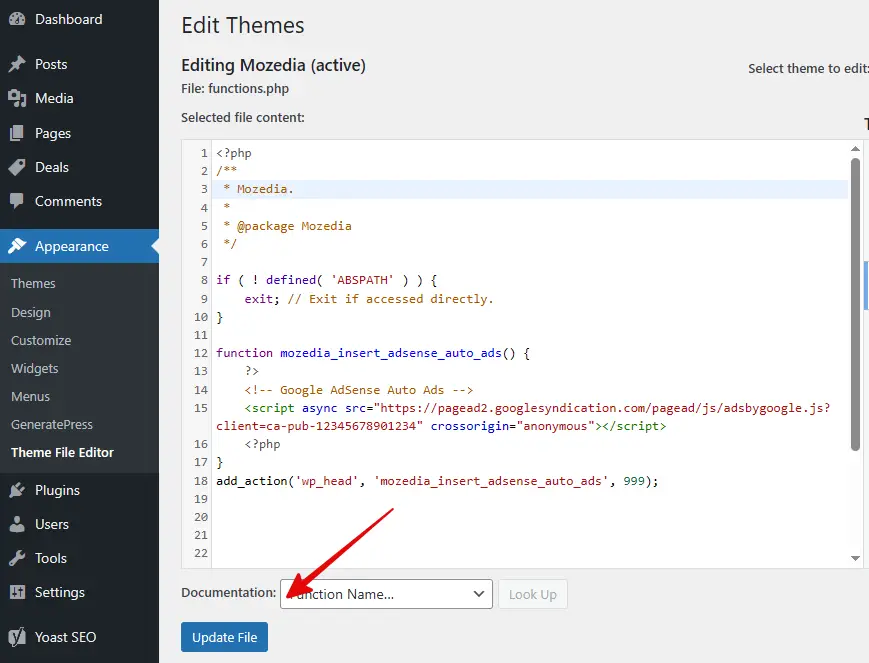
If you want to add it manually, you can insert the code through wp_head in your WordPress theme. See the example below:
To add custom code in WordPress:
- Open the WordPress Dashboard
- Go to Appearance >> Theme Editor
- Open the
functions.phpfile - Add the code below at the end of the file
function mozedia_insert_adsense_auto_ads() {
    ?>
    <!-- Google AdSense Auto Ads -->
    <script async src="https://pagead2.googlesyndication.com/pagead/js/adsbygoogle.js?client=ca-pub-12345678901234" crossorigin="anonymous"></script>
    <?php
}
add_action('wp_head', 'mozedia_insert_adsense_auto_ads', 999);
Please note: You need to replace “12345678901234” with your actual AdSense Publisher ID.
After adding the code, click on “Update File“.
Your work is now complete; you have successfully completed the entire process.
Now, the Google AdSense team will review your website, and if your site meets their policies and quality standards, approval is guaranteed.
I hope your AdSense account will be approved soon., All the best!
Also read:
Don’t make These Mistakes After Applying for AdSense!
If you want to avoid your application being rejected, make sure your website has high-quality, original content, is easy for users to navigate, and fully complies with AdSense policies.
Here are some common mistakes and how to avoid them:
1. Insufficient Content
Many people apply in a hurry, even though their website doesn’t have enough articles.
You shouldn’t make this mistake.
2. Loq Quality Content
Copying from other websites, using automated content, ai generated content, or writing very short articles will lead to immediate rejection.
3. Poor Website Design
If the site looks disorganized, loads very slowly, or has confusing navigation, AdSense will hesitate to approve it. A clean layout, fast loading speed, and easy navigation are essential.
4. Policy Violations
Google does not approve content that is illegal, promotes violence or hatred, or is related to crime, drugs, weapons, or child exploitation.
Completely avoid these topics.
5. Lack of Contact Information
If your website doesn’t provide a way for users to contact you, this is also a negative signal. Make sure to have a clear Contact Us page and an About Us page.
6. Unsupported Language
AdSense does not support all languages. Therefore, ensure your content is in a supported language, here are the AdSense Supported Languages.
7. Invalid Clicks
Clicking on your own ads, repeatedly refreshing pages, or asking others to click on your ads is risky for your account.
This can lead to immediate application rejection.
One more thing, please don’t put lots of AdSense ads code in your website, Google Auto Ads code is enough, just put this and be patient.
Useful Tips for Getting AdSense Approval in 2026
If you want your website to be approved for AdSense on the very first attempt, it’s crucial to prepare your site carefully and follow a few essential best practices.
The focus shouldn’t just be on filling out the application, but also on the website’s quality, user experience, and adherence to Google’s policies.
By paying attention to the points below, you can significantly increase your chances of approval.
1. Focus on high-quality content
Google prioritizes websites with original and useful information. Avoid copy-pasted content, incomplete AI-generated articles, or content that simply fills space.
Your content should solve a problem for readers or add value for them.
2. Optimize your website
Your site should be mobile-friendly, load quickly, and be easy for users to navigate. Slow and disorganized websites are quickly rejected during the review process.
3. Follow AdSense policies
Google immediately rejects content that violates its policies. Do not include adult content, violence, hate speech, illegal activities, or copyrighted material.
Always write about safe and “advertiser-friendly” topics.
4. Increase traffic
While there’s no specific traffic requirement, having regular and genuine visitors demonstrates your blog’s credibility to AdSense.
Gradually increase organic traffic; don’t rely solely on social media.
5. Place ads correctly
Ads should be displayed in a way that doesn’t disrupt the user experience. Visible placements are better, but avoid covering content or negatively impacting the user experience.
Google Auto Ads is a good option to start with.
FAQs about AdSense Approval
Below are the answers to the most common questions about AdSense approval. Your question might be among them.
How Long Does AdSense Approval Take?
The AdSense review time depends on the website. Typically, this process can take anywhere from a few days to two or three weeks.
Sometimes it can even take up to six weeks. Google will notify you via email whether your application has been approved or rejected.
What should I do If My AdSense Application is Rejected?
If your site doesn’t meet the requirements, Google sends a rejection email explaining the reasons.
Address the issues mentioned in the email, such as increasing content, improving the design, or complying with policies.
After making the necessary changes, you can reapply.
Is Traffic Necessary for AdSense Approval?
AdSense doesn’t have a minimum traffic requirement. However, consistent and genuine traffic strengthens the chances of approval, as it indicates that your site is useful.
Can a New Websites get AdSense Approval?
Yes, but it may take time. Very new websites with little content or traffic are often not approved on the first attempt.
Having at least 20-30 original posts and regular activity helps.
Can I use AI-generated Content?
You can, but don’t rely entirely on it. Incomplete or factually inaccurate AI-generated content can hinder approval.
Always edit, refine, and ensure the content is useful before publishing.
Can I Click on My Own Ads?
Absolutely not. Clicking on your own ads or having others click on them is a policy violation and will not only result in your account being rejected,
But you will also never get AdSense approval in the future.
Which types of websites are not suitable for AdSense?
Google does not approve sites with the following types of content:
- Copyright infringement
- Adult content
- Gambling, weapons, drugs
- Hate speech
- Violence or illegal activities
- Child abuse material
How Many Times Can I Apply for a Website?
Unlimited times, but fix the issues first each time. Applying again without making improvements is just a waste of time.
Do Earnings Start Immediately After Approval?
Ads start appearing as soon as approval is granted, but earnings depend on traffic and engagement.
Good content, SEO, and regular updates lead to strong earnings in the long run.
Final Thoughts
Applying for Google AdSense in 2026 isn’t difficult, as long as you’re properly prepared.
If you follow the steps outlined in this guide, your website’s chances of being approved on the first attempt will significantly increase.
Always remember that high-quality content, adherence to policies, and a technically optimized website are the three most important pillars.
If you don’t get approved, don’t be discouraged.
Learn from the experience, make improvements, and try again. Continuous learning and patience are the true path to sustainable earnings with AdSense.
To increase your AdSense earnings, read this:
Finally, just remember this:
The right direction, the right preparation, and a little patience.
Your AdSense account, your website, and your hard work will all be successful.
Best of Luck! 😊



This guide is super helpful! The step-by-step explanation makes the AdSense application process much clearer. I’ll be following these tips to get my site approved. Thanks for sharing
Thanks John, Glad you found it helpful. Hope you get AdSense approval soon. 😊
Sir, I have applied for AdSense approval many times, every time the approval is rejected, what should I do?
Hi Manoj,
Read the AdSense mail carefully, understand the rejection reasons, fix them and apply again.