
Has your website suddenly disappeared from Bing search results? If your website has been removed from Bing or your site is not indexed in Bing, you are not alone.
Don’t worry, this happened to me, which is why I’m writing this article. In this article, I’ll share the real solution so you can get your site reindexed in Bing and Yahoo.

If your website has disappeared from Bing and Yahoo search engines, first of all, you may notice these warning signs.
Signs Your Website Has Been Deindexed:
- Bing shows no results for
site:example.com - Bing Webmaster Tools shows zero impressions
- Previously indexed pages suddenly disappear
- IndexNow submissions are not being crawled
If you notice these signs, your website may have been removed from Bing’s index. If your site has recently been ranked down, read this.
Let’s understand the situation in detail.
Why Bing Deindexed My Website (And How I Got It Back) – Real Life Experience
Imagine, you wake up in the morning, open Bing Webmaster Tools, and there’s nothing on your screen. No links, no impressions, not a single page indexed.
Your entire website, which you’ve spent months building, disappears from Bing’s search results overnight. You can imagine how devastating that feels.
That’s exactly what happened to me on Feb 12th. Everything was normal before that, but the next day all the links disappeared from Bing.
You can see the condition of my site yourself in the screenshot below.
- At that moment, it was clear – Bing had removed my website from its index.
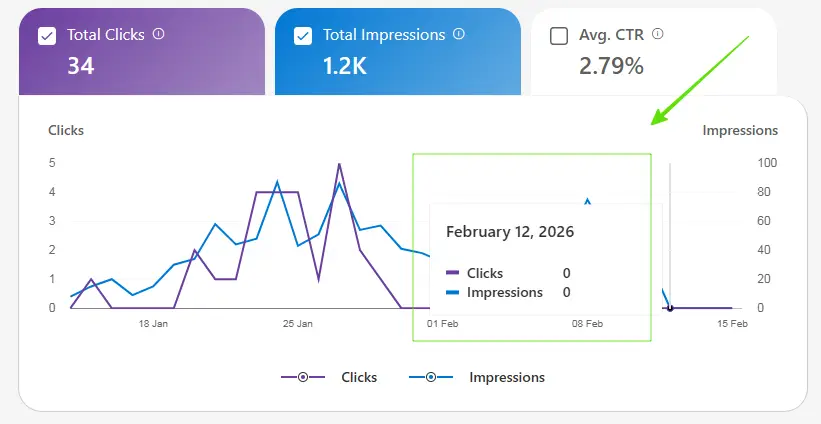
This was a huge surprise for me, because I hadn’t made any big mistake that would have led to the site being completely removed from Bing search.
What did I do First?
When I saw zero results in Bing, the first thing I did was search for site:mozedia.com in Bing and confirm if any pages from my site were showing up.
You can see what the situation is:
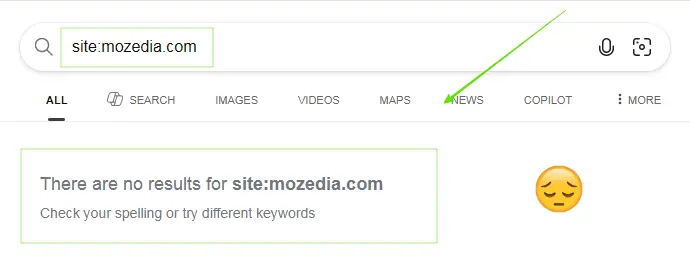
This was not a temporary glitch. My entire domain had vanished from Bing’s index. I don’t know why this happened, but when this happens, many questions come to mind.
First Question – “What did I do Wrong?“
After seeing zero impressions and zero clicks on the Bing Webmaster Tools and zero results in Bing search engine, the following questions first came to my mind.
- Did I make a mistake?
- Did Bing penalize me?
- Was my website hacked?
To be honest, I was really scared because I hadn’t made any mistakes that would cause Bing to penalize my site.
I thought it was probably a technical issue and tried many ways to fix it.
What I Tried and Why It Didn’t Work?
When I first encountered this problem, I tried all the common solutions I knew and found on the internet through Google, such as:
- Deleted the sitemap and resubmitted: nothing happened
- Waited for a month: nothing happened
- Refreshed the URL: nothing happened
- Tried manually indexing pages one by one: nothing happened
The result of all this: not a single page was returned in Bing or Yahoo. The same problem still existed, I couldn’t understand what to do next.
Then I thought,
“Maybe my content isn’t deep enough.“
I started thinking that maybe Google may consider it high-quality content and index it, but it doesn’t meet the Bing search engine guidelines.
I tried it. I read, edited, improved, and lengthened over my 20+ articles. Even after days of hard work, Bing still didn’t crawl or index a single page on my site.
I fixed all the technical issues in the website, even fixed the most common warnings, still no solution was found, my site was still unindexed from Bing.
The real clue — the Answer was Hidden In IndexNow
One day, while browsing the IndexNow report, I noticed something I’d previously overlooked. When I tried to fetch my new article using the URL Inspection tool, I saw this warning.
The inspected URL is known to Bing but has some issues which are preventing us from serving it to our users. We recommend you to follow Bing Webmaster Guidelines.
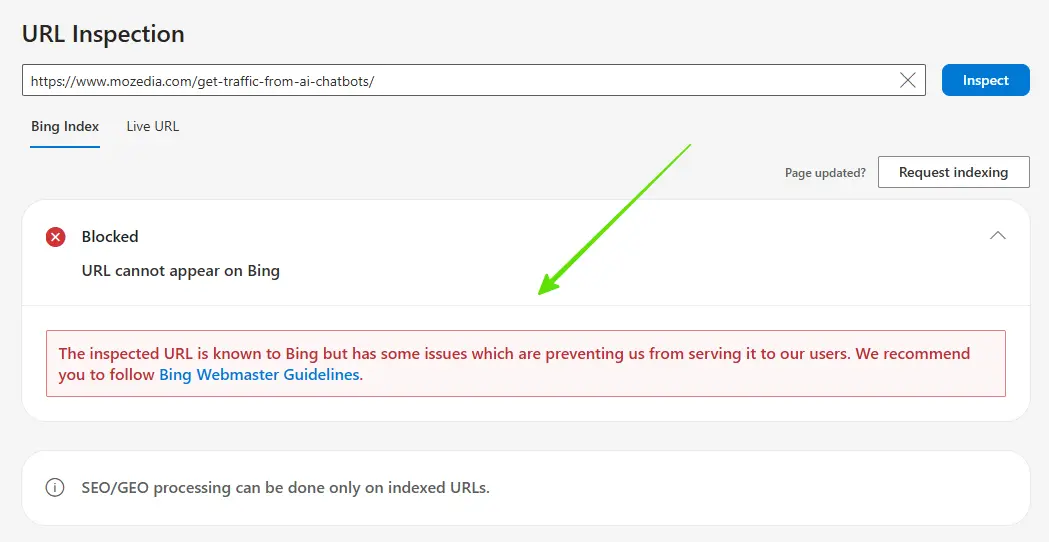
This warning usually indicates content that may violate Bing’s safety or quality guidelines.
When I read the article carefully, I found that one paragraph contained something that I thought Bing might have considered content that may be considered unsafe.
I immediately removed that part and rewrote it, using neutral and safe language. I manually resubmitted the page. The warning was immediately removed.
The post was indexed, but the entire site still wasn’t. I thought fixing one article wouldn’t be enough, so I made changes to several other pages and posts.
But there was no benefit, the pages which were indexed also disappeared from Bing within a few days, now the situation was the same as before.
You can also automate indexing signals using modern SEO tools.
The Final Step: Contact Bing Directly
After trying everything, I realized the only way forward was to speak directly with Bing Support, as none of the methods I tried were working.
I somehow found the Bing support option and contacted them, I’ll explain step-by-step how below. First, let’s understand how the problem was fixed.
I kept my message simple and straightforward:
- I explained that my entire site had been deindexed.
- I fixed all the issues I found with my site.
- And politely asked if they could help me.
About 5-6 days later the first response came. They said a basic check was done, but a “professional review team” would look into the issue more deeply.
I agreed and allowed the review to proceed, and a few more weeks passed.
And then… one day I got a message from them saying, “We’ve fixed everything, your website has been reindexed, you can check.”
I went to Bing Search and was overjoyed; my site URLs were back in Bing Search, meaning my website is now visible again on Bing and Yahoo.
Many thanks to the Bing support team.
What Exactly Happened?
Bing never reveals the exact reason; they simply tell me that my site is now showing up in search results again, and you can check it. They didn’t say anything else.
But based on my experience, I believe that:
In 2026, Bing made major changes to its algorithm, and its rules are in many cases stricter than Google’s, which has affected many small websites.
If even a single paragraph among the hundreds of articles on your site violates its safe content rules, it can get the entire website deindexed.
How I Contact Bing Support Team?
Contacting the Bing support team is very easy. If you don’t know where to find them, follow these simple steps, I used them.
Step 1: Got Bing Webmaster Tool
- Open Bing Webmaster Tools.
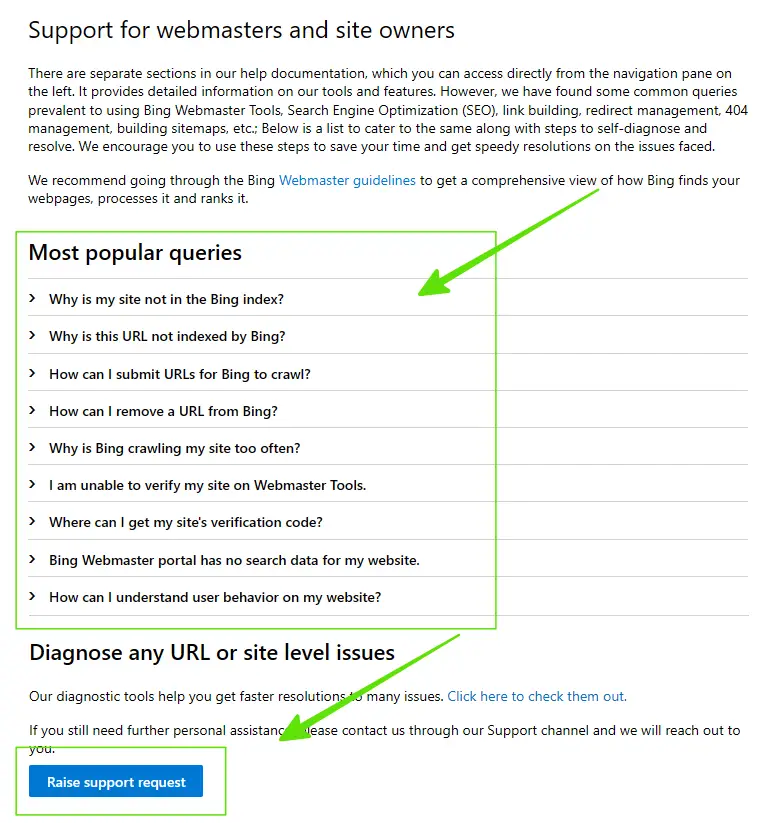
- Click the question mark (?) in the upper right corner.
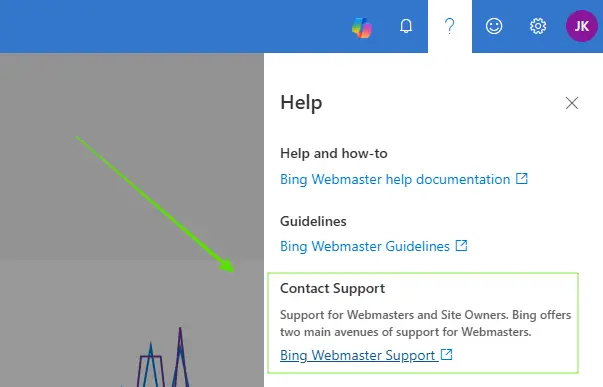
Step 2: Read Carefull Most Popular Queries
Now the page that opens will have 10-12 most popular questions, it is possible that your problem may be different from mine, so read all of them carefully once.
Your solution may be one of these.
Step 3: Raise Support Request
If you don’t find a solution in the most popular queries in second section like me, then click on the “Raise Support Request” button.
Now the page that opens will have a form in which you have to select the correct option and fill in all the information correctly.
- Fill out the form, explain your situation, and provide a website link.
- Finally, confirm everything properly and Submit it.
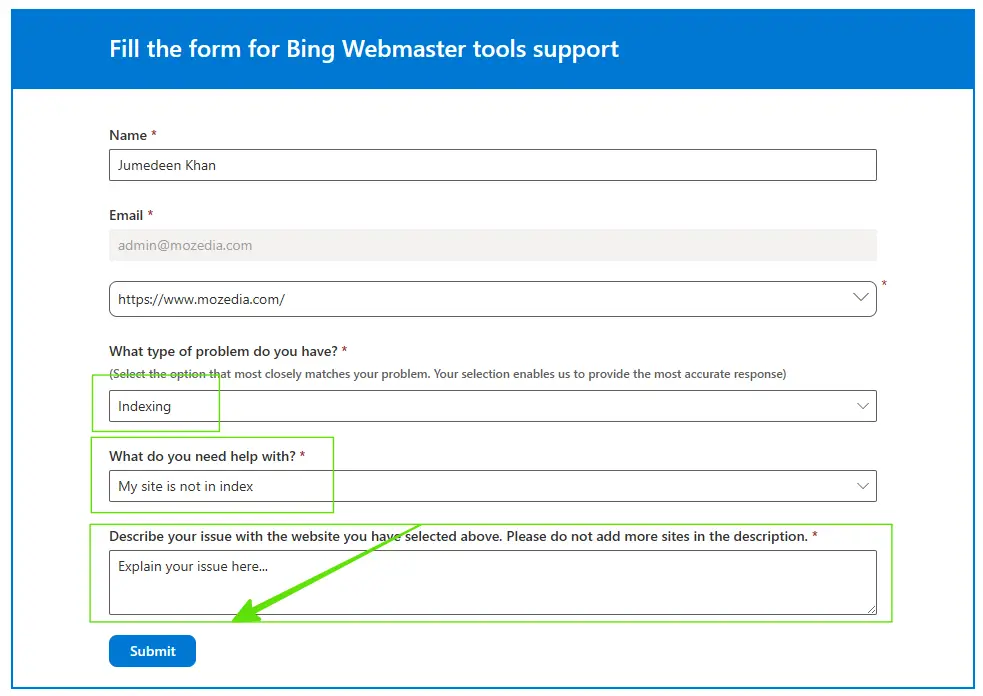
After contacting the Bing support team, you will have to wait, it may take 1-2 weeks for a reply to come, please be patient.
Your Website Removed from Bing? Follow These Steps
First of all, don’t panic. It’s fixable, you just need to take the right approach.
- Step 1: Open the IndexNow report and look for any warnings.
- Step 2: Immediately fix any content that violates Bing’s guidelines.
- Step 3: Improve articles with weak or insufficient content.
- Step 4: Most importantly, contact Bing Support directly.
This button is your biggest help. Without it, you could be waiting for months in vain. Even one unsafe or policy-violating paragraph can impact your entire site’s visibility.
Pro Tip: If your site is fully deindexed, manual indexing alone won’t fix the issue. A human review from Bing support may be required.
Frequently Asked Questions (FAQs)
Below are answers to some of the most common questions website owners have when their site disappears from Bing search results.
This simple information will help you understand why deindexing occurs and how recovery works.
Why did Bing remove my website?
Bing may remove or deindex a website if it finds guideline violations, unsafe or sensitive content, technical errors, spam signals, or major quality issues.
In some cases, algorithm updates or policy violations can also result in the removal of an entire site from search results.
How long does reindexing take?
After fixing issues and submitting your site for review, reindexing can take anywhere from a few days to several weeks.
If a manual review is required, the process may take longer depending on Bing’s review queue.
Can a single article cause deindexing?
Yes. Content that violates Bing’s safety or quality guidelines, such as graphic, unsafe, or policy-violating content, can impact your site’s visibility.
In some cases, a single problematic page can contribute to site-wide deindexing.
Final Words
Finally, have hope that everything will be fine. I didn’t know when my website was removed from Bing, or if it would come back at all. I did what I could.
And finally, I found a solution. Even though I made many mistakes, I don’t consider them mistakes but improvements; they definitely helped.
You should also fix your website’s technical issues, test designs and violating content before contacting the Bing support team.
I must say this much:
If you’re working day and night, improving content, and are tired of trying everything — know that there is a way.
If your content is original, safe, and helpful, and your site follows Bing guidelines, your visibility can return. It happened to me. It can happen for you too.
Always monitor your site. If you notice an IndexNow warning or guideline issues on your website, fixing it quickly can help restore your site’s visibility.
Learn how proper SEO setup helps search engines crawl and index your site correctly.
- How to Install & Setup Yoast SEO Plugin in WordPress in 2026?
- How to Get Traffic from AI Chatbots in 2026 (ChatGPT & AI SEO Guide)
Please share this article with your friends who are experiencing this same problem. We can all help each other, thank you!